HCS User Manual
40
Table 5: COSMOS
®
Digital Interface Connection
Input Load Management 0 Load Management 1
Power Level
Color Blue Brown
Not Grounded Not Grounded 100%*
Grounded Grounded 50%
Not Grounded Grounded 25%
Grounded Not Grounded 0% / Off
State
(% of max continuous
current)
COSMOS
®
Digital Interface Connection
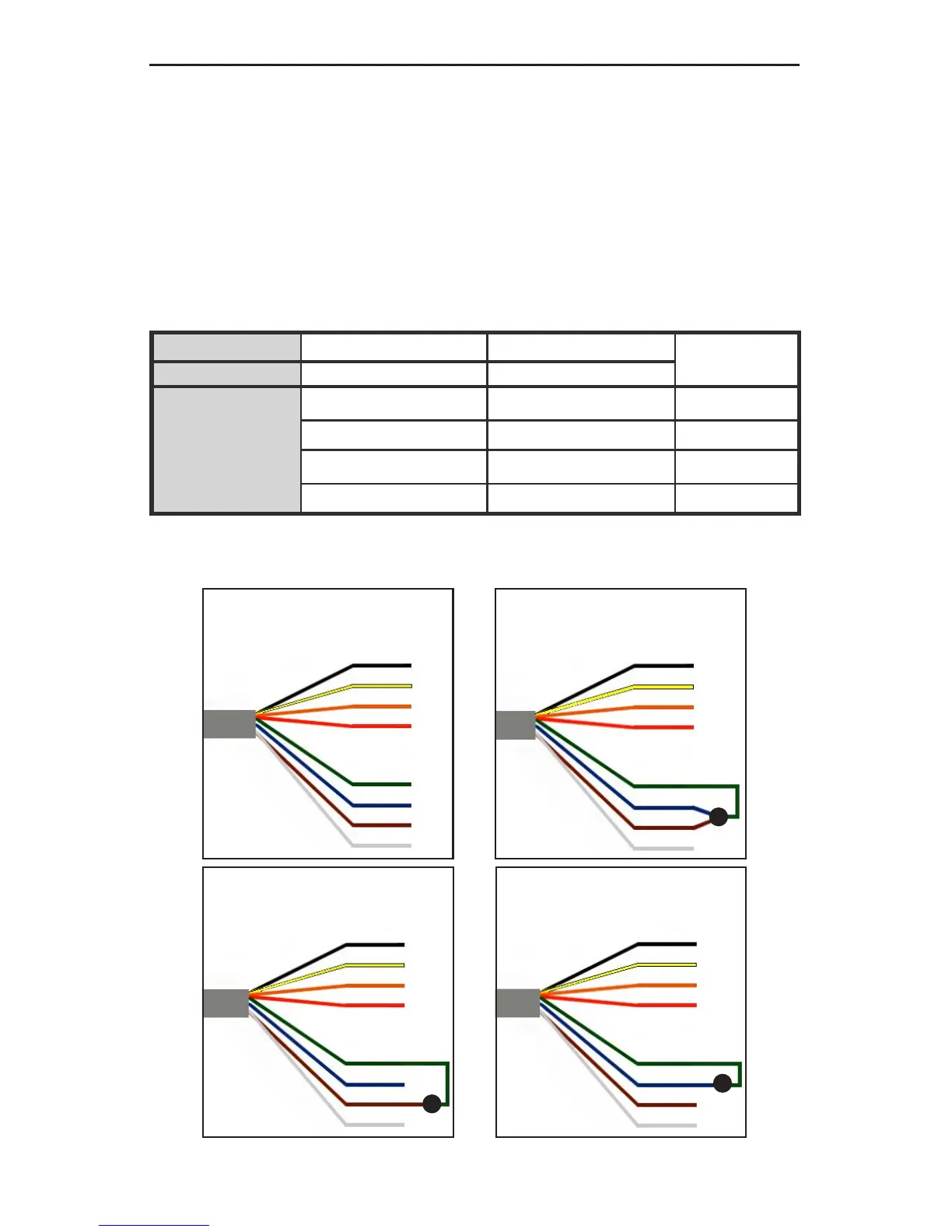
The Digital Interface wiring must be completed regardless
of whether or not the Serial Interface is to be utilized in the
installation. The Power Level is determined by the state of the
External Load Management Digital Inputs which can either be used
independently OR will become the default power level if and when
the Serial Interface is inactive. Refer to Table 5.
* Power Level is returned from a lower power setting to the 100% state after a ten second delay.
Black
Yellow
Orange
Red
Green
Blue
Brown
White
Wiring for
100% Power Level
Black
Yellow
Orange
Red
Green
Blue
Brown
White
Wiring for
50% Power Level
Black
Yellow
Orange
Red
Green
Blue
Brown
White
Wiring for
25% Power Level
Black
Yellow
Orange
Red
Green
Blue
Brown
White
Wiring for
0% Power Level = OFF
Figure 21: COSMOS
®
Power Level Wiring


 To Next Page