CL64WLAN User Manual V001
15 of 44
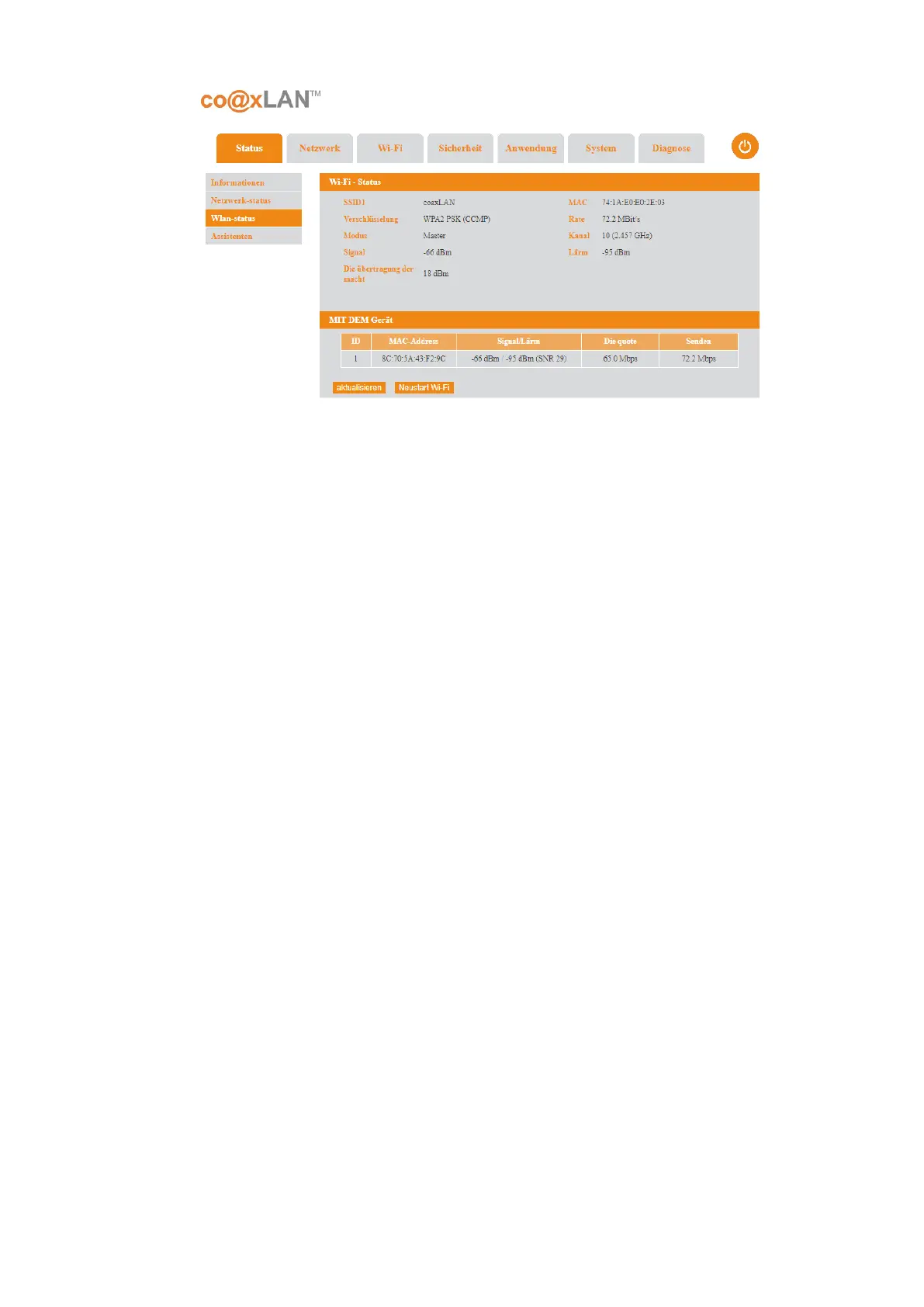
This page will show the Wi-Fi Status and the Devices connected:
• Wi-Fi Status: it shows the following parameters related to the Wi-Fi network:
◦ SSID1: It is the Service Set Identifier (SSID) of the access point.
◦ MAC: MAC address of the slave.
◦ Encryption method: The encryption method used for the WiFi connection.
◦ Rate: Transmission rate in Mbps
◦ Model
◦ Channel: It is the wireless channel used by the slave WiFi interface.
◦ Signal: level of the signal received in dBm.
◦ Noise: level of noise received in dBm.
◦ Transmission power: power used by the CL64WLAN to transmit in dBm.
• Device connected: it shows a table of the devices connected to the WiFi network
with the following information of each device:
◦ ID: a number to identify a device connected to the WiFi network.
◦ MAC address: MAC address of this device.
◦ Signal/Noise: signal-noise ratio received from this device.
◦ accept rate: data rate received from this device.
◦ send rate: data rate sent to this device from the slave unit.
The Refresh button updates the information shown in this page. The Restart Wi-Fi button
allows to restart the WiFi interface of the slave.
Picture 5



 To Next Page