V001 CL64WLAN User Manual
14 of 44
T
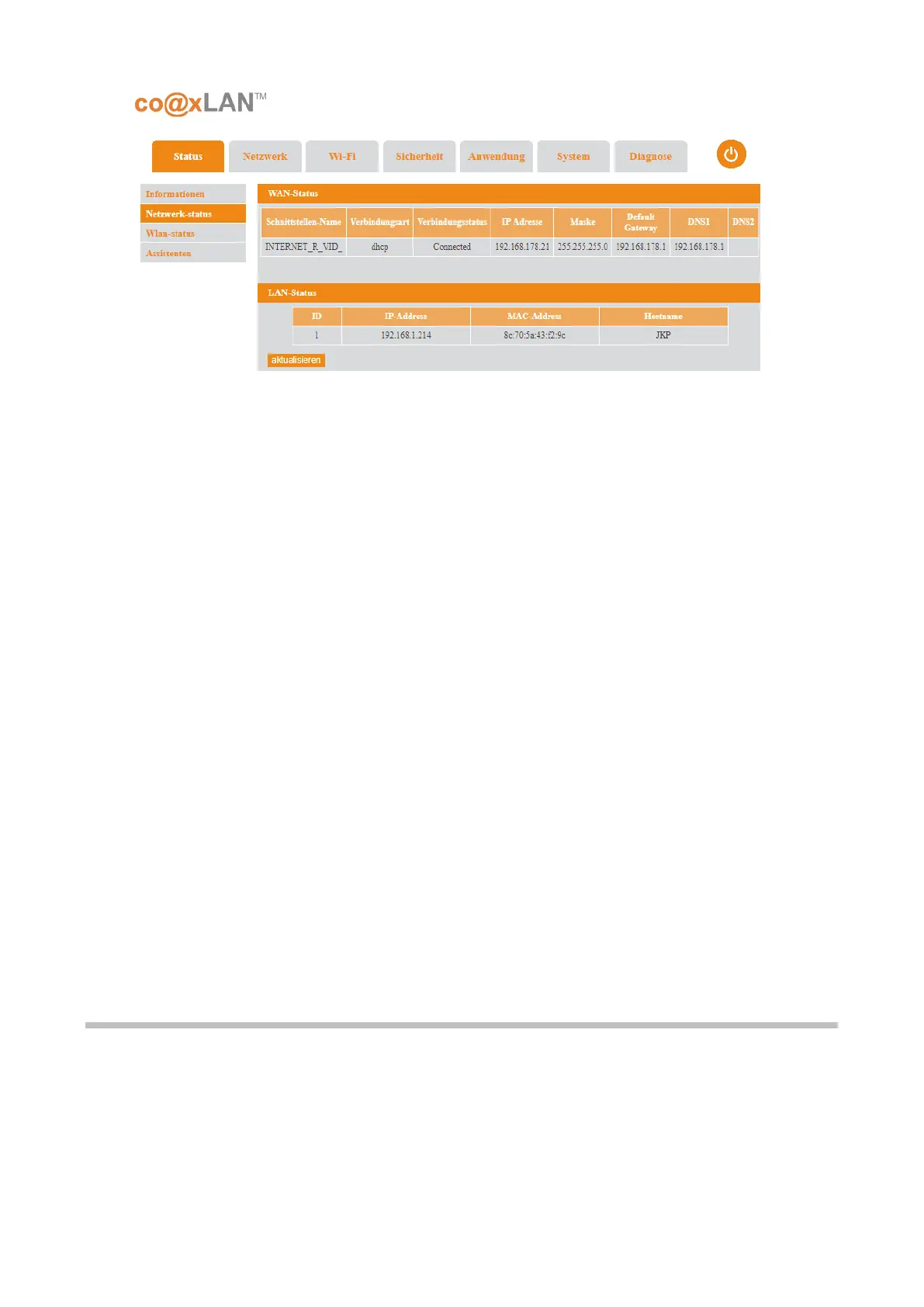
his page will show the WAN connection status and the LAN status.
•
WAN Status: It shows a table with the following information for each available
interface:
• I
nterface Name: to identify uniquely this WAN network interface.
• Connect Type: it is the type of connection for this interface. It can be:
▪ Static: the IP address of this interface has been configured manually
▪ DHCP: the IP address is automatically assigned via DHCP.
▪
PPPoE: the IP address is automatically assigned via PPPoE.
▪ B
ridge: the interface is working in bridge mode so NAT is not available.
• Mask: the network mask assigned.
• Default Gateway: it is the default gateway assigned, if any.
• DNSn: the IP of the DNSs configured, if any.
• LAN Status: it shows a table with the following information for each client connected
to the LAN:
•
ID: number to identify a client connected to the LAN.
• I
P address: IP address of this client.
• MAC address: MAC address of this client.
• Hostname: name of this client connected to the LAN.
T
he Refresh button is used to update the information displayed in this page.
5.3. Wireless Status
If the Wireless Status sub-menu is selected the screen shown in Picture is displayed.



 To Next Page