V001 CL64WLAN User Manual
8 of 44
2.4. Cable Your IPC-S
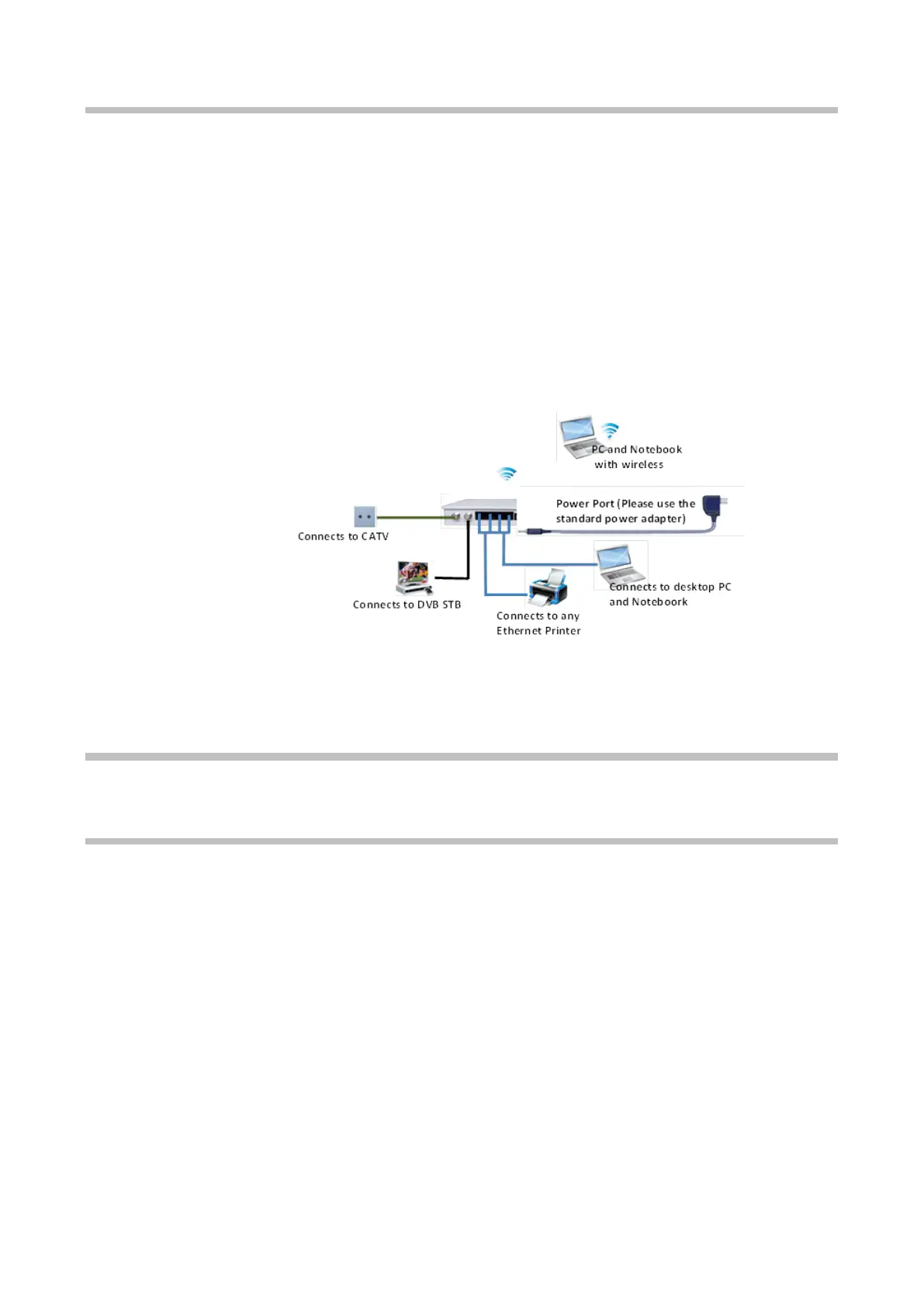
This section walks you through how to cable your CL64WLAN with detailed illustrations.
To cable your :
1. P
lease connect the LAN port of the slave to the network adapter of your computer
with one cable.
2. Please connect your coaxial line provided by your ISP to the Cable port of your slave.
3. Please use the delivery-attached power adapter to the slave, and plug the power
adapter into an outlet. Wait for the Power LED on the front panel to light. If no LEDs
are lit, press the Power On/Off button on the rear panel of the slave.
3. Getting Starting
3.1. Prepare for login the CL64WLAN web management
Before you login the CL64WLAN, you should confirm the connection between the
CL64WLAN and your PC is correct. Please, follow these steps:
• Step 1: Configuring the IP address of your PC to 192.168.1.X (2~254) subnet mask is
255.255.255.0, gateway is 192.168.1.1.
•
Step 2: Ping the IP address of the CL64WLAN (Default address is 192.168.1.1). If the
PC can get right reply from the ping command, it means that the connection
between the PC and the CL64WLAN is correct.



 To Next Page