Chapter 4: To use the web interface
98-140012-H Status information 58
Status information
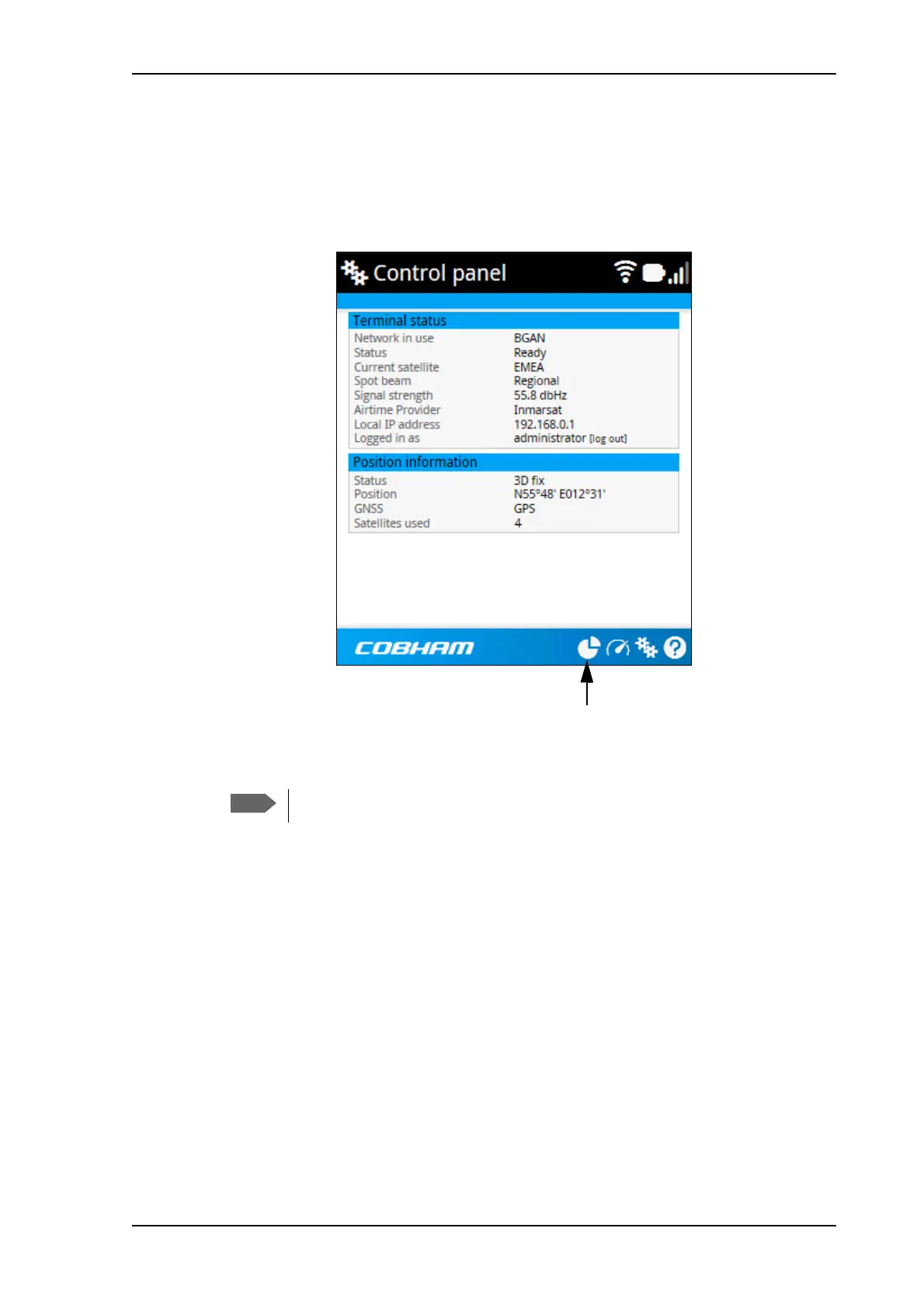
If the window is large enough, it shows a status field at the bottom of the page or in the right
side of the page. If not, click at the bottom of the page to show the status page. Click
again to return to the previous page.
The following status is available:
Terminal status:
• Network in use: The network currently used (BGAN or Cellular).
• Status: The status of the BGAN network (or cellular network, if used). “Data” means a
data connection is running. The status could also be e.g. “Registering” or “Ready”.
• Current satellite: The BGAN satellite to which the EXPLORER 710 is currently registered.
• Spot beam: The type of BGAN spot beam currently used, e.g. “Regional” or “Narrow”.
• Signal strength: The signal strength of the BGAN connection.
• Airtime Provider: The provider of the BGAN services.
• Network operator: The operator (or provider) of the Cellular network, if used.
• Local IP address: The local IP address of the EXPLORER 710. E.g. used to connect to the
web interface.
• Logged in as: You can log in as Administrator. This field shows if you have administrator
rights.
Shown fields depend on the mode of the terminal (BGAN or Cellular)
Toggle between status and contents page



 To Next Page