Code Blue
•
259 Hedcor Street
•
Holland, MI 49423 USA
•
800.205.7186
•
www.codeblue.com
GU-147-Bpage 16 of 47
IP5000 1.0 Series
Administrator Guide
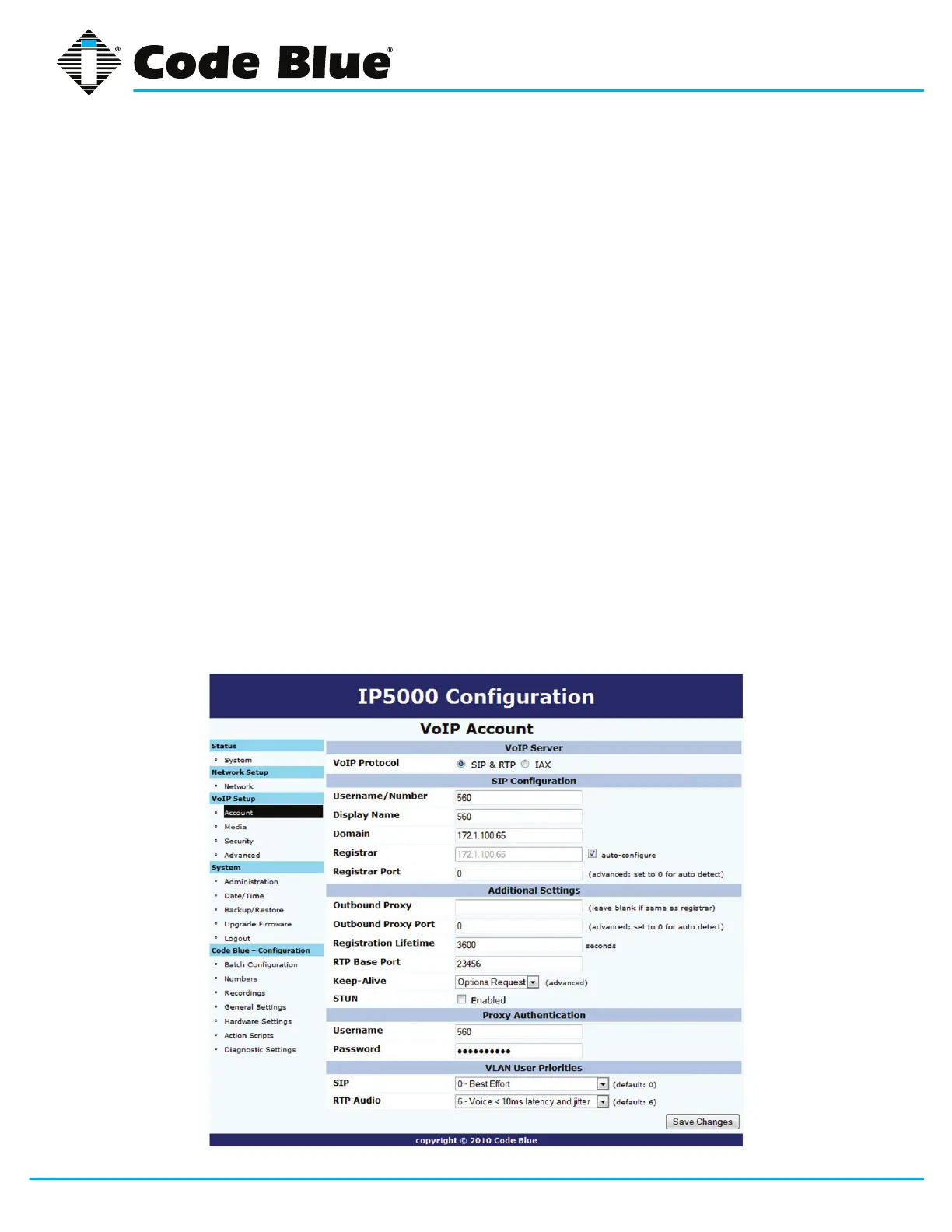
5.1 Configuring a SIP Account 1
TheIP5000speakerphoneiscapableofconnectingtoVoIPsystemsviatheSIPprotocol.
1. Click on the Account menuitemunder VoIP Setup (seefarleft-handcolumn).
2. Click on the SIP & RTPradialbuttonforVoIP Protocol under VoIP Server.
3. EnterallappropriateinformationunderSIP Conguration, Additional Settings, Proxy
Authentication and VLAN User Priorities.
4. Oncethisinformationisentered,selectSave Changes.
TheRegisterkeep-alivewillsendoutaREGISTERrequestevery30seconds.TheREGISTERre-
questdoesnothaveatimeoutof30seconds,however.Thetimeoutvaluewillbethevaluethatwas
setupontheaccountwebpage.Beyondjustbeingakeep-alivemechanism,theRegisterkeep-
alivehasthesideeffectofquicklyre-registeringauseriftheserverrebootedbeforetheRegister
timeoutexpires.TheRegisterkeep-alivewillbeauthorizedbytheserver,forcingsomeextratrafc
(421responseandasecondREGISTERrequestwithauthenticationcredentials).
TheOptionskeep-alivesendsanOPTIONSrequesttotheserverevery30seconds.Thisrequest
requires the server to respond with a list of what SIP extensions it supports. Often, however, the
server will respond with an error like 424. This error is ignored since the point of this keep-alive is to
sendtrafcthroughtheNAT,andwhatissentisinconsequential.TheOptionskeep-aliveisseldom
authorized,soithaslesstrafcoverheadthantheRegisterkeep-alive.



 To Next Page