Code Blue
•
259 Hedcor Street
•
Holland, MI 49423 USA
•
800.205.7186
•
www.codeblue.com
GU-147-Bpage 34 of 47
IP5000 1.0 Series
Administrator Guide
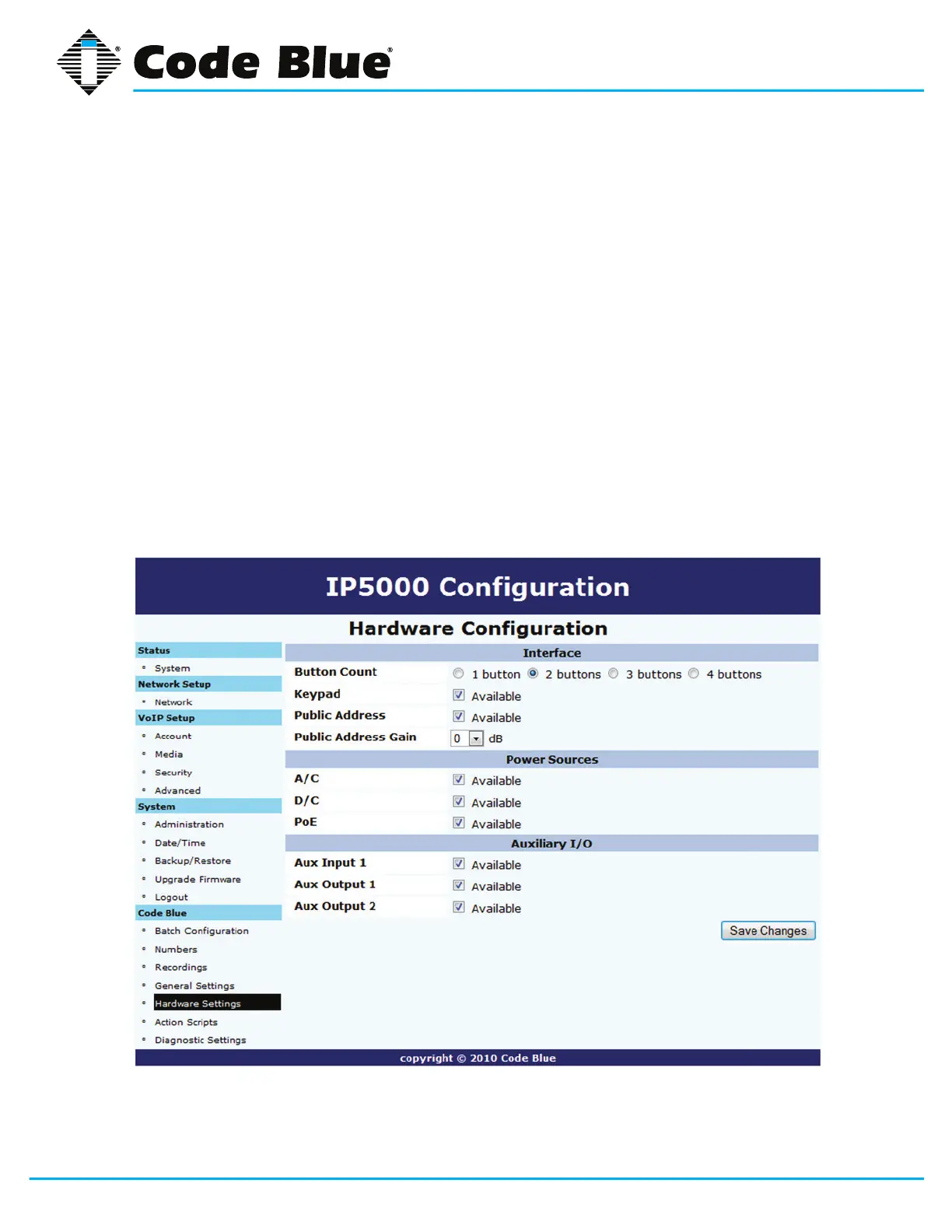
7.5 Hardware Settings
TheIP5000speakerphonehardwaresettingsareconguredby:
1. Selecting Hardware Settings under Code Blue(seefarleft-handcolumn).
2. Select the appropriate Button Count, Keypad Available,(Public Address) Available and
Public Address Gain settings under the Interface section.
(Public Address)Available and Public Address GainareutilizedwhentheIP5000is
controllingtheoptionalCodeBluePAScomponents(i.e.,CB1,CB2,CB5withPublicAd
dressorWM180).
3. The Power Sourcessectionallowsyoutoselectthepowersourcesavailabletothe
IP5000.
4. The Auxiliary I/Osectionallowsyoutoturnonorofftheavailabilityoftheauxiliaryinputs
and outputs.
5. Withselectionsmade,clickSave Changes.



 To Next Page