Code Blue
•
259 Hedcor Street
•
Holland, MI 49423 USA
•
800.205.7186
•
www.codeblue.com
GU-147-Bpage 41 of 47
IP5000 1.0 Series
Administrator Guide
7.7 Diagnostics Settings
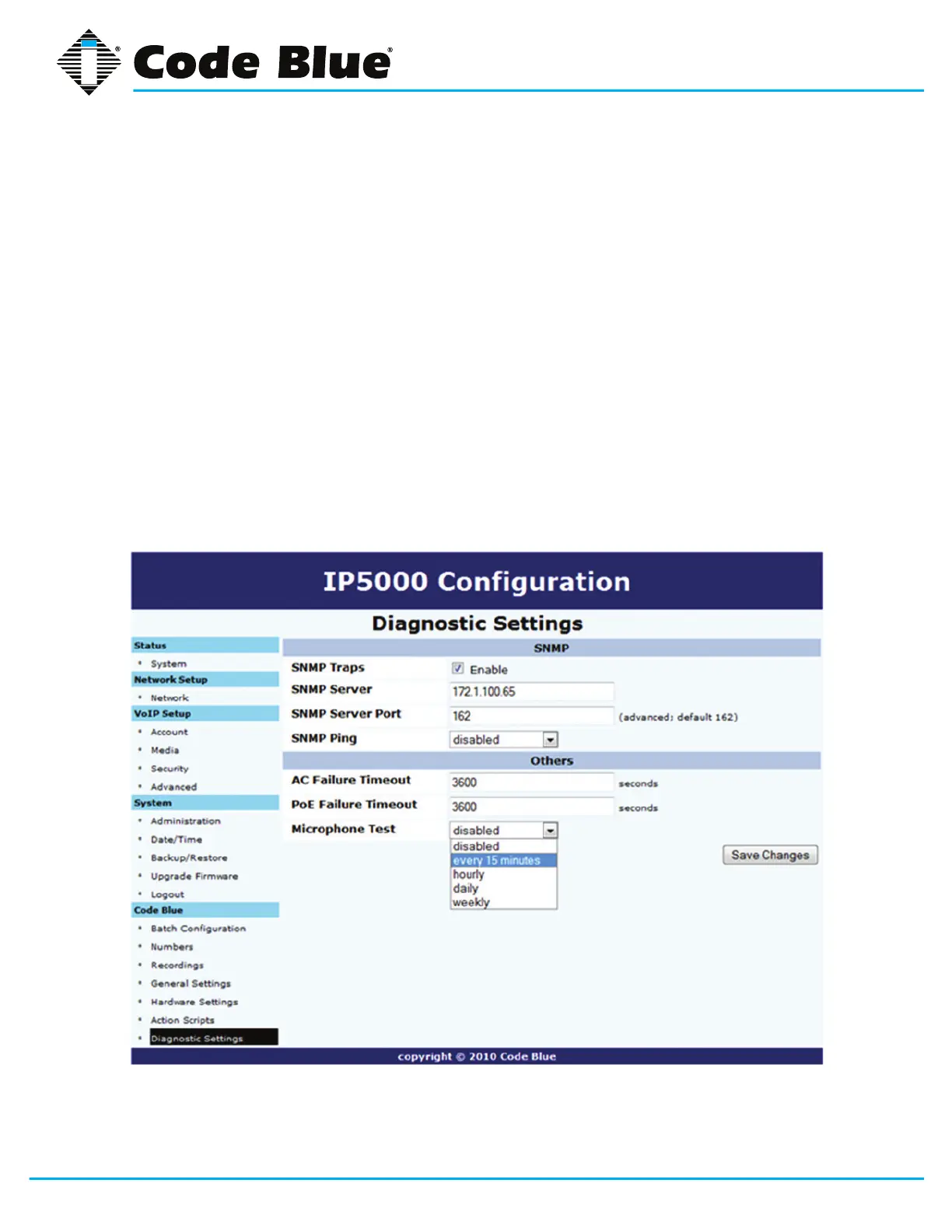
The IP5000 speakerphone diagnostic settings are congured by:
1. Selecting Diagnostic Settings under Code Blue.
2. Check Enable to send SNMP Traps.
3. CongureyourSNMP Server IP Address and SNMP Server PorttomonitortheIP5000
withSNMPmanagementsoftwareorCodeBlue’sUnitProgrammingandDiagnostics(UPD)
software.
CodeBlue’sUPDsoftwareutilizesport162bydefaultforSNMPmonitoringoftheIP5000
speakerphone.
4. AC Failure Timeout, PoE Failure Tmeout and the Microphone Testtimeperiodarealso
conguredinthissection.
5. Oncethisinformationisentered,clickSave Changes.



 To Next Page