Code Blue
•
259 Hedcor Street
•
Holland, MI 49423 USA
•
800.205.7186
•
www.codeblue.com
GU-147-Bpage 32 of 47
IP5000 1.0 Series
Administrator Guide
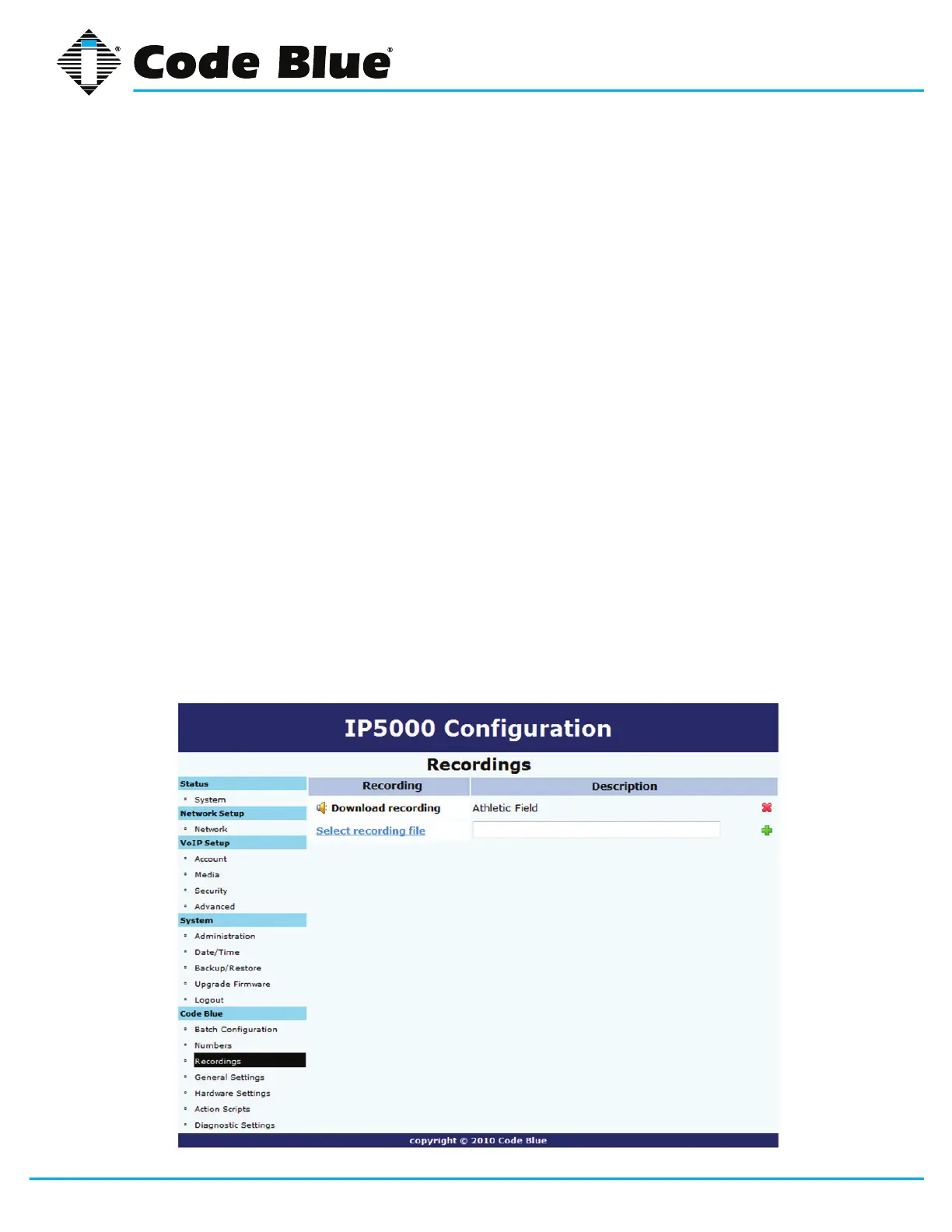
7.3 Recording Administration
TheIP5000speakerphonerecordingcongurationismadeby:
1. Selecting Recordings under Code Blue(seefarleft-handcolumn).
2. Click on Select recording leandchoosetheleyouwishtoupload.
3. Enter the Description within the Athletic Field.
4. Click on the green plus sign to add the recording.
5. Duringtheuploadprocessthescreenwilldisplay,Uploading le…
At this point do notrefreshthepageorclickawayfromthepageorthelewillnotbe
uploaded.Oncetheleuploadiscomplete,youwillseeDownload Recording and a new
line for uploading additional recordings.
6. Todeleteanumber,simplyclickthered x.
7. Select the green check markwhenprompted,Are you sure.
TheIP5000speakerphonesupportsthefollowingformatsandalllesmustcontainmono
(singlechannel)data.
» FilecontainingrawPCMaLawdata(extension.alaw)
» FilecontainingrawPCMuLawdata(extension.ulaw)
» Wavelecontaining8KHzor16KHzLinearPCMdata(extension.wav)



 To Next Page