Code Blue
•
259 Hedcor Street
•
Holland, MI 49423 USA
•
800.205.7186
•
www.codeblue.com
GU-147-Bpage 24 of 47
IP5000 1.0 Series
Administrator Guide
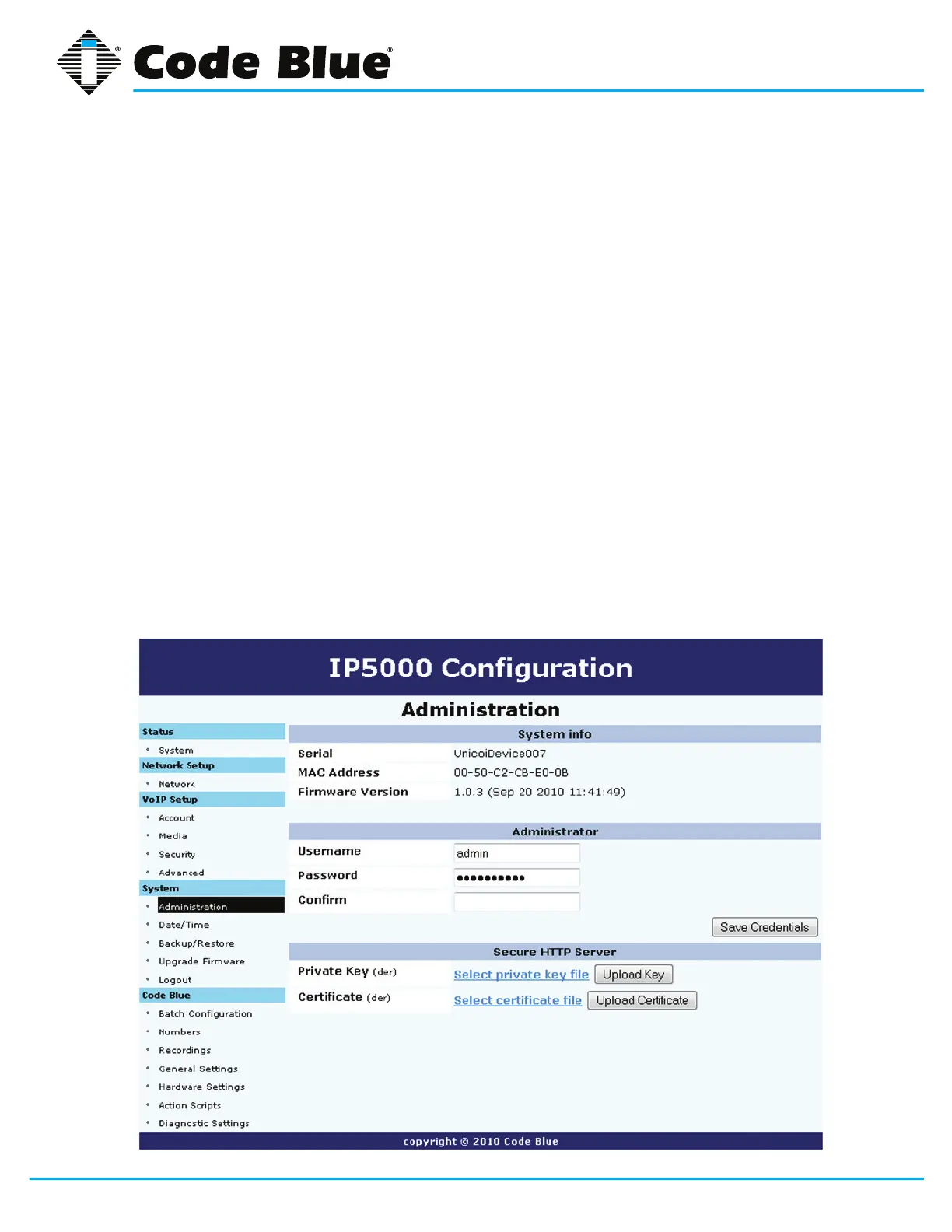
6.1 System Administration Settings
TheIP5000speakerphonesysteminformation,administrativelogon/passwordchangeandsecure
HTTPservercerticatearemanagedby:
1. Clicking Administration under System(seefarleft-handcolumn).
The System InfosectionwilldisplaytheSerialnumber,MACAddressandFirmwareVer-
sion of the IP5000 speakerphone.
2. Under Administrator, enter a new Username and Password to change the default User
name/Passwordforsystemaccess.
3. OnceanewUsername/Passwordhasbeenentered,clickonSave Credentials toapply
the new settings.
4. To change the Private Key, click on Select private key le link under Secure HTTP
Server.
5. Click on Upload Key.
6. To change the Certicate, click on Select certicate le link.
7. Click on Upload Certicate.



 To Next Page