5. Configuration CCT 800 GE 300
20 3.3/0518
Start-up of a networked system
In networked systems each Intercom Server housing must be advised a unique number (server ID).
Setting the numbers with DIP switches
1. Initialise each housing with the desired number (1 to 14):
Switch the Intercom Server off.
Set the DIP switches 1 to 4 of the G3-GEM to “ON“.
Switch the Intercom Server on (RUN-LED is blinking fast).
Set the desired number (switch position see below).
Switch the Intercom Server off and back on.
2. Connect the computer to any housing and read out the configuration of the Intercom Server with the
configuration software CCT 800 (Menu Intercom Server > Receive). Now all cards are recognised
correctly and the Intercom Server can be configured as usual.
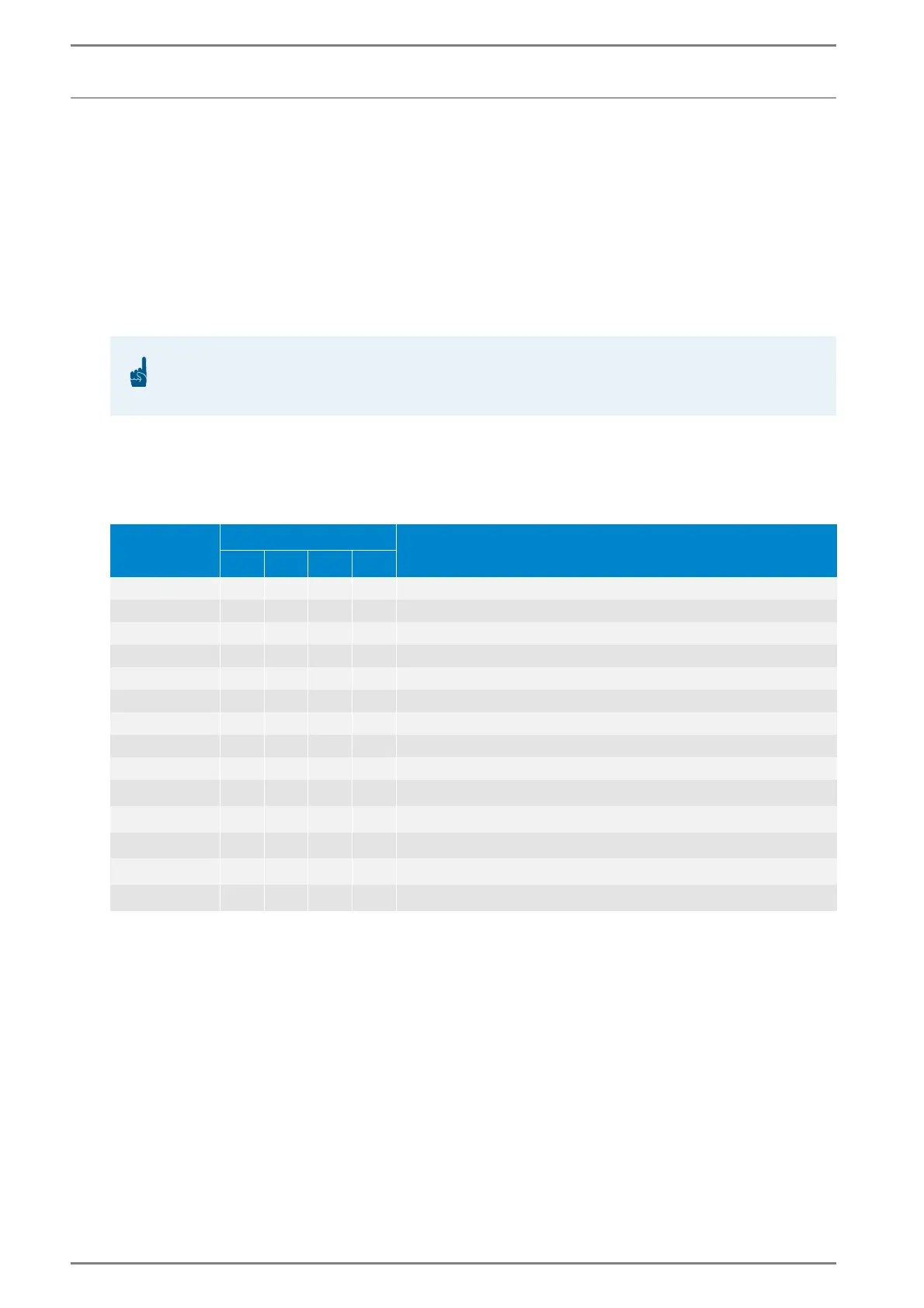
1=switch position “ON“, 0= switch position “OFF“
ATTENTION: Initialisation resets configuration
Initialising the Intercom Server resets the configuration. Therefore, configured networks can not be
reached anymore.
Server ID:
DIP switch:
Standard call numbers with subscriber cards with 8 subscribers:
1 2 3 4
1 1 0 0 0 101 – 180
2 0 1 0 0 201 – 280
3 1 1 0 0 301 – 380
4 0 0 1 0 401 – 480
5 1 0 1 0 501 – 580
6 0 1 1 0 601 – 680
7 1 1 1 0 701 – 780
8 0 0 0 1 801 – 880
9 1 0 0 1 901 – 980
10 0 1 0 1
1001 – 1080
1)
11 1 1 0 1
1101 – 1180
1)
12 0 0 1 1
1201 – 1280
1)
13 1 0 1 1
1301 – 1380
1)
14 0 1 1 1
1401 – 1480
1)
1)
The standard calling numbers, that are automatically allocated to the housings, must be changed by config-
uration if more than 9 housings are connected. Otherwise, three- and four-digit numbers beginning with
the same digits would occur (e.g. 110 in housing no. 1 and 1101 in housing no. 11).













 To Next Page