GE 800 4. Cabling
1.1/1209 11
Connection of IP-Intercom Terminals
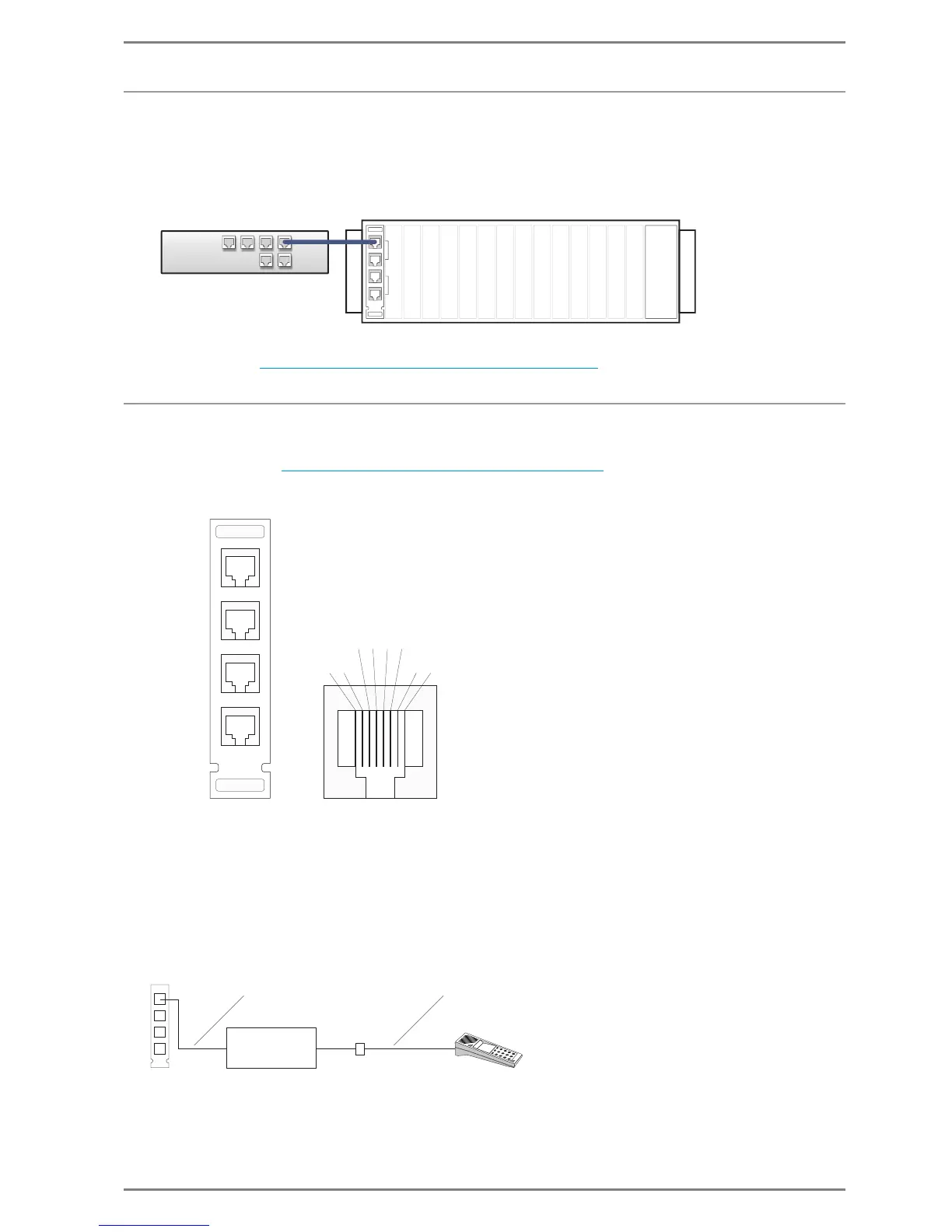
For IP-Subscribers no additional installation boards are required. Communication to the Intercom
Server is carried out via the G8-NET Card: (G8A-NET installation board).
The G8-IP is connected to the network (switch) via the RJ 45 sockets “UPLINK” or “DOWNLINK” on
the installation board G8A-NET
Configuration see ”
7. Configuration of IP-Terminals” on page 34
Connection of Intercom Terminals (Digital, Analogue)
For digital and analogue Intercom Terminals installation boards are required for connection to the
Intercom Server (see ”
Installation Boards for GE 800” on page 9).
Installation Board G8A-C for 4 Subscribers
NC = not connected
At DSP-Subscriber cards G8-GED only A and B are connected.
Connection over patch panel
Between G8A-C and the patch panel a standard CAT5-cable, e.g. ASK KAT5/1 (1m, 3.3 ft) or ASK KAT5/
5 (5m, 16.4 ft) of our selection should be used, because these cables are not cross-jointed. A standard
intercom cable can be used between socket and intercom station (the cables, that are delivered with
each station, are cross-jointed).


 To Next Page