GE 800 6. Licensing
1.1/1209 31
Deactivation of Licenses:
Select the license to be deactivated in the card area
Click on the license with the right mouse button and select Detach / Deactivate
Acknowledge the Deactivation with YES
The deactivated license is moved back to the license pool
Click Synchronize
At inactive internet connection the licence must be deactivated at the licence server via the web-
site (see ”
Licence Website” on page 31)
Licence Website
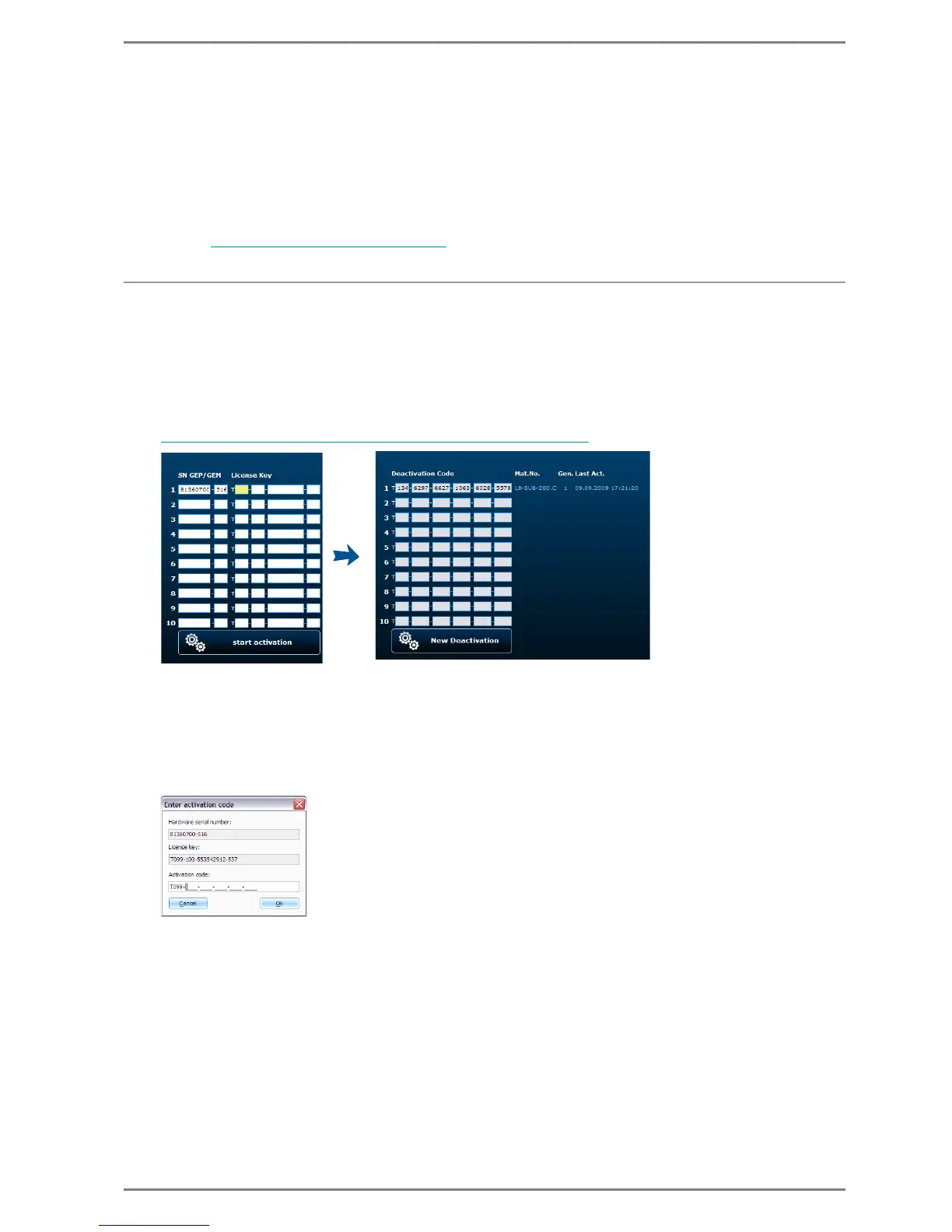
If no internet connection is available during the licensing process in CCT, the licenses can be activated/
deactivated via a website.
With the following URLs the licenses can be activated or deactivated
Activation
http://license.intercom-online.cc/Activation.aspx?language=en
Enter the serial number of the GE 800 / GE 300 Intercom Server in the field SN GEP/GEM
In the field next to it the Licence key is entered, that is allocated to the cards in the Intercom Server
Click start activation
An activation code is generated, that must be entered in CCT
In the card area click on the licence with the right mouse button and select Enter/Change activati-
on code
Enter the activation code and accept with OK
Click Synchronize


 To Next Page