GE 800 6. Licensing
1.1/1209 27
Licensing in CCT
Configuration CCT
Receive the configuration of the Intercom Server.
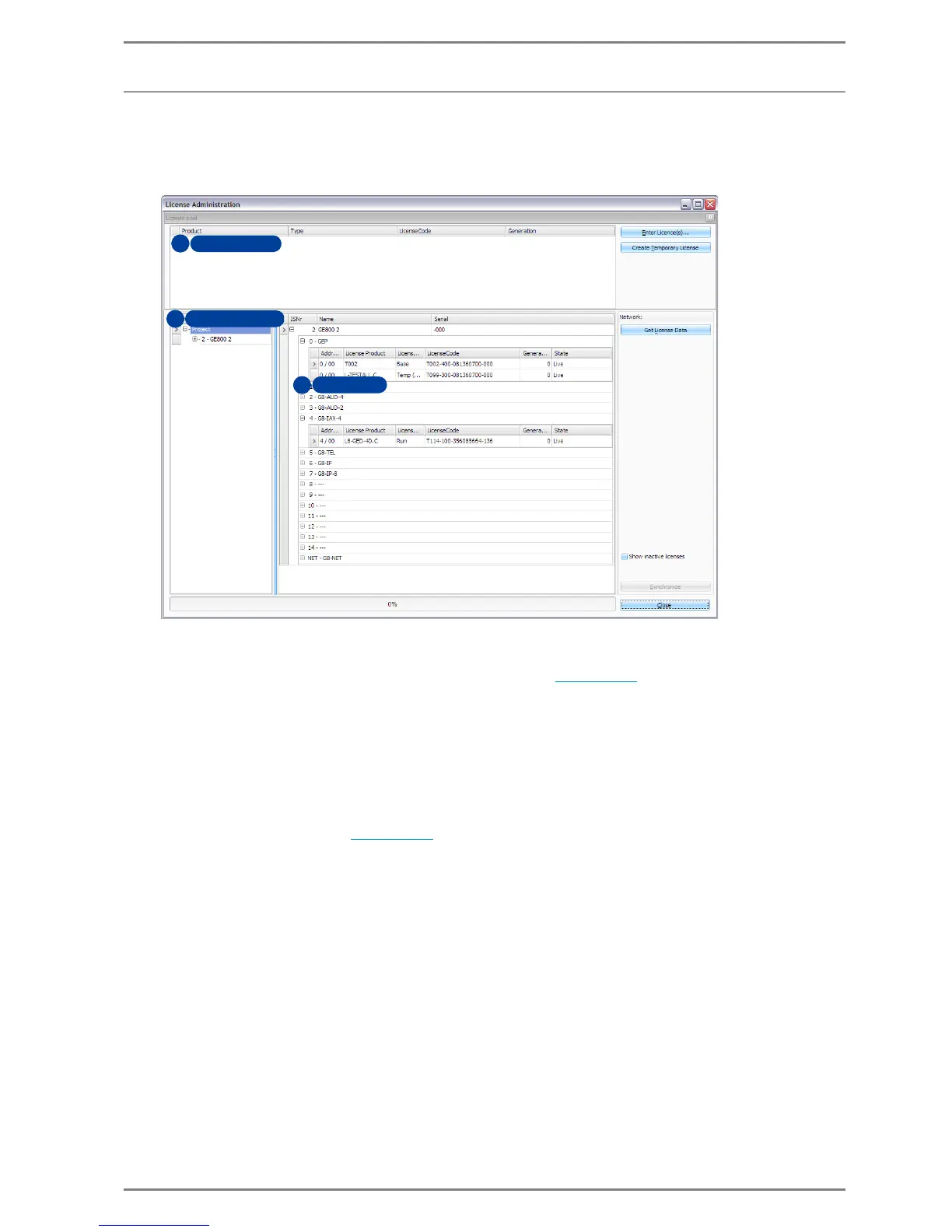
Menu Intercom Server > License administration
Licence Pool
In the licence pool (1) all available licenses are displayed, that have been added to the license pool
via Enter Licence(s) and Create Temporary License (see page 28
).
Server Area
In the server area (2) all Intercom Servers in the project are listed. Here the desired Server can be
selected, to which the license shall be allocted.
If “Project” is selected, the card area displays all Servers in the Project
Card Area
The card area (3) shows a detailed view of all the cards and allocated licenses of the Intercom Server
selected in the server area (see page 29
).
Get Licence Data: Receives the current licence data from the Intercom Server
Synchronize: Synchronizes the licence data with the licence server and the Intercom system
Show inactive licenses: If this check-box is activated, the card area also displays inactive and
deactivated licenses


 To Next Page