5. CCT-Configuration GE 800
20 1.1/1209
Start-up of a Networked System
In networked systems each Server housing must be advised a unique number (Server-ID). There are
two methods of advising each Intercom Server a Server-ID:
For a maximum of 14 housings the Server-IDs can be set via the DIP-switches of the G8-GEP. This is
the easiest method, because the PC does not need to be connected to each single housing.
The numbers can also be set with the program CCT, e.g. for more than 14 housings or if the program-
ming should be prepared in advance for a central.
Attention: The standard calling numbers, that are automatically allocated to the housings (see ”
Stan-
dard Call Numbers” on page 47), must be changed by programming if more than 9 housings are con-
nected. Otherwise three- and four-digit numbers beginning with the same digits would occur (e.g. 110
in housing no. 1 and 1101 in housing no. 11).
Setting the numbers with DIP-switches
1. Initialize each housing with the desired number (1 to 14):
Set the DIP-switches 1 to 4 of the G8-GEP to “ON“.
Switch the Intercom Server off and back on.
Set the desired number (switch position see below).
Switch the Intercom Server off and back on.
2. Connect all housings. If all Server-IDs are set correctly the status LEDs of the G8-NET must signal
faultless operation (siehe Seite 52
).
Attention: Initialising the Intercom Server resets the programming.
3. Connect the PC to any housing and read out the configuration of the Intercom Server with the
program CCT (Menu Intercom Server > Receive). Now all cards are recognised correctly and the
central can be configured as usual. For configuration the PC can be connected to any housing, all
housings are configured like a single housing.
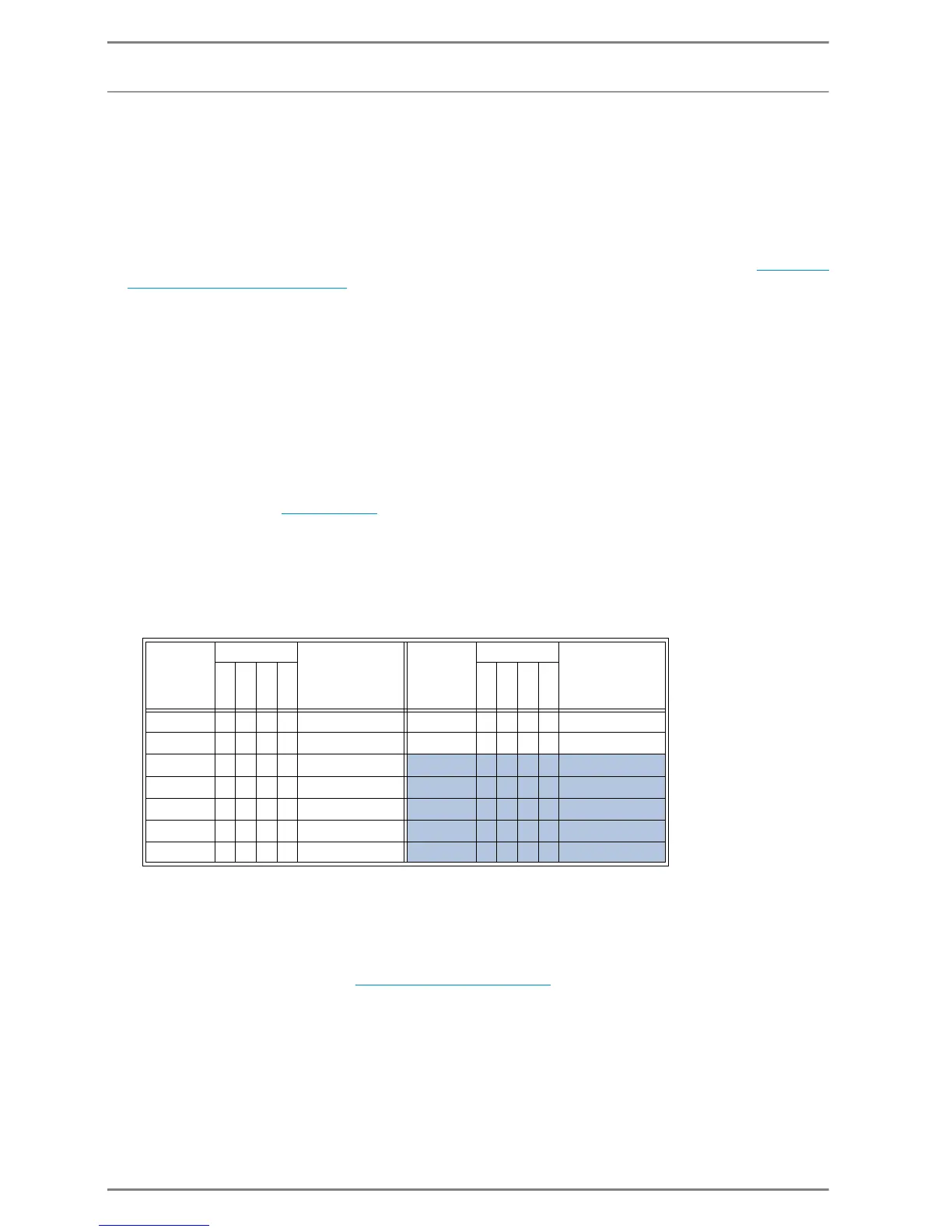
Server-ID: DIP-switches: Standard
call numbers with
subscriber cards
with 4 subscribers:
Gehäuse-
nummer:
DIP-switches: Standard
call numbers with
subscriber cards
with 4 subscribers:
1234 1234
1 1000 101-148 8 0001 801-848
2 0100 201-248 9 1001 901-948
31100 301-348
10 0 1 0 1 1001-1048 *
40010 401-448
11 1 1 0 1 1101-1148 *
51010 501-548
12 0 0 1 1 1201-1248 *
60110 601-648
13 1 0 1 1 1301-1348 *
71110 701-748
14 0 1 1 1 1401-1448 *
1=switch position “ON“, 0=switch position “OFF“
* Attention:
- The standard calling numbers, that are automatically allocated to the housings, must be changed by
programming if more than 9 housings are connected. Otherwise three- and four-digit numbers beginning
with the same digits would occur (e.g. 110 in housing no. 1 and 1101 in housing no. 11).
- At full expansion with IP-Subscribers (14 cards with 8 subscribers per card = 112 per housing) collisions
may already occur at the second housing (see ”
Standard Call Numbers” on page 47)


 To Next Page