7. Configuration of IP-Terminals GE 800
38 1.1/1209
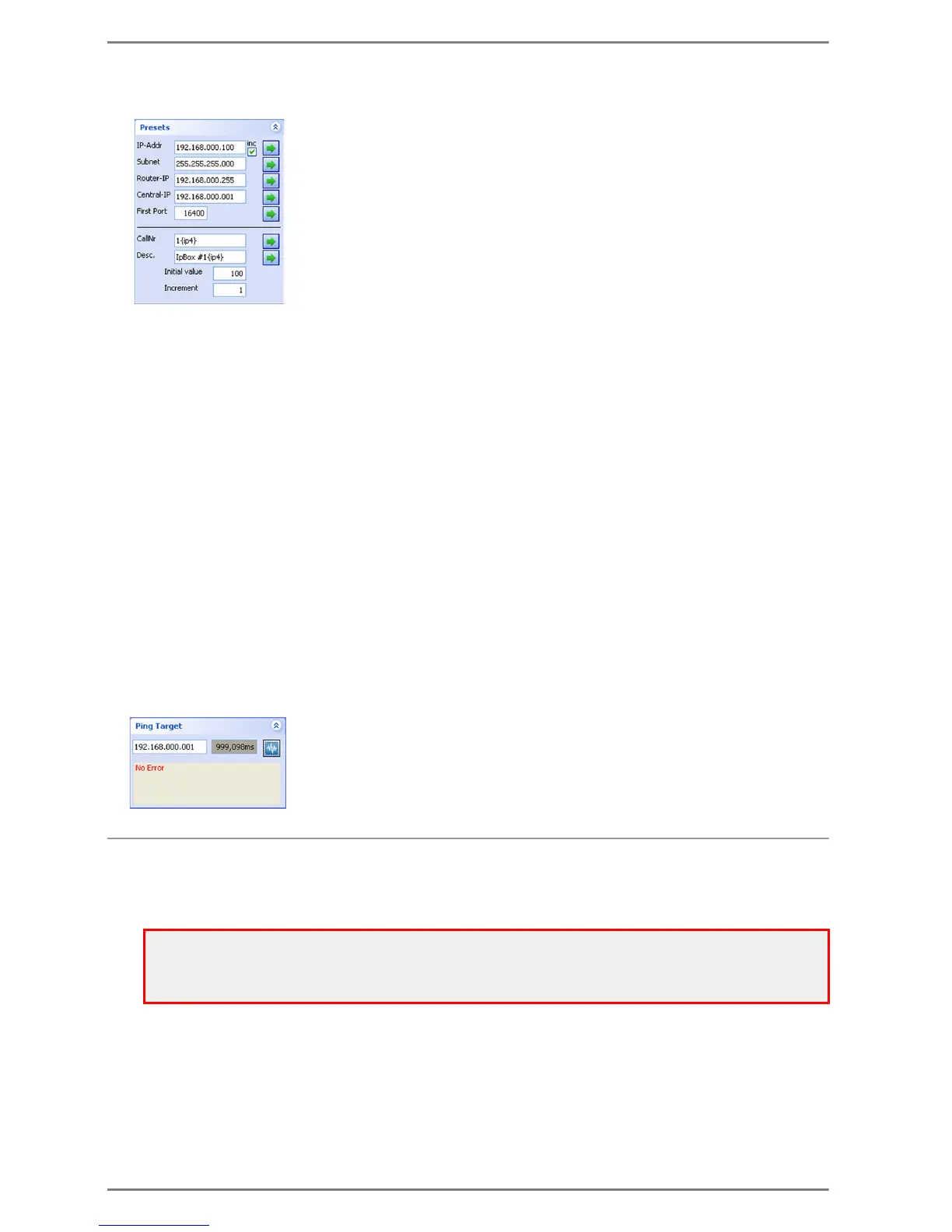
Presets
In this window it is possible to define settings/
texts for multiple IP-subscribers automatically .
Therefore it is also possible to advise e.g.
consecutive IP-addresses automatically.
By clicking on the arrow, the respective preset is advised to the selected subscribers in the table.
If the checkbox inc is activated at IP-Addr, the IP-address per subscriber is increased by one (at
multiple selections).
CallNo (Call number) / Desc. (Description)
By clicking on the arrow, the respective text is advised to the selected subscribers in the table.
For this different variables can be used:
{ip1} to {ip4} ............................... 1st to 4th Byte of the IP-address
{sn1} to {sn4}.............................. 1st to 4th Byte of the subnet mask
{ce1} to {ce4} .............................. 1st to 4th Byte of the central-IP-address
{rt1} to {rt4}................................. 1st to 4th Byte of the router-IP-address
{mac1} to {mac6} ....................... 1st to 6th Byte of the MAC-address
{port}........................................... port number
{n} ............................................... automatic increase
Initial value = Start value, Increment = value increase
Note: Maximum amount of digits which can be stored for the Call number and Description:
“CallNo”: max. 126 digits
“Desc.”: max. 126 digits
Ping Target
With this window it is possible to send a ping request to a network device. For
this, the IP-address of the computer which is used must be in the same subnet
as the IP-address that shall be reached. Three ping measurements are made;
the result/the time of the last measurement is indicated.
Firmware Download
Alternatively to the download via CCT the firmware of the ET 901 / ET 908 can be downloaded via the
program IPStationConfig.
Select Station in the menu Firmware Download. A window for selection of the desired GEH-file
is displayed.
Attention – ET 901:
For an ET 901, this feature is available with firmware versions as of 2.2 only!
Download of the ET 901 firmware is only possible, if an Intercom station (i.e. a subscriber) is connected to
the ET 901!


 To Next Page