The size of the header may be calculated as
five
bytes plus
two
times
the number of dimensions
in
the array. The total size of the elements may be
calculated as the number of bytes per element (5 for f10ating point. 2 for
integer. 3 for string) times the number of elements (the dimensions multi-
plied together
+ 1). The total size of the array. header plus elements.
is
stored
in
byte 4 of the array header.
The following
is
a program for viewing sample Array Area entries:
10 DIM A(5). 8%(2,2). C$(10):REM SAMPLE ARRAYS
20
FOR
1=0
Ta
5:
A(I)=I:NEXT
30
FOR
1=0
Ta
2:FOR J=O
Ta
2:8%(J,1)=100+3*I+J:NEXT J,I
40
FOR
1=0
Ta
10:C$(I)=CHR$(ASC("A")+I):NEXT
50 X=PEEK(45)*256+PEEK(44):REM POINT
Ta
ARRAY AREA
60 Y=PEEK(47)*256+PEEK(46):REM
END
OF
ARRAYS
70
FOR
I=X
Ta
y
80
PRINT
1.
PEEK(I)
90
GET
D$:IF
D$=
....
GOTO
90
100 NEXT
Each
of
the three types of arrays
is
dimensioned. Line 20 fills the floating
point
array A
with
the numbers 0 through
5.
Line 30 fills the integer array
8%
with
the numbers 100 through 108. Line
40
fills the character array
C$
with
the single
strings A through
K.
Lines 50 and 60 fetch the pointers
to
the end of the Variable
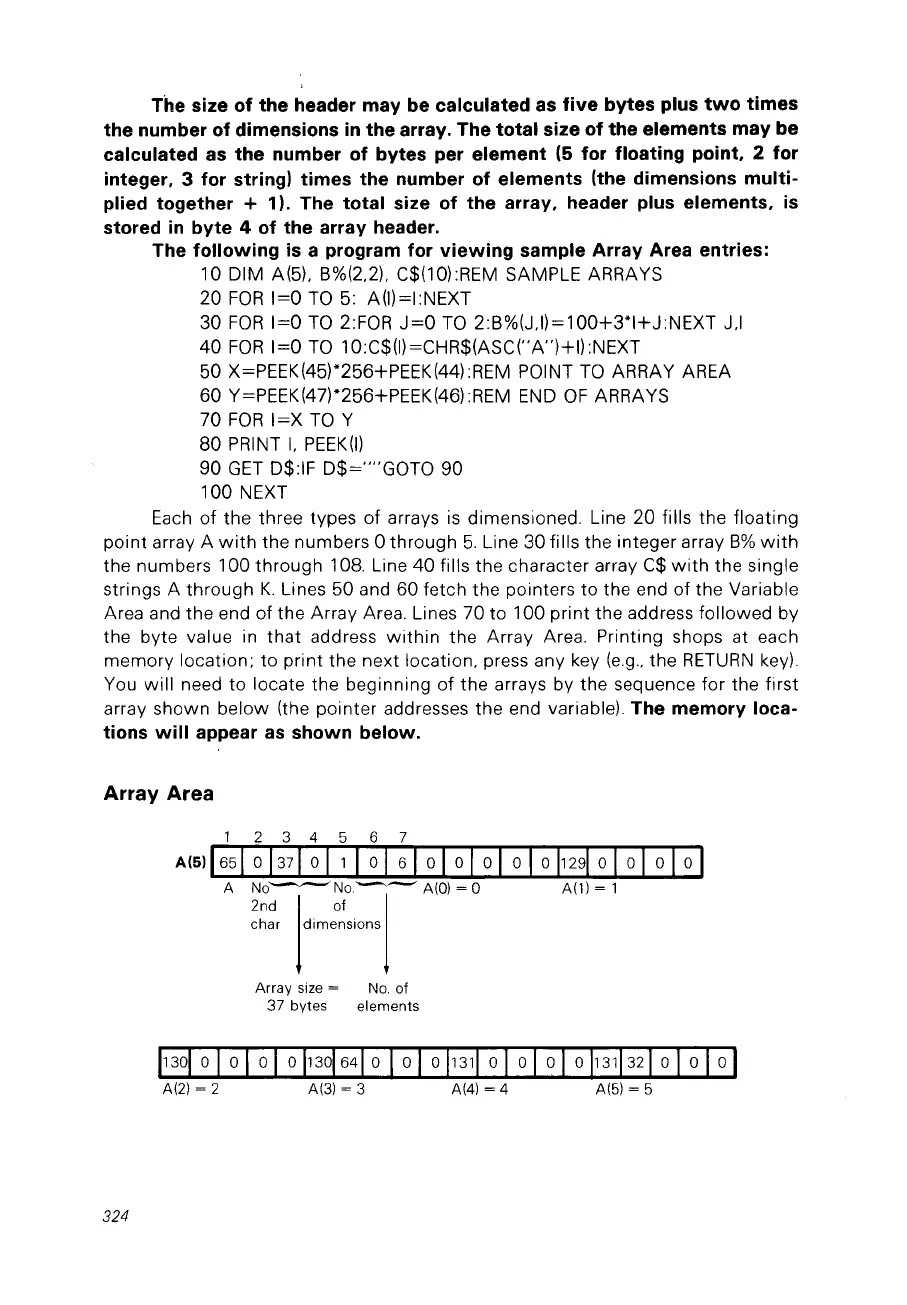
Area and the end of the Array Area. Lines 70 to 100 print the address followed by
the byte value
in
that
address
within
the Array Area. Printing shops at each
memory location;
to
print the next location, press any key
(e.g.,
the
RETURN
key).
You
will
need to locate the beginning
of
the arrays by the sequence for the first
array shawn below (the pointer addresses the end variable). The memory loca-
tions
will
appear
as
shown below.
Array Area
324



 To Next Page