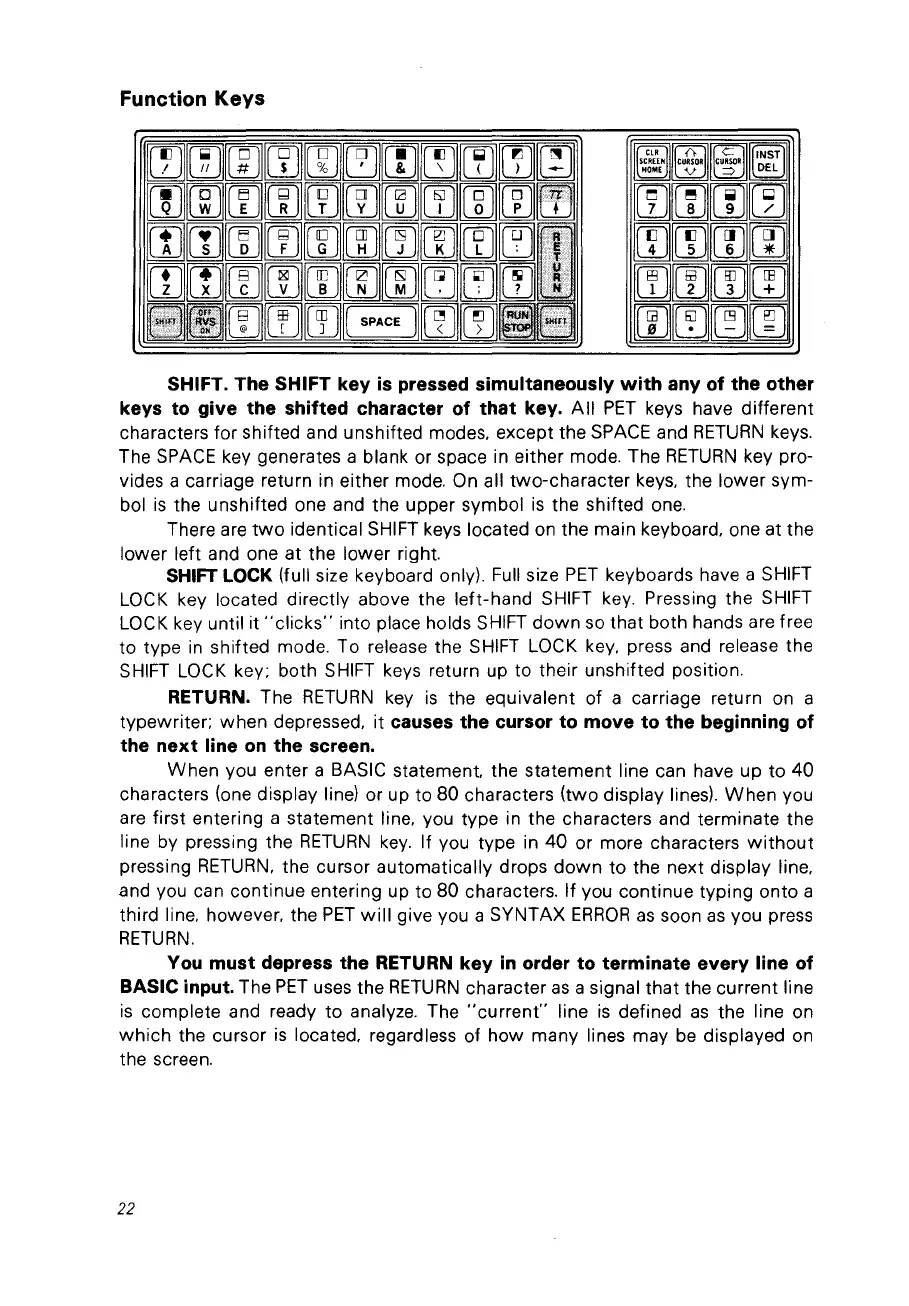
Function Keys
SHIFT. The SHIFT key
is
pressed simultaneously
with
any of the other
keys to give the shifted eharaeter of that key.
Ali
PET
keys have different
characters for shifted and unshifted modes.
ex
ce
pt
the
SPACE
and
RETURN
keys.
The
SPACE
key generates a blank or space in either mode. The
RETURN
key pro-
vides a carriage return in either mode. On ail two-character keys. the lower sym-
bol
is
the unshifted one and the upper symbol
is
the shifted
one.
There are
two
identical
SHIFT
keys located
on
the main keyboard. one at the
lower left and one at the lower right.
SHIFT
LOCK
(full size keyboard only).
Full
size
PET
keyboards have a
SHIFT
LOCK
key located directly above the left-hand SHIFT
key.
Pressing the SHIFT
LOCK key until it
"clicks"
into place holds
SHIFT
down
sa that bath hands are free
ta type
in
shifted mode. Ta release the
SHIFT
LOCK
key, press and release the
SHIFT
LOCK
key; bath
SHIFT
keys return up ta their unshifted position.
RETURN. The
RETURN
key
is
the equivalent of a carriage return
on
a
typewriter; when depressed. it
causes the eursor to move to the beginning of
the next line
on
the sereen.
When vou enter a BASIC statement. the statement line can have up ta
40
characters (one display line) or up ta 80 characters (two display lines).
When
vou
are
first entering a statement line. vou type in the characters and terminate the
line by pressing the
RETURN
key.
If
vou type in
40
or more characters
without
pressing
RETURN.
the cursor automatically drops
down
ta the next display line,
and
Vou
can continue entering up ta 80 characters. If vou continue typing onto a
third line. however, the
PET
will
give vou a SYNTAX
ERROR
as
saon
as
vou press
RETURN.
You
must depress the RETURN key
in
order to terminate every line of
BASIC input.
The
PET
uses the
RETURN
character
as
a signal that the current line
is
complete and ready ta analyze. The
"current"
line
is
defined
as
the line on
which
the cursor
is
located, regardless of
how
many lines may
be
displayed
on
the screen.
22



 To Next Page