ComNav 1101 Autopilot
Dodge Function
When in AUTOPILOT mode, you can use the DODGE buttons to
avoid an obstacle in the water. Pressing either the PORT DODGE
button or STARBOARD DODGE button will cause the Autopilot to turn
the vessel in that direction. However, it is important to realize that
while the DODGE buttons are activated the Autopilot will not limit the
rate of turn of the vessel. To maintain a heading part way through a
dodge, hold both PORT DODGE and STARBOARD DODGE buttons
simultaneously.
Once the DODGE buttons are released, the Autopilot will turn the
vessel back to the commanded course, but this time the turn will
occur at the turn rate that is set in the Steering Parameters.
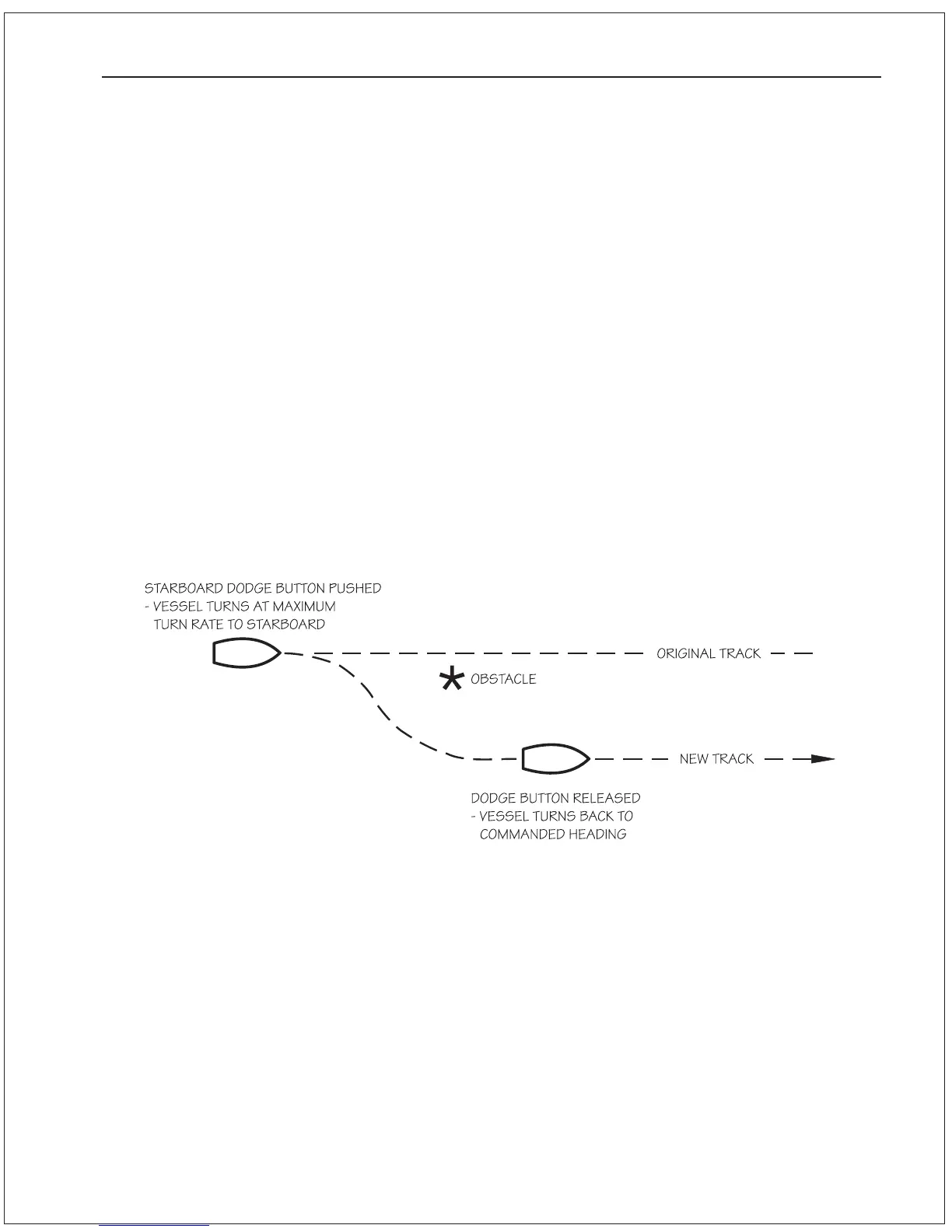
Note that if you dodge the vessel in one direction, once you release
the DODGE button the vessel will return to the same heading but
NOT the same track. The new track will be offset from the original
track by the distance traveled during the dodge maneuver.
BASIC OPERATIONS 6 - 2
Figure 11—DODGE Maneuver



 To Next Page