ComNav 1101 Autopilot
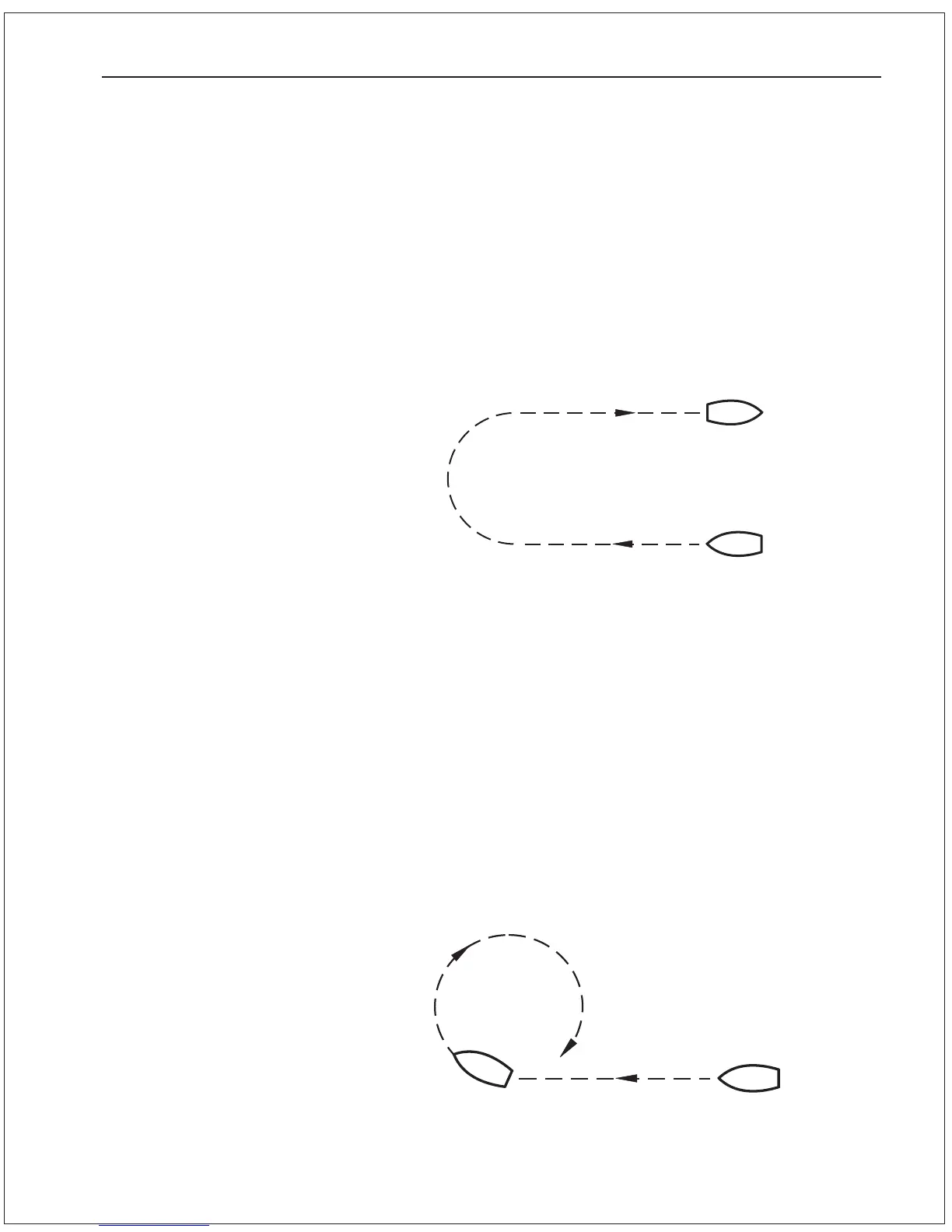
Figure 14—Continuous Circle Turn
Figure 13—U Turn
U Turn
The U Turn is just what it sounds like. The vessel makes a 180
degree turn in the direction that you ask it to.
To initiate a U Turn press the TURN button, while in AUTOPILOT
mode, followed by one of the two DODGE buttons.
If the PORT DODGE button is pressed, the Autopilot will make a 180
degree turn to port, and if the STARBOARD DODGE button is
pressed, the Autopilot will make the 180 degree turn in the
starboard direction.
Continuous Circle Turn
The Continuous Circle Turn, also known as C Turn, will turn the
vessel in a circle until the turn is disabled by either turning the knob
or by changing modes.
To initiate a C Turn press the TURN button, while in AUTOPILOT
mode, followed by one of the two DODGE buttons.
If the PORT DODGE button is pressed, the turn will be in the port
direction, and if the STARBOARD DODGE button is pressed, the turn
will be in the starboard direction.
BASIC OPERATIONS 6 - 4



 To Next Page