ComNav 1101 Autopilot
Setup and Trial Special Turns
Now that you are confident that the Autopilot steers accurately in
AUTOPILOT mode, you should setup and trial a Special Turn.
Review the descriptions of the Special Turns earlier in this section
to decide which turn will be most useful to you in an emergency
situation.
1 . Place the Autopilot in STANDBY mode.
2. Double press the STBY/OFF button to display the menu.
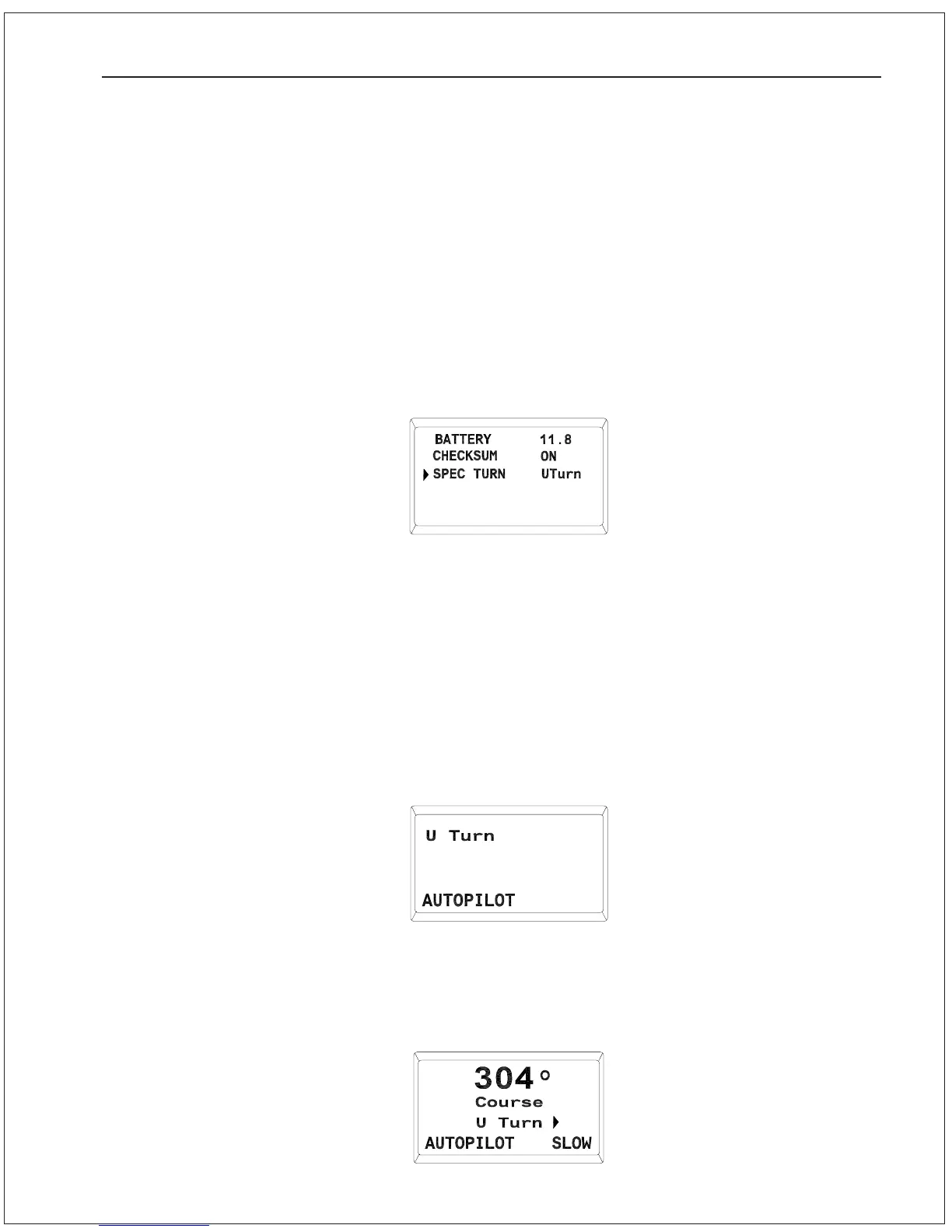
3. Use the ADJUSTMENT KNOB to select the “SPEC TURN”
parameter. Press the STBY/OFF button and the value will
begin to flash.
4. Use the ADJUSTMENT KNOB to select “UTurn”, “CTurn” or
“ETurn”.
5. Press the STBY/OFF button to save the value.
6. Double press the STBY/OFF button to return to STANDBY
mode.
7. Place the Autopilot in AUTOPILOT mode. Check that you are
well clear of obstacles and marine traffic and that your vessel is
on a course which leaves plenty of room to execute the type of
turn you have selected.
8. Initiate a Special Turn by pressing the TURN button. The type of
turn to be executed will appear on the display:
9. Execute the Special Turn by pressing either the PORT or
STARBOARD DODGE button.
The vessel will turn in the
selected direction. The new course and the type of turn will
appear on the display:
BASIC OPERATIONS 6 - 16



 To Next Page