4
Operation
Operation l 4-15
Control Function Descriptions - RW
Configuration
Home Screen
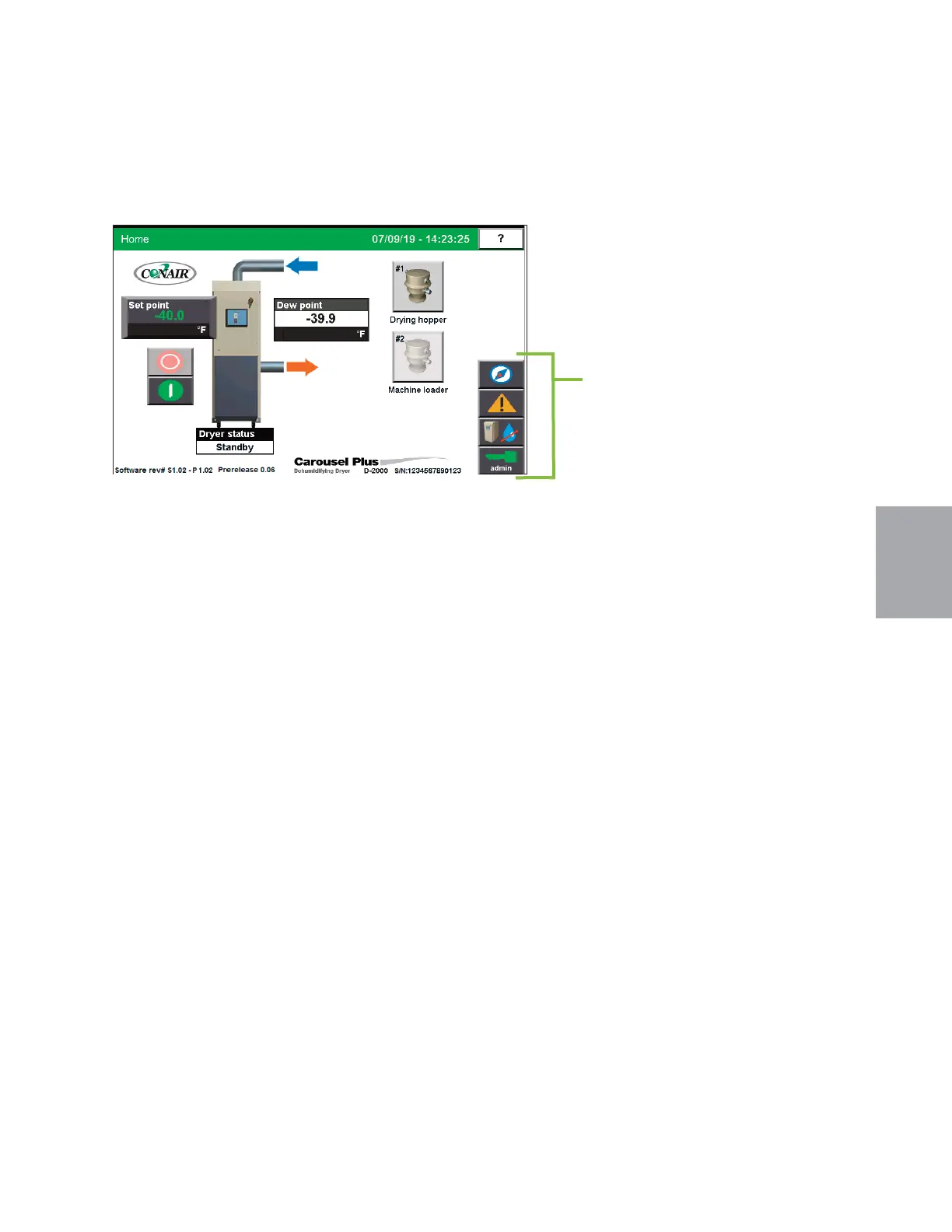
The Home screen provides the user with the current live information concerning the
processes within the dehumidifying dryer including:
• Setpoint
• Dryer Status
• Dew point
It tells the user the current status of the dryer blower (powering up, standby, starting or stop-
ping, passive and shutdown alarms).
If the user is logged-in at the proper security level, changes can be made to:
• Setpoint - When used as a central dryer the setpoint allows you to set the desired dewpoint
level.
This screen also allows the user to start or stop the dryer. The user can also view the other
system parameters on the Navigation screen, view alarms, view hopper settings, or log in by
pressing the applicable buttons on the right of the screen.
NOTE: Live data is displayed as
text inside a box. Set point boxes
have beveled edge borders and
green text. Set points can be
changed, if the user has logged in
at the proper security level, by
pressing the set point boxes. This
will launch a pop-up keypad win-
dow that can be used to change
the set point.
See Operation sec-
tion entitled, How to Navigate
Control Screens.
After the new
set point value has been entered,
press the "Enter" key to lock in
the new set point.
0
Navigation Buttons
Touching the navigation
buttons will take the user
to the control screen se-
lected.


 To Next Page