4-16 l Operation
(continued)
Control Function Descriptions - RW
Configuration
(continued)
Navigation Screen
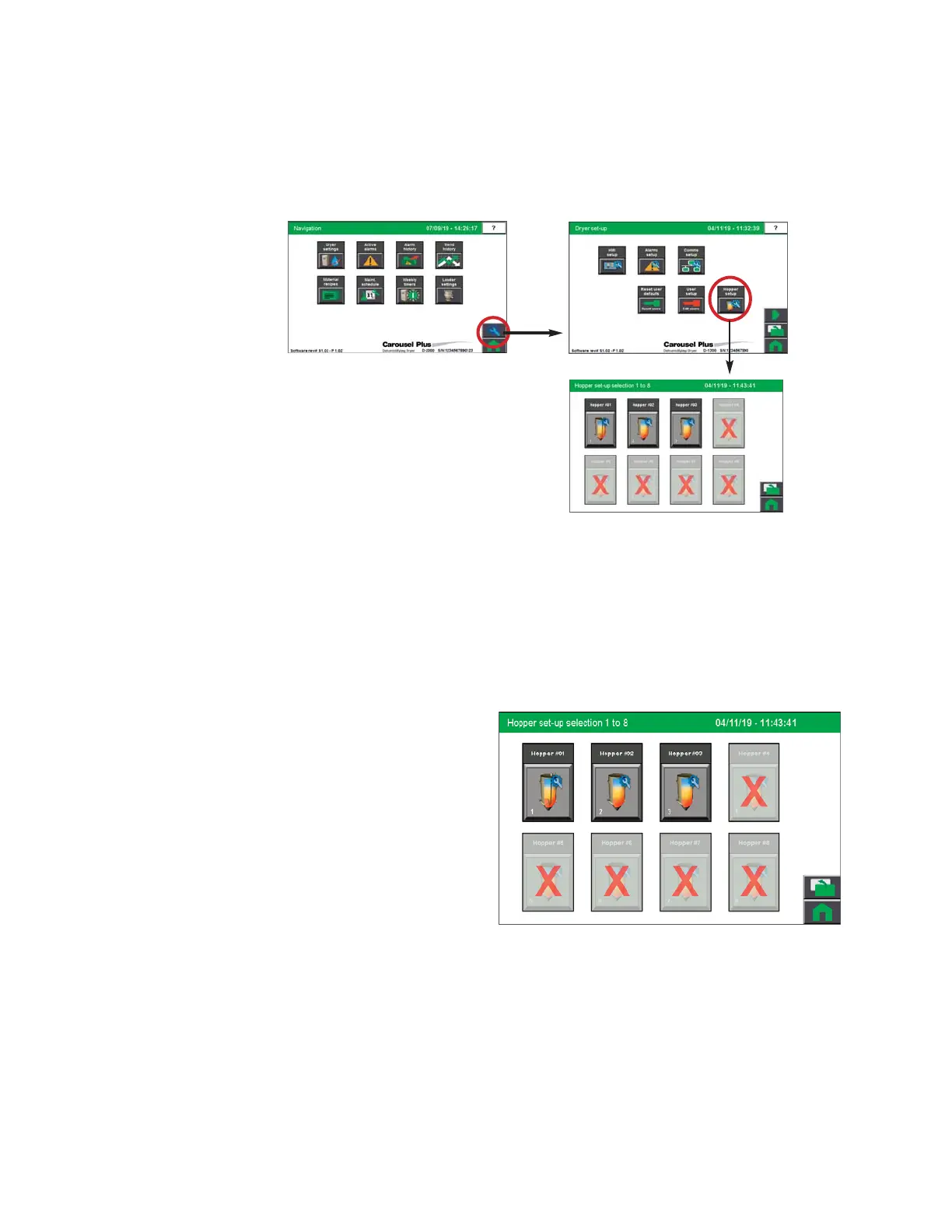
To access the Hopper Set-up Selection screen:
1 Press the Wrench button on the Navigation screen to get to the Dryer Set-up screen.
Then press the Hopper Set-up button to get to the Hopper Set-up Selection screen.
The Hopper Setup Selection screen provides the user with the list of enabled hoppers. If the
list is empty, or does not show the proper number of hoppers, Setup has not been completed
yet. See Operation section entitled: Hopper Setup.
NOTE: Depending on which options
your dryer has been configured with,
and whether or not you have the
Drying Monitor enabled, your
screens and icons may appear dif-
ferent. For example, if your Resin-
Works system is Drying Monitor
TM
equipped, your hoppers will display
as Drying Monitor hoppers.
0


 To Next Page