4-44 l Operation
Control Function Descriptions -
Stand Alone Configuration
(continued)
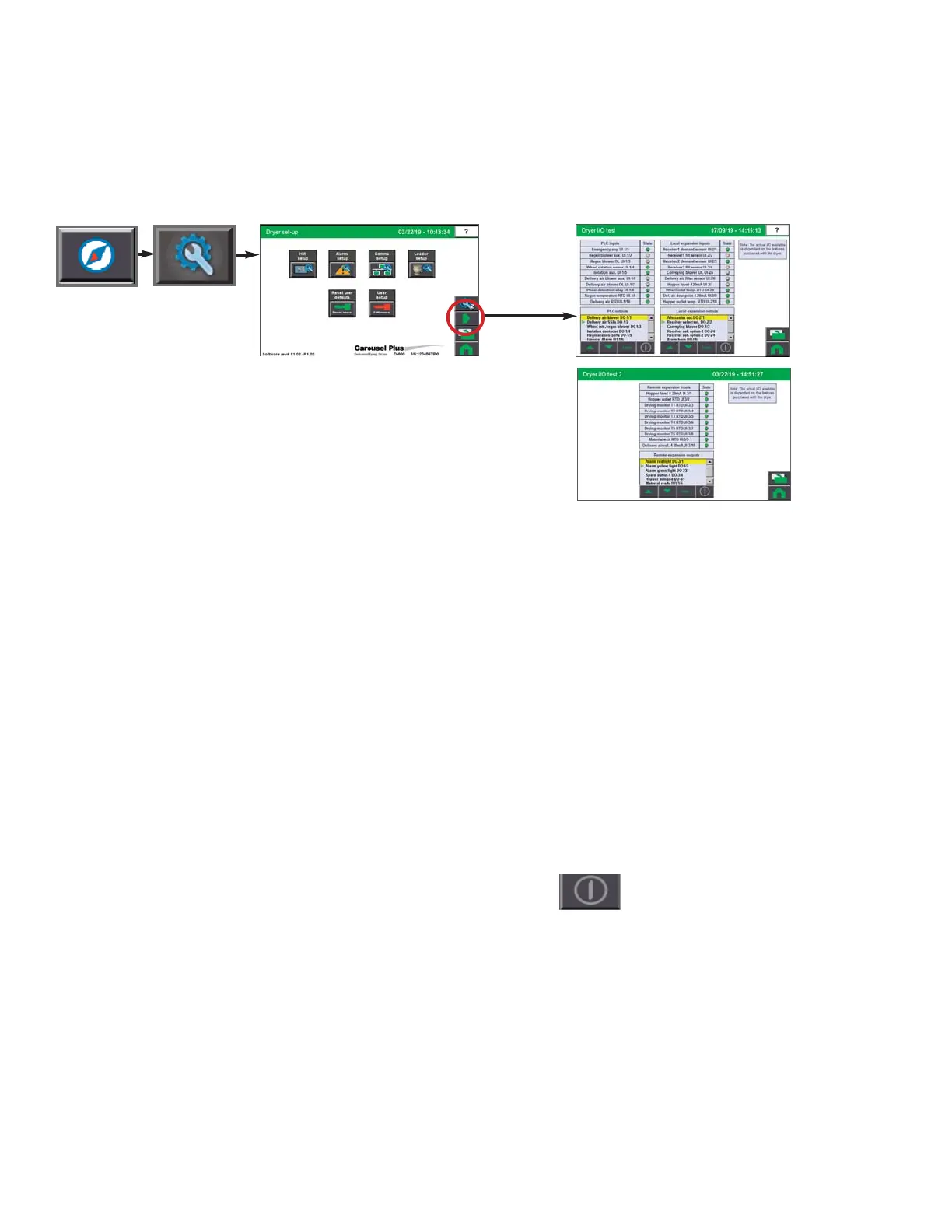
Digital Output Test screen
To access the Test screen:
1 Press the Navigation button from the
Home screen.
2 Press the wrench Setup button.
3 Press the Right Arrow button.
The Dryer I/O Test screen allows for digital output tests of various outputs attached to the
DC-C control. The actual I/O available is dependent on the features purchased with the
dryer. Possible tests are:
• Delivery air blower
• Regen blower
• Regen heater (jog)
• Wheel motor
• Alarm horn/red light
• Heater isolation contactor
• Delivery air heater (jog)
• Alarm yellow light
• Alarm green light
To test an output:
1 Select the output you would like to test. The yellow highlight indicates the current se-
lected output.
2 Press and hold the On/Off push button.
3 Release the power button to stop the test.
NOTE: Proper login is re-
quired to test the outputs.
Depending on the config-
uration of your dryer,
some inputs or outputs
may not be available.
0
NOTE: Dryer must be
stopped to perform test
mode.
0


 To Next Page