4-46 l Operation
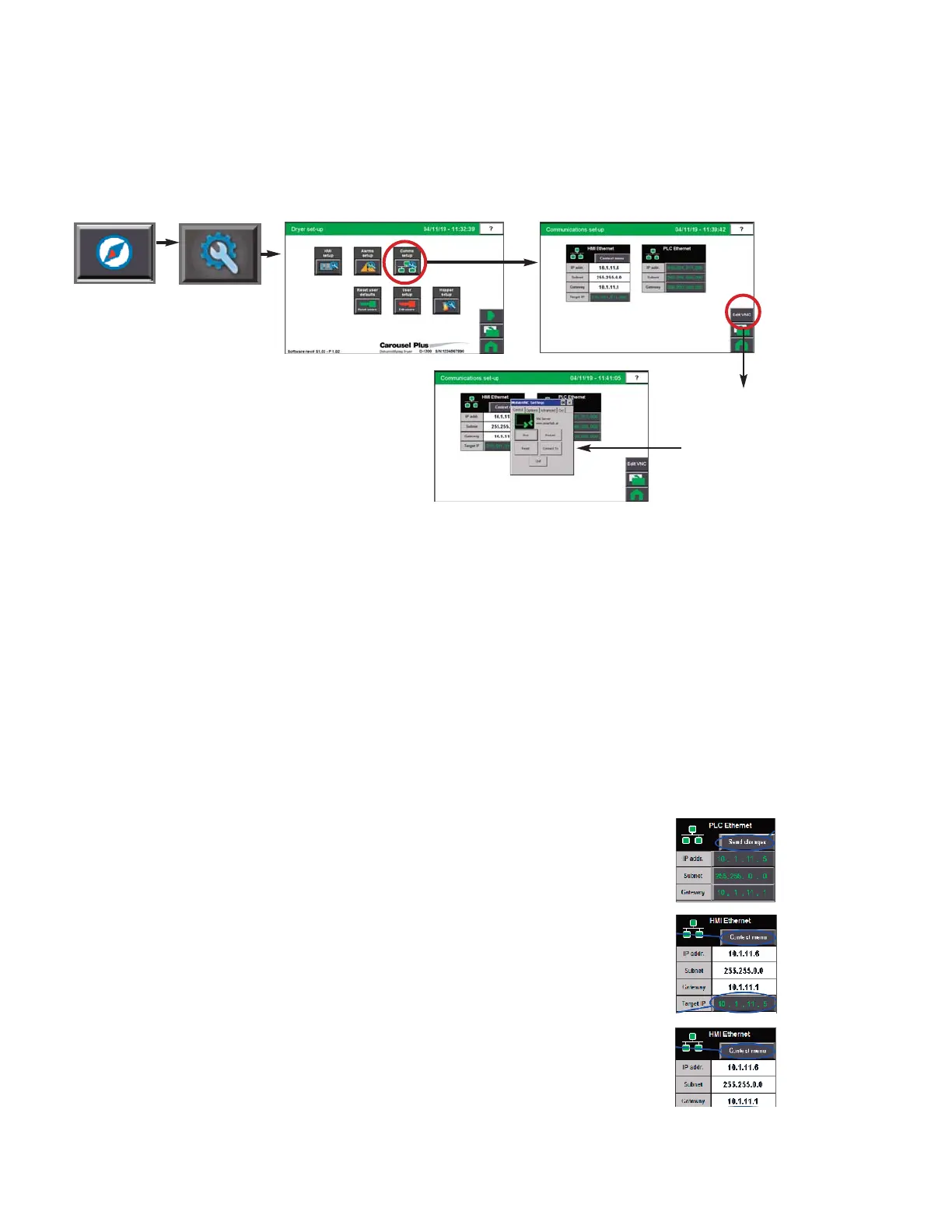
NOTE: Conair’s default IP address
setting for the DC-C control is
10.1.11.6 as shown in the graphic
to the right.
0
Control Function Descriptions - RW
Configuration (continued)
Communications screen
To access the Hopper Comms screen:
1 Press the Navigation button from the Home screen.
2 Press the Setup button (Wrench).
3 Press the Comms Set-up button.
The Communications Setup screen provides the user with the ability to view current HMI
Ethernet settings, or to change and apply new Ethernet settings.
Changing Ethernet settings requires the Admin login. Only qualified personnel should at-
tempt changes. Improper setting sequence or values will result in loss of communications.
Always record your new settings before making any changes. Always set the PLC first!
To apply new Ethernet settings:
1 Verify new PLC settings and Press the “Send changes”
button which is visible when settings are different.
2 Set the target IP to the new PLC IP address.
3 Press the “Context Menu” button, then on the pop-up
menu select “show system settings”. Under network set
the new HMI IP address.
NOTE: Proper login is required to
change these settings.
0
Press the Edit VNC button,
which is visible when logged
in as admin, to access the
VNC server settings pop-up
window.


 To Next Page