4-48 l Operation
Control Function Descriptions -
Stand Alone Configuration
(continued)
Dry Air Temperature Trend
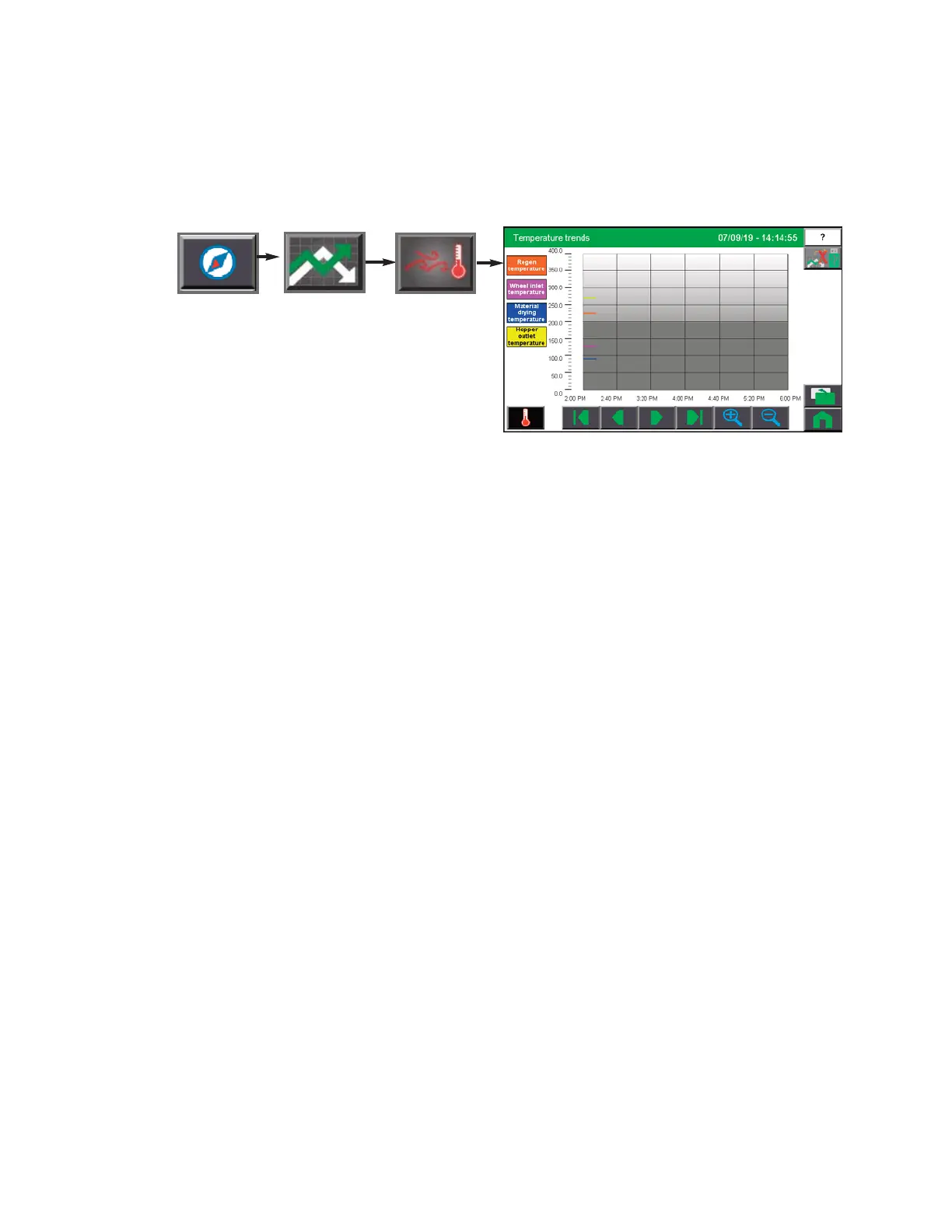
To access the Dry Air Temperature
Trend screen:
1 Press the Navigation button
from the Home screen.
2 Press the Trending button.
3 Press the Dry Air Temperature Trend button.
The Dry Air Temperature Trending screen allows the user to view the air temperature trend
vs. time at several locations in the Carousel Plus Dryer. The air temperature reading loca-
tions are denoted by various colors. The colors associated with the locations are:
Orange: Regeneration Temperature (within the dryer)
Pink: Wheel Inlet Temperature
Blue: Material Drying Temperature
Yellow: Hopper Outlet Temperature
The Dry Air Temperature Trending screen shows values sampled every 15 seconds. Each
colored line represents a pen or variable being trended. Up to 14 days of data is recorded
and available for review. The scroll buttons near the bottom of the screen allow the user to
scroll back to an earlier time or forward to the present time.
NOTE:
See Trending Screen Navigation (Operation Section: Control Function Descriptions- Stand Alone
Configuration: Trending) for more information on how use the navigation buttons to navigate through indi-
vidual trending screens.
0


 To Next Page