CONTENTSINTRODUCTION
INSTALLATION
COMMISSIONINGOPERATION
8
GSM module installation
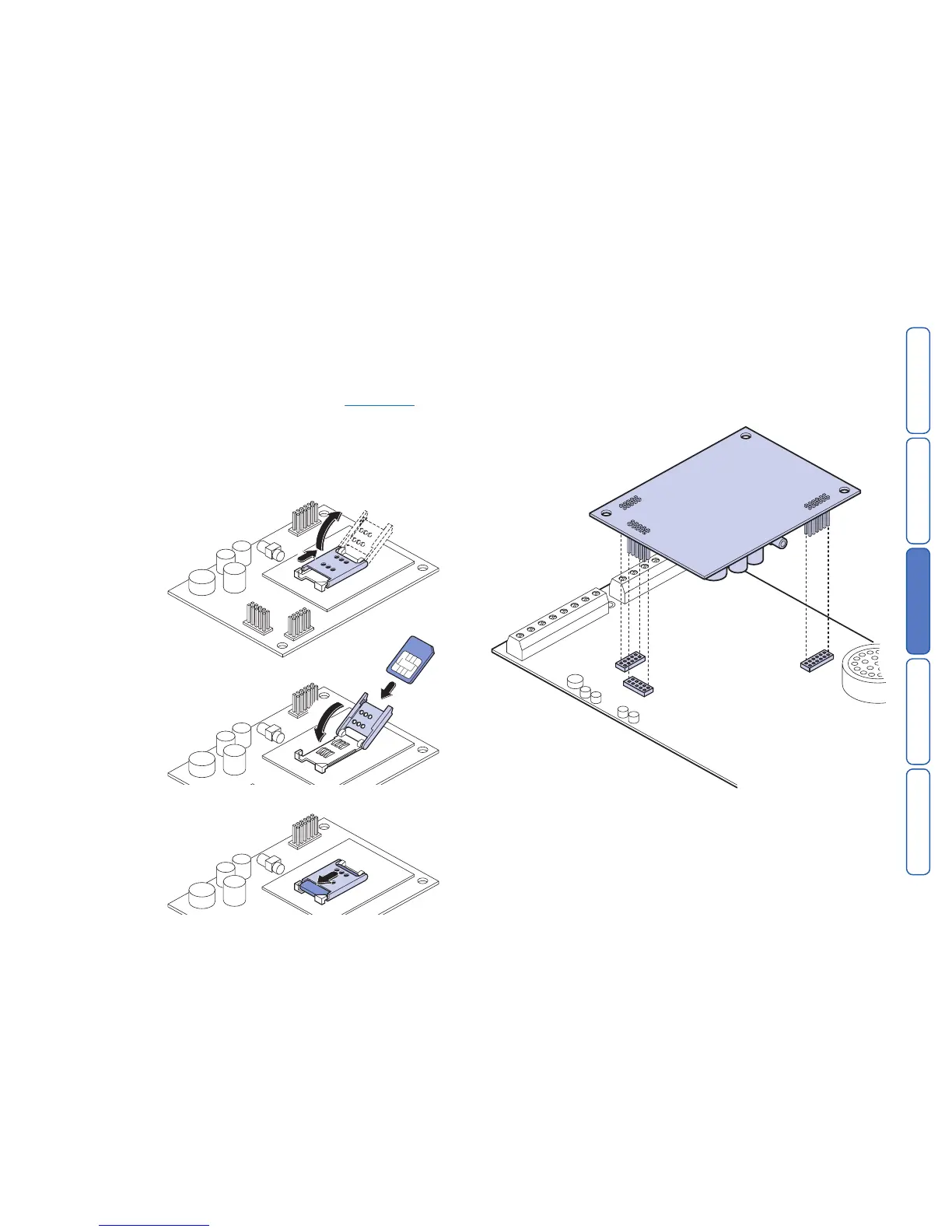
The GSM module is a plug-in board for the SD3 Speech Dialler that allows it to
communicate via a mobile phone network. In addition, the GSM module allows the
SD3 to send SMS (Short Message Service) text messages.
This section provides brief instructions on fitting the GSM module within the SD3.
To prepare the SD3 to use the GSM module, please see the
programming section
later in this guide.
Note: If you are adding the GSM module to an SD3 that has already been installed
then first make sure that the system is completely unset and in its programming
mode (to prevent the control unit raising un-necessary tamper alarms when you
open the case.)
To install the GSM module
1 Unpack the GSM module and its antenna.
3 If necessary, remove the SD3 unit from the wall fixings and remove the two
screws holding the front panel and backbox together.
4 Separate the SD3 front panel and backbox, and disconnect the power connec-
tion and the siren lead (if fitted).
5 Fit the GSM module to the sockets on the SD3 circuit board.



 To Next Page