EasyManua.ls Logo

CPS ECB200KTL/US-800 - Electrical Installation; Cables Specifications; Tools Required and Torque Values; Connection Interface

Default Icon
135 pages
Print Icon
To Next Page IconTo Next Page
To Previous Page IconTo Previous Page
Loading...
Electrical Installation
22 / 135
4 Electrical Connection
4.1 Cables specifications
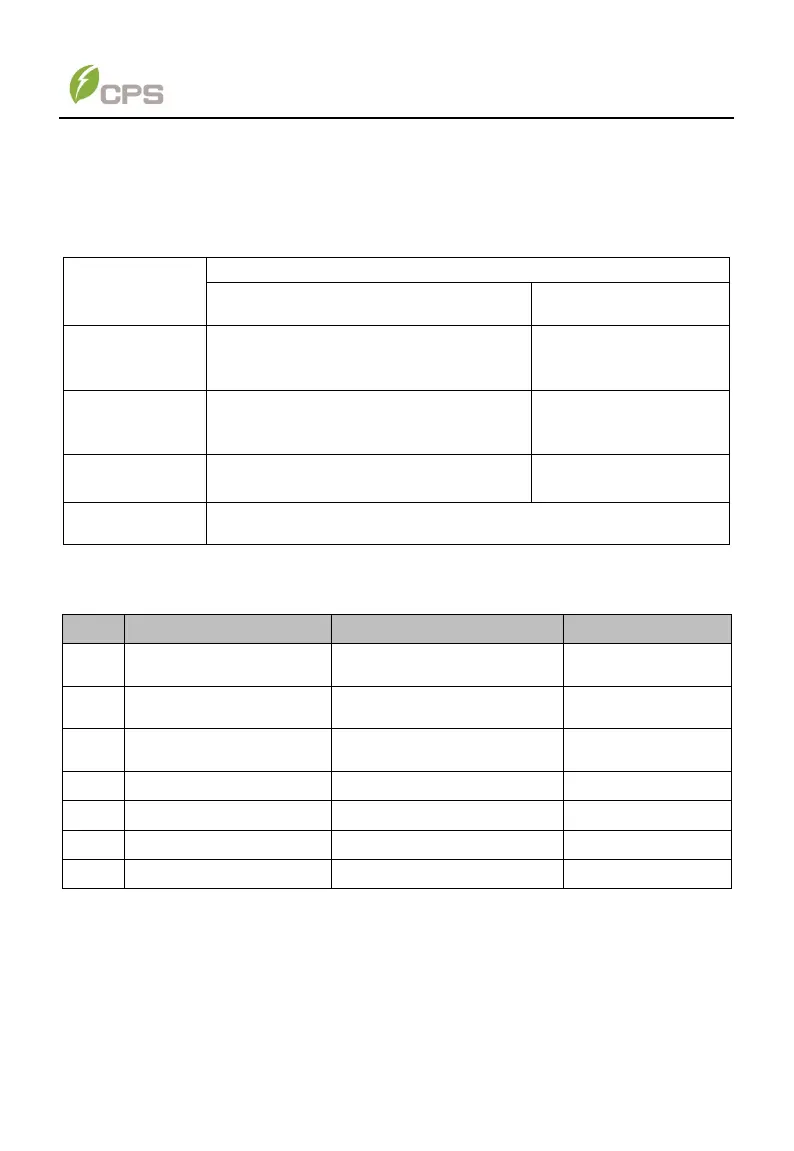
Choose the cables according to the following configuration table.
Table 4-1 Cables specifications
Position
Cable specifications
Acceptable Range
Recommended Size
DC
input/output
(/)
#4/0AWG (Copper);
O.D.: Φ19±0.4mm
#4/0AWG (Copper)
AC
input/output
(L1/L2/L3)
#3/0~4/0AWG (Copper)
O.D.: φ17±0.4mm~Φ19±0.4mm
#4/0AWG (Copper)
AC & DC GND
#10~6AWG (Copper)
#8AWG (Copper)
RS485 &CAN
communication
UTP CAT-5e or 3x#22~18AWG communication cable (e.g.
Belden 3106A)
4.2 Tools Required and Torque Values
Table 4-2 Tools Required and Torque Values
No.
Tools
Usage
Torque value
1
No.2 Phillips head
screwdriver
LINKIT
1.6 N.m, 14 in-lbs
2
No.2 Phillips head
screwdriver
Cover of communication
interface
1.2 N.m, 10.6 in-
lbs)
3
No.3 Phillips head
screwdriver
DC grounding terminal
AC grounding terminal
6-7 N.m (53-62 in-
lbs)
4
1.5mm flat screwdriver
RS485 comm. terminal
0.2 N.m, 1.8 in-lbs
5
Diagonal pliers
Cut cable
-
6
Wire stripping pliers
Remove jacket
-
7
Crimping pliers
Crimp terminal
-
4.3 Connection interface
After loosening all the six M4x12 screws located on the cover of the communication
module, you can see all the connection interface of CPS ECB200KTL/US-800, shown
as below.