Electrical Installation
24 / 135
4.4 AC and Ground connection
The following contents describes how to connect the AC and ground cables between
the PCS and the AC grid:
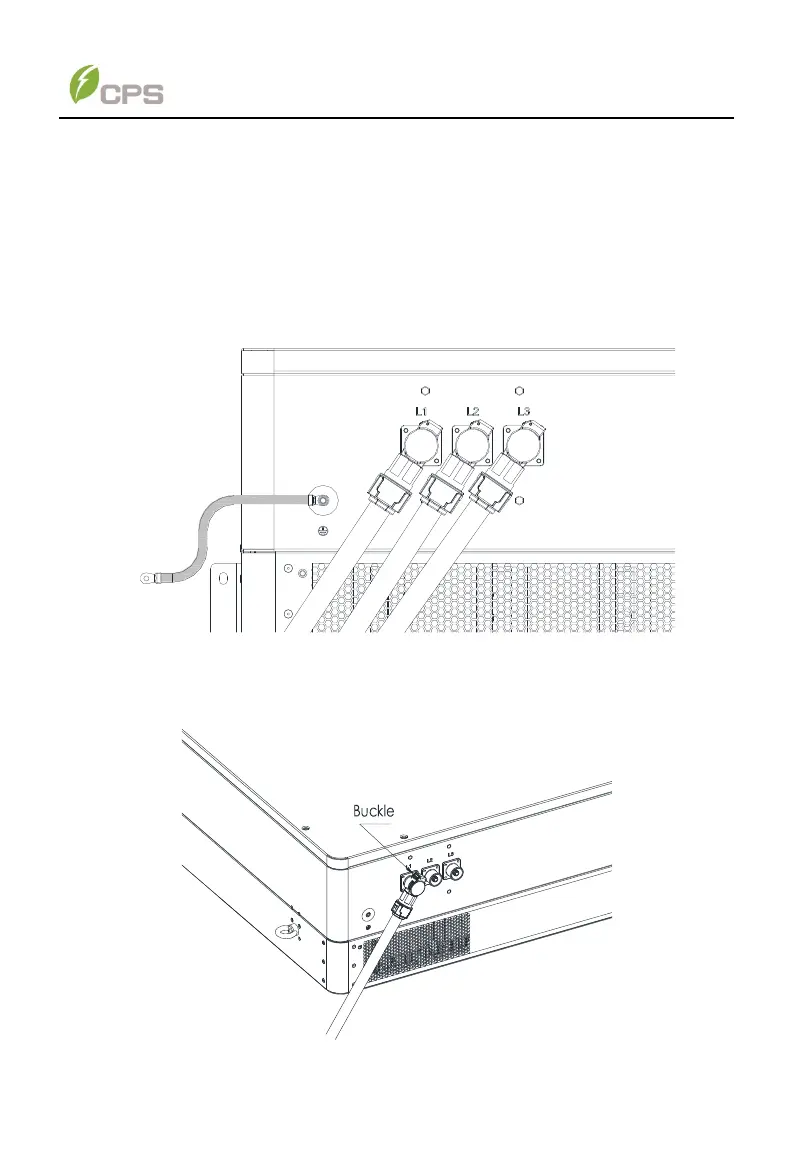
1. Connect the crimped ground cable to the grounding terminal and tighten it
with one M6X12 screw.
2. Plug the AC (L1, L2, L3) connector to the correct sockets and push all the
way to the end till you hear a click (see Figure 4-2). The connectors can be
also rotated for convenient wiring.
Figure 4-2 AC output and ground cable connection
3. If you need to unplug the connector, press down and hold the buckle of AC
connector with your thumb and unplug the AC connector off .
Figure 4-3 Buckle on the AC connector



 To Next Page