Electrical Installation
25 / 135
4.5 DC and Ground connection
To ensure the optimum performance of the PCS, please read the following guidelines
before DC connection:
1. Ensure that the maximum open circuit voltage of the Battery is lower than
1500Vdc under any conditions.
2. Do not mix different types of battery chemicals, and make sure that the
specifications of batteries are identical in a string.
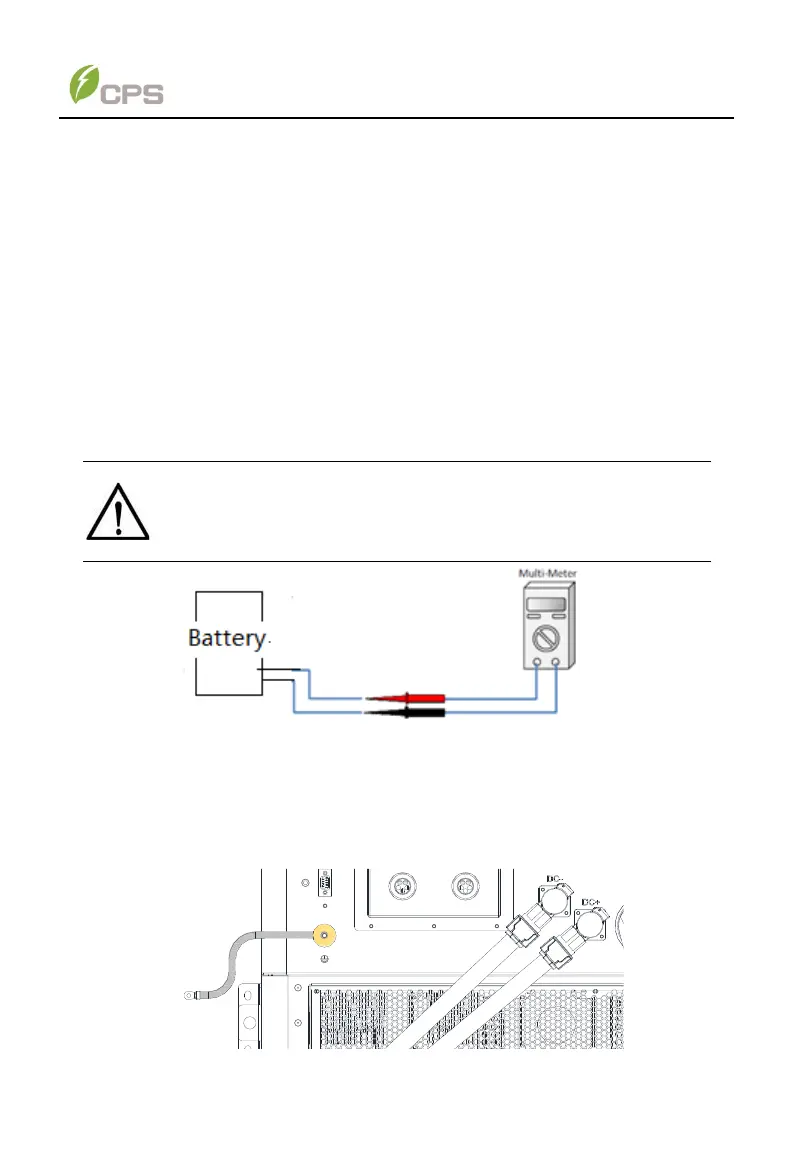
3. Check the polarity (Figure 4-4) before plugging the DC connectors with the
cables of batteries according to the following steps:
i. Use a multi-meter to measure the batteries cable ends and
check the polarity.
ii. The positive (+) terminal of cable should match the positive (+)
terminal of PCS’s DC input.
iii. The negative (-) terminal of cable should match the negative (-)
terminal of PCS’s DC input.
Figure 4-4 Polarity check
Connect the DC and ground cables according to the following steps:
1. Connect the crimped ground cable to the grounding terminal and tighten it
with one M6X12 screw.
2. Plug orange DC+ and black DC- connector to correct sockets and push
them all the way to the end till you hear a click (see Figure 4-5). The
connectors can be also rotated for convenient wiring.
Figure 4-5 Connection of DC input cables



 To Next Page