CABRIOLE’
CRAMARO TS S.r.l. – 37044 COLOGNA V.TA (VR) - VIA QUARI DESTRA, 71/G TEL. +39 0442/411688 / FAX + 39 0442/411690
E-MAIL info@cramaro.com WEBSITE: http://www.cramaro.com - Manual n° MCA016-EN-ED00 – date 15/01/15
page 38
The remote control, like the previous ones, contains a CR 2032 button BATTERY
however, it differs from the previous remote controls in the series as it has additional functions that allow you to
control the tarpaulin electrical system even before having finished fully assembling it
TEST FUNCTION
The test function is useful to verify and diagnose the operation of the control unit and the correct connection of
the wiring during installation, even with the motor still disconnected.
After having connected the battery with the control unit, carried out the new remote control learning operation
and entered the test function, you can test system operation by selecting the tarpaulin opening or closing
button (or selector); if the red indicator light, located inside the control unit cover, is on, it means that the
control unit and all the wiring is functional and correct.
For the control unit to be made active and operative, it is MANDATORY to switch off and on
by pressing the (red) mushroom-shaped emergency button.
The procedure to perform this kind of test is as follows:
1. Press the (red) mushroom-shaped emergency button to switch the device off and wait at least 1
second
2. Release the (red) mushroom-shaped emergency button to switch the device on again
3. Within 3 seconds after start-up,, press buttons A and D on the remote control simultaneously until
the control unit LED lights up for about 100 ms (wait for about 10 s).
This means that the control unit has entered the learning mode.
4. Release buttons A and D on the remote control and wait at least 1 second; within 10 seconds, in the
control unit learning mode, activate the test function.
5. Activate the test function as follows: press and hold button D on the remote control until the control
unit LED is activated (wait for about 10 s) with two consecutive pulses of about 100 ms to indicate
that the control unit has successfully performed the function and exited the learning mode
6. Select the cover opening or closing button (or selector) to verify operation.
If the red LED inside the cover is on, the control unit is running.
7. Switch the control unit off and on to make it active and operative by pressing the (red)
mushroom-shaped emergency button.
In the learning mode, the control unit can only perform one function at a time.
The test function cannot be enabled unless the remote control code is first saved.
Once you enter the learning mode, the control unit will wait 10 seconds for a function to be executed
(learning-test-deletion).
If no action is launched, once the 10 seconds elapse, the control unit LED is activated with two
consecutive pulses of about 100 ms and the control unit will automatically exit the learning mode.
When the control unit exits the learning mode, it is automatically operational.
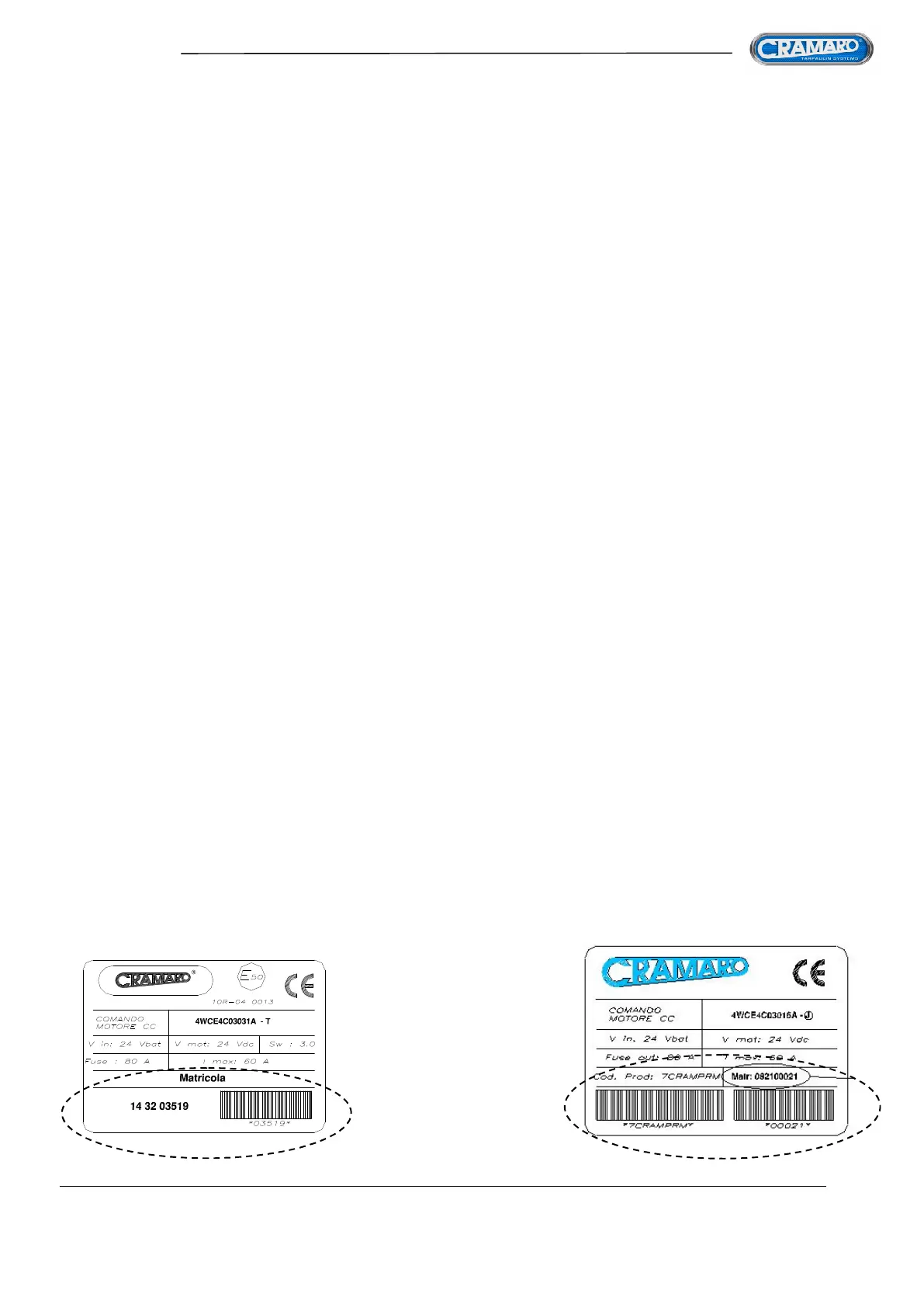
Identify the new control unit CODE 4WCE4C03031A by looking at the label inside the cover.
The serial number is written in the lower left part and only a barcode is present compared to
the previous version
NEW
LABEL
OLD
LABEL



 To Next Page