Snack - Based Troubleshooting and Repair Guide
1670065 Page 26 of 54 September, 2002
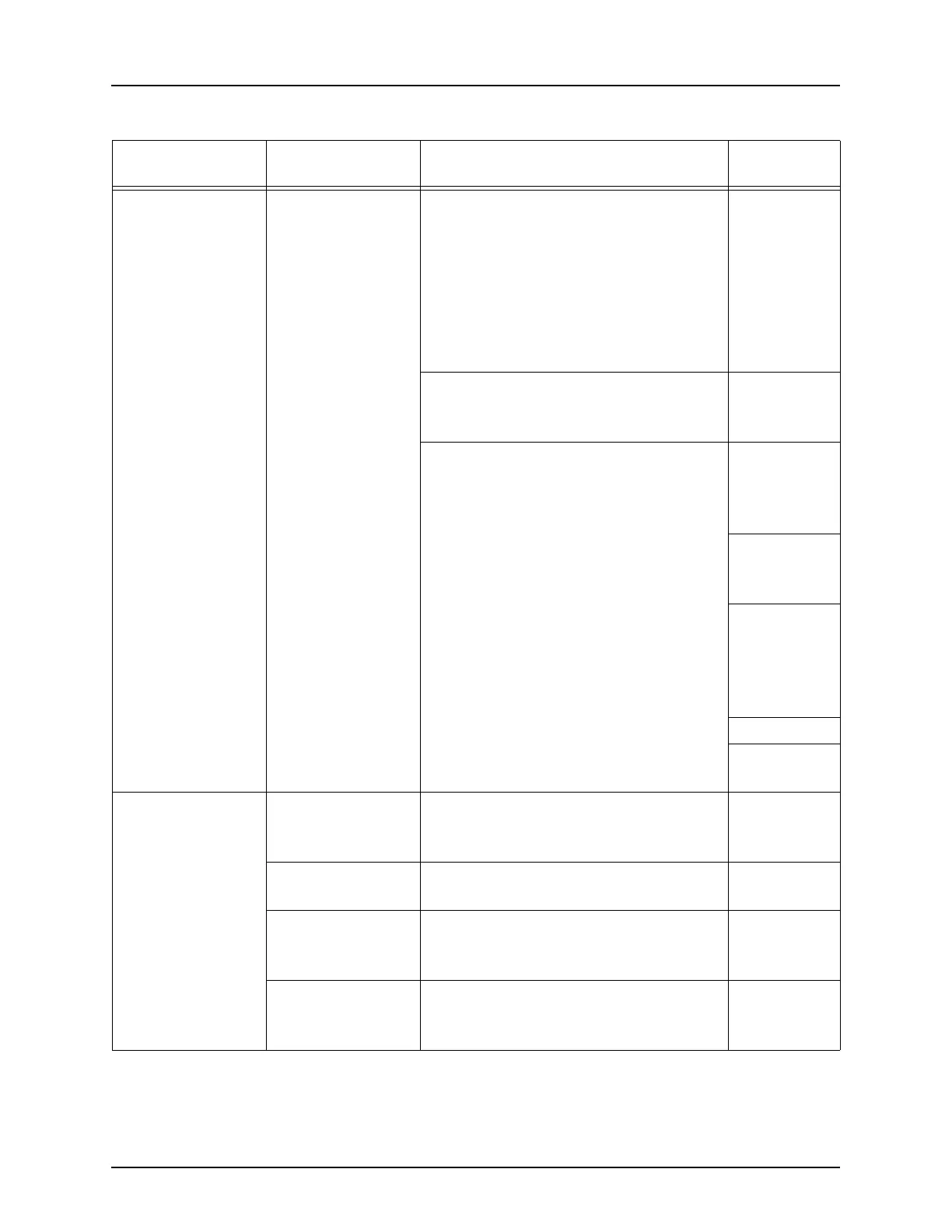
Selection keypad
does not respond
or beep.
If the display func-
tions properly...
If the display does
not function prop-
erly....
1. Unplug one keypad to see if the
other keypad is functioning prop-
erly. Then vice-versa to find if one
keypad is not functioning.
2. Check the connections on the
display PCB.
Selection
Keypad on
page 43.
and
Maintenance
Keypad on
page 52
a. If display PCB connections are
good, replace the selection pad.
3. Verify proper operation of the
LEDs on the controller PCB.
Setup and
Operator’s
Guide
4. Check connectors and harnesses
between the power panel and con-
troller PCB. Replace suspect com-
ponents:
a. Power panel.
Power Panel
Assembly
page 37
b. Controller PCB.
Controller
Board on
page 39
c. Harnesses.
d. Display PCB.
Display PCB
on page 41
Keypad is working
erratically.
Unplug one key-
pad
1. Unplug first keypad, if good then
disconnect and check the second
keypad.
Keypad is affected
by a bad display.
2. Replace the display.
Display PCB
on page 41.
Bad selection key-
pad.
3. Replace the selection keypad.
Selection
Keypad on
page 43.
Bad service key-
pad.
1. Replace the maintenance keypad.
Maintenance
Keypad on
page 52
Table 1. Possible Failures (Symptoms) - Continued
SYMPTOM
POSSIBLE
FAILURE(S)
DO THIS: REFER TO:







 To Next Page