Snack - Based Troubleshooting and Repair Guide
September, 2002 Page 51 of 54 1670065
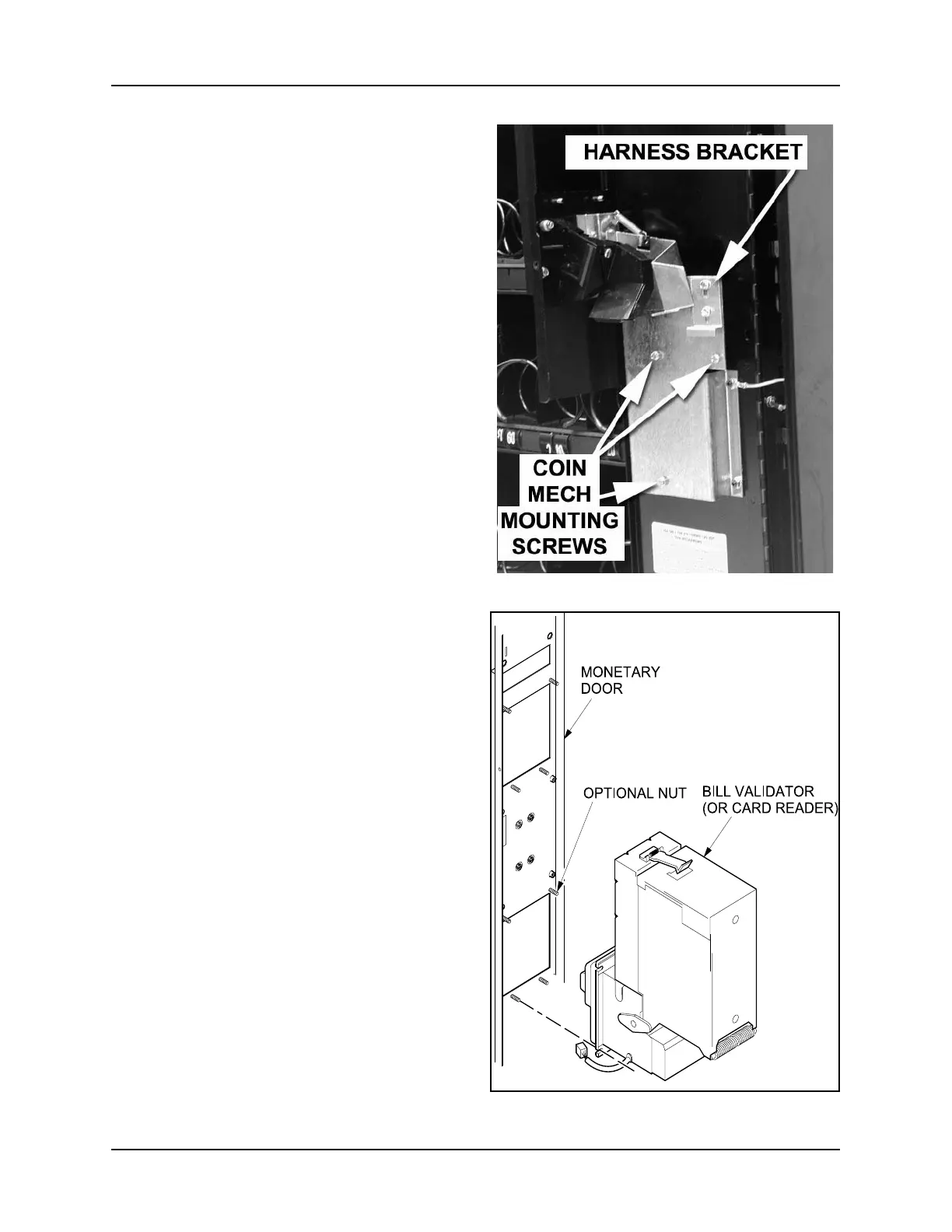
3. Feed the harness through the harness
bracket (figure 29). Push down on the
harness bracket to capture the harness
against the top of the coin mechanism.
4. Tighten the 2 hex-head slotted screws.
5. Connect the coin mechanism wiring
harness.
6. Replace the flight deck.
A. Bill Validator
Removal
1. Disconnect the bill validator wiring
harnesses from the machine.
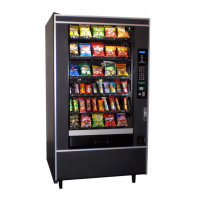
2. Remove the 3 nuts (Optional 4th nut
See Note) as shown (See figure 30).
Save the nuts for later use.
NOTE:
It may be easier to access
the nuts if you remove the
stacker section.
3. Remove the bill validator.
Replacement
1. Position the bill validator in place.
2. Secure with the 3 nuts (Removal of 4th
nut is Optional See Note) you removed
previously.
3. Connect the bill validator wiring har-
nesses to the machine.
Figure 29
Figure 30
167ts000
NOTE:
For ease of installation and or
removal, the 4th nut is optional
(See figure 30)







 To Next Page