Snack - Based Troubleshooting and Repair Guide
September, 2002 Page 45 of 54 1670065
A. Tray Rails
Removal
1. Remove the tray. See the procedure in
the Setup Guide.
2. If you are removing the right hand tray
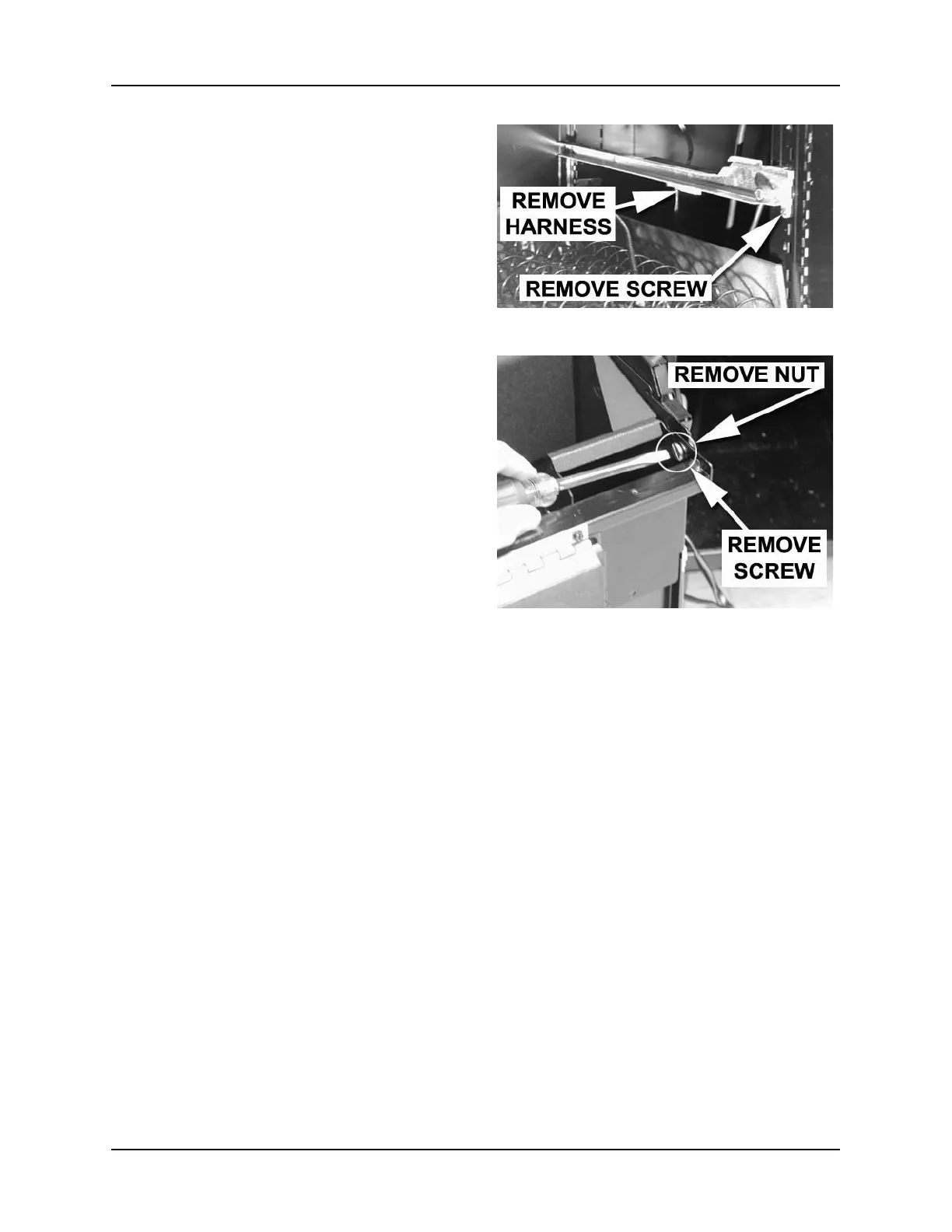
rail, disconnect the tray harness from
the rail PCB connector (figure 19).
3. Each tray rail is held in place by one
thread-forming screw near the front of
the machine.
4. Remove the screw from the rail you are
removing (figure 20). Save the screw
for later use.
5. Lift up on the front of the tray rail and
twist it to release the rear portion.
Replacement
1. Hook the rear portion of the rail into
the rear bracket.
2. Hook the front of the rail into the corre-
sponding slot on the front bracket.
3. Secure with the screw you removed
earlier.
4. If you are replacing the right hand rail,
re-connect the tray harness to the rail
PCB.
5. Replace the tray. See the procedure in
the Setup Guide.
B. Gum and Mint Unit
Removal
1. While supporting the gum and mint
unit, remove one nut and one shoulder
screw from each side of the delivery
pan (figure 21). Save these for future
use.
2. Remove the gum and mint unit.
Replacement
1. Lift the gum and mint unit into place.
2. Secure with one shoulder screw and
one nut on each end, removed earlier.
Figure 19
Figure 20







 To Next Page