Snack - Based Troubleshooting and Repair Guide
1670065 Page 52 of 54 September, 2002
A. Maintenance Keypad
Removal
1. Remove the cover from the display
PCB. (see “Display PCB” on page 41)
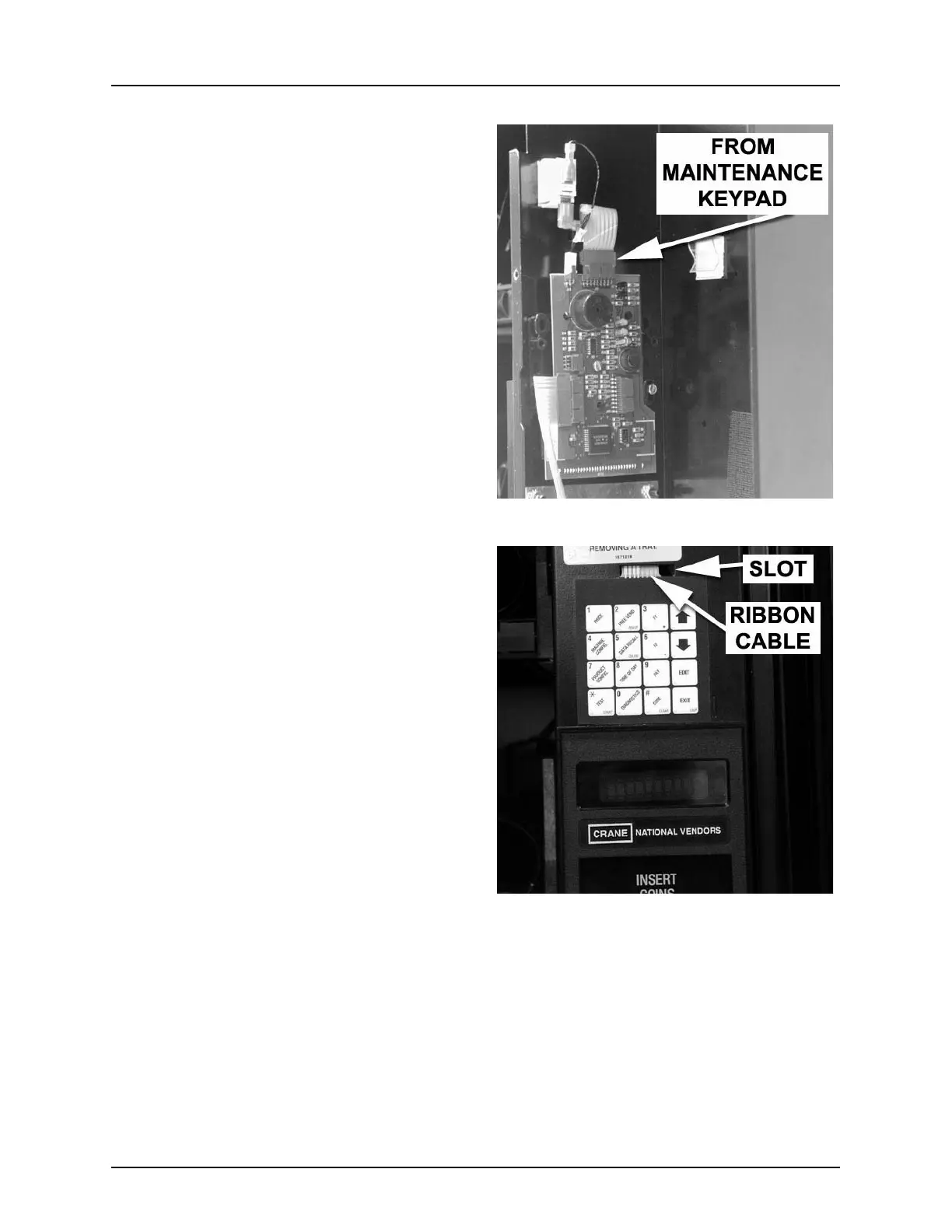
2. Disconnect the ribbon cable from the
maintenance keypad to the display
PCB (figure 31).
3. Using a small putty knife or other flat-
bladed tool, carefully pry the mainte-
nance keypad off the monetary door
(figure 32).
4. Feed the ribbon cable out through the
slot in the monetary door (figure 32).
Replacement
1. Feed the new maintenance keypad’s
ribbon cable through the slot in the
monetary door (figure 32).
2. Apply the new maintenance keypad to
the monetary door with the included
self-stick tape.
3. Connect the ribbon cable to the display
PCB (figure 31).
4. Install the cover over the display PCB.
(see “Display PCB” on page 41)
Figure 31
Figure 32







 To Next Page