Snack - Based Troubleshooting and Repair Guide
1670065 Page 30 of 54 September, 2002
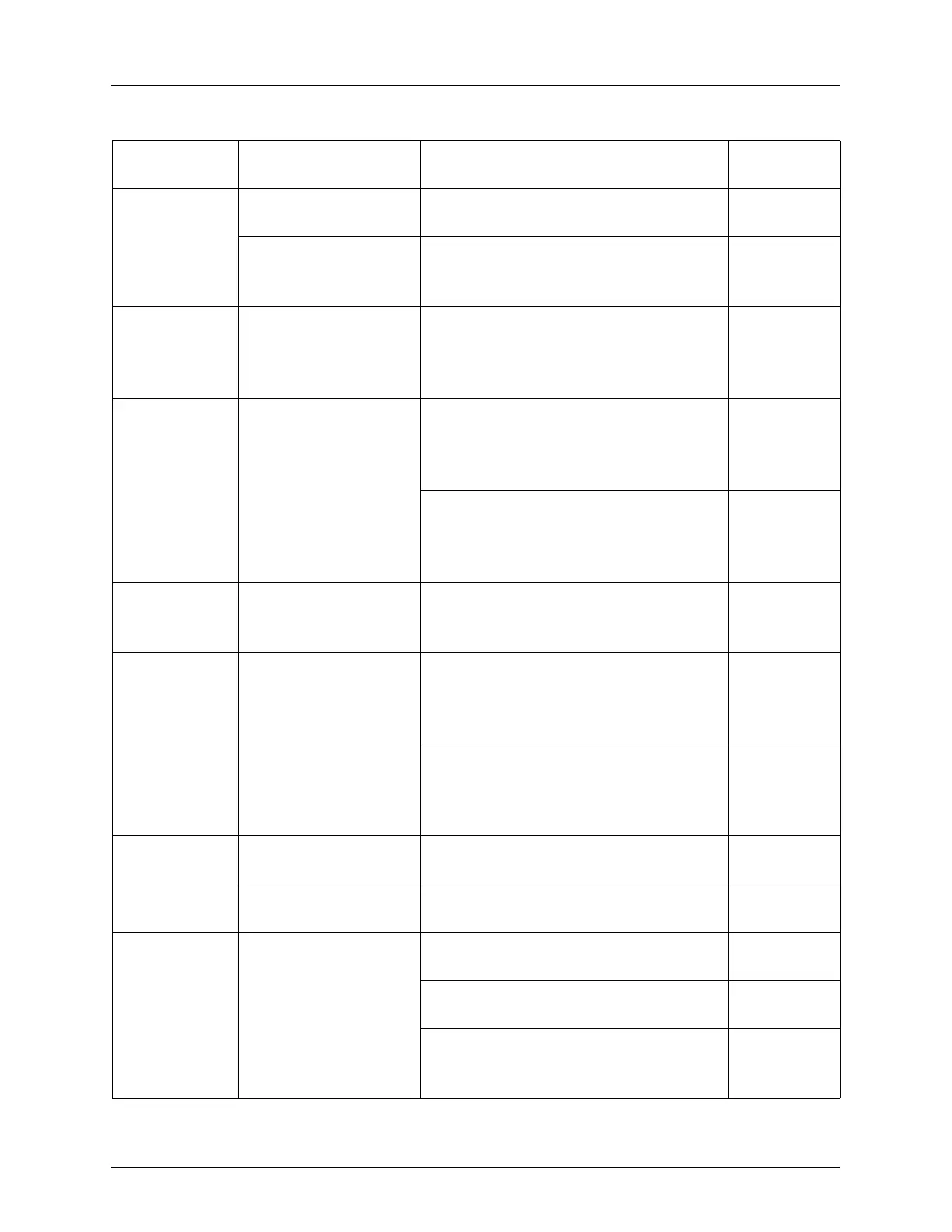
DBV.COMM
Incomplete bill valida-
tor communications.
1. Check harness(es).
Bad bill validator. 2. Replace bill validator.
Bill
Validator on
page 51
DBV.JAM
A bill is jammed in the
acceptance path.
1. Remove bill stuck in the accep-
tance path.
2. Cycle machine power OFF and
then ON.
DBV.MOTOR
One of the validator
motors has failed.
1. Check for bill stuck in the accep-
tance path.
a. Remove bill, then cycle machine
power OFF then ON.
2. If no bill is present, replace the val-
idator.
a. Cycle machine power OFF and
then ON.
Bill
Validator on
page 51
DBV.ROM
ROM checksum fail-
ure.
1. Replace the validator.
Bill
Validator on
page 51
DBV.SENSOR
One of the sensors in
the bill validator has
failed.
1. Check for bill stuck in the accep-
tance path.
a. Remove bill, then cycle machine
power OFF then ON.
1. If no bill is present, replace the val-
idator.
a. Cycle machine power OFF and
then ON.
Bill
Validator on
page 51
DBV.STACKR
The stacker is open or
removed.
1. Install the stacker correctly.
The stacker is full of
bills.
1. Remove bills from the stacker.
ERR A B C
(etc.)
Error exists on tray A,
B, C, etc.
Motor may be
jammed, not home, or
a couple error exists.
1. Swap tray with a known working
tray.
Tray Rails
on page 45
a. If problem is cleared, check tray
motors, harnesses, etc.
b. If problem persists, check tray
block, machine harness or inter-
face PCB.
Tray Rails
on page 45
Table 2. Possible Failures (Diagnostic Messages) - Continued
DIAGNOSTIC
MESSAGE
FAILURE DO THIS: REFER TO:







 To Next Page