LED Description
Link/Activity (Steady)
(Flashing) Network activity
Left Side - Baud rate/network speed:
(Yellow) 1000Mb
(Green) 100Mb
(Off) 10Mb
SAS Port LEDs
Lane ON - Ready, no traffic
FLASHING - Active, I/O traffic
ALL FLASHING - Fault condition or rebooting
OFF - Not ready, no power
. . . .
ID LED Identification
Fault LED Module fault condition
OK LED Module is operating normally.
Diagnostic LEDs Display hexidecimal power-on self test (POST) codes during the boot process.
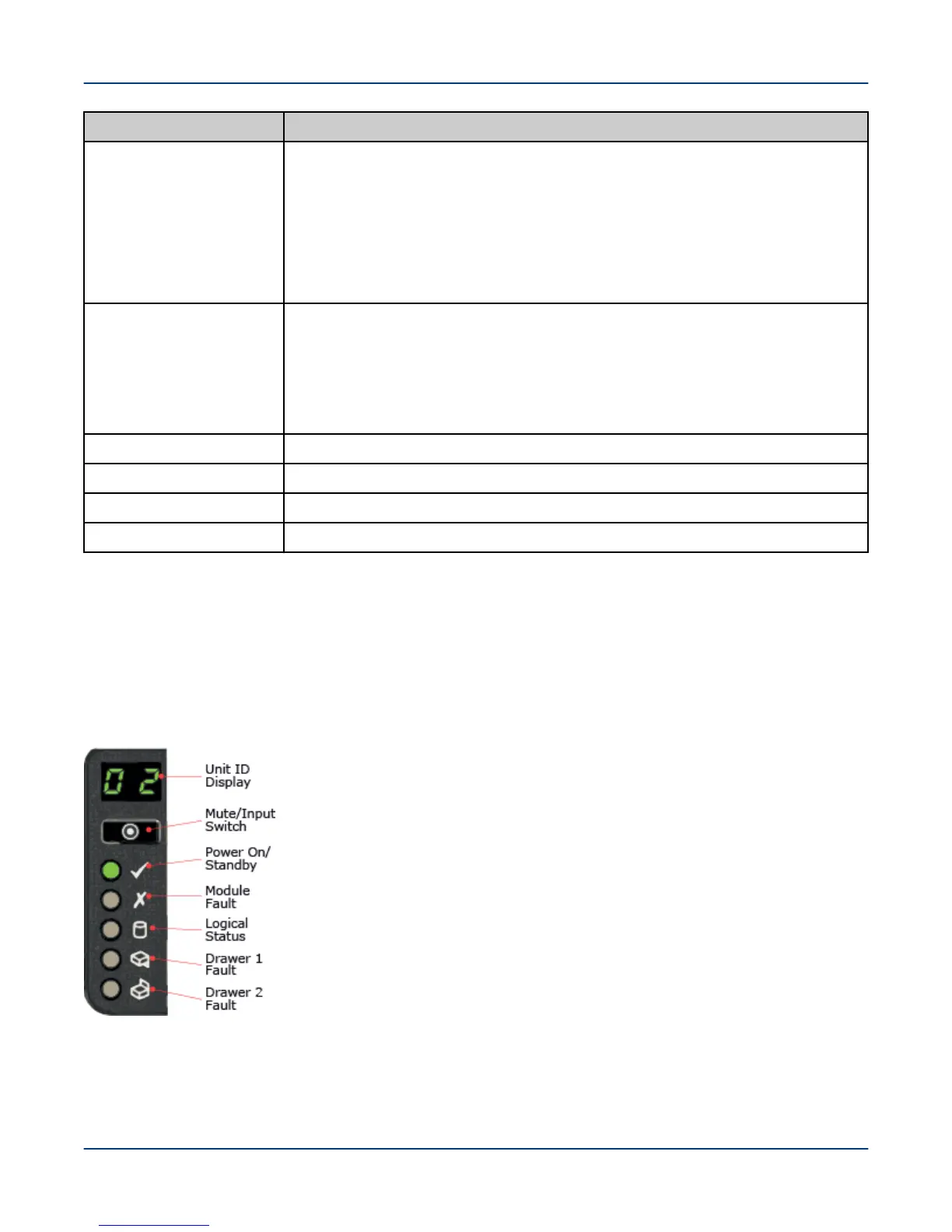
16.4.2 Operator Control Panel - 5U84
The front of the ClusterStor L300 and L300N 5U84 enclosure incorporates an operator’s control panel (OPS) with
five LEDs and the Unit ID LCD display. The OPS panel provides a consolidated view of the operational status of
the enclosure components and the enclosure's assigned ID, plus an alarm mute button.
Figure 81. Operators Panel 5U84
Unit Identification Display (Unit ID Display)
Dual seven-segment display that provides feedback to the user. Used primarily to display an
enclosure unit identification number to assist in setting up and maintaining multiple
enclosure systems. The unit identification display is configured via a VPD option. By default
Reference
121



 To Next Page