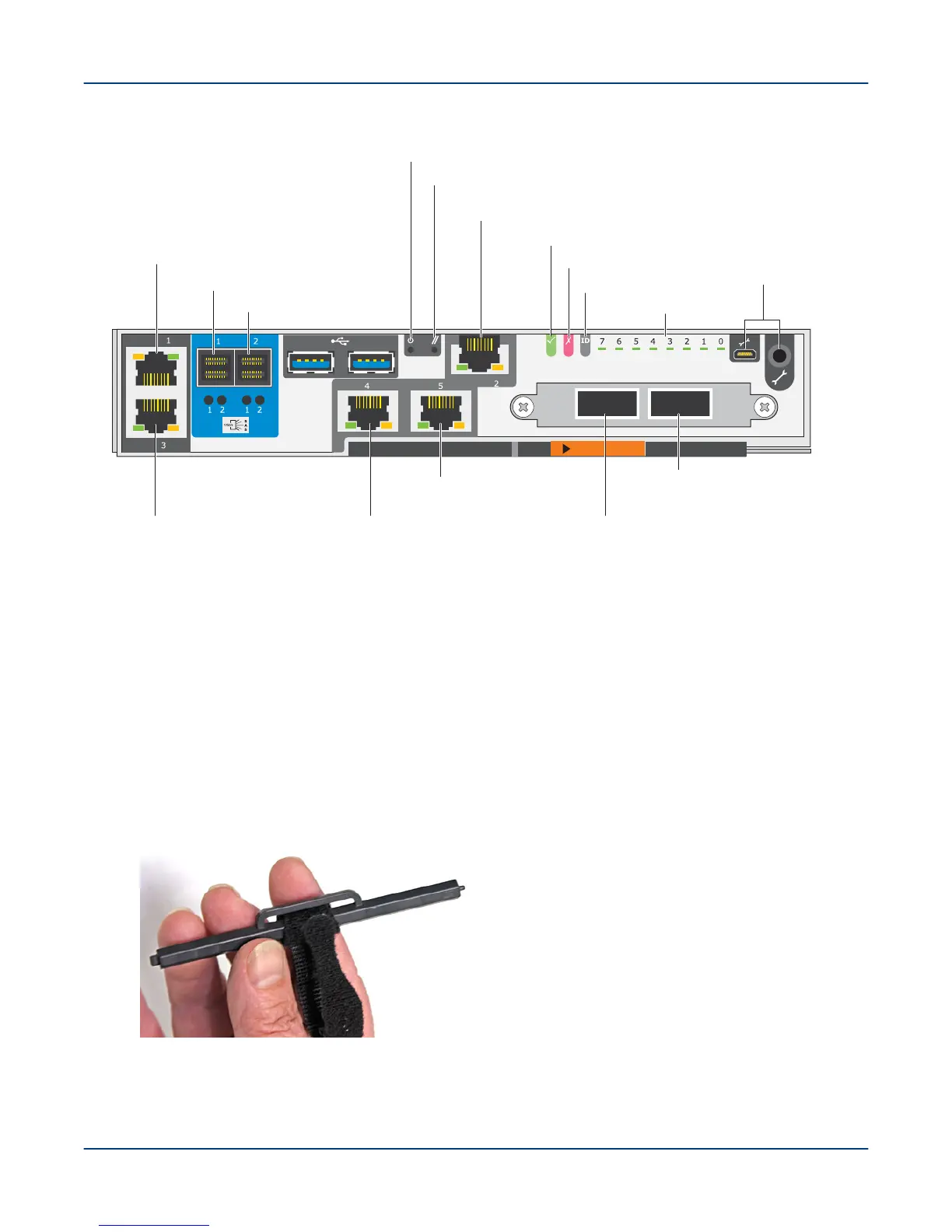
Figure 48. EAC for SMU Nodes
Ethernet NIC 3
eth2 (not used)
SAS port 1
SAS port 2
Reset
Power
OK LED
Ethernet NIC 2
mgmt0 (secondary management network)
Fault LED
Diagnostic LEDs
Local data network (LDN)
port I
Local data network (LDN)
port II
Maint ports
ID LED
Ethernet NIC 4
pub1 (external admin network)
Ethernet NIC 5
pub0 (external admin network)
Ethernet NIC 1
mgmt1 (primary management network)
6. Open a terminal session (with a serial port configured for 115.2 Kbps, 8 data bits, no parity, 1 stop bit, and no
flow control).
7. If the system includes an AMMU, enable power to the AMMU by powering on the 1U servers and their EACs;
then power on the 2U24 EBOD enclosure.
8. Enable power to the 2U24 SMU and the MMU controllers (nodes 1 and 0) that host the MGMT and MGS/
MDS nodes.
a. At the back of the rack, push the recessed power button on each controller to place both PCM power
switches in the ON position.
IMPORTANT: Be sure to use the provided reset tool, to avoid damaging the recessed switch.
Figure 49. The OSS Controller Reset Tool
Power On the ClusterStor L300 and L300N System
58



 To Next Page