
 Need help?
Do you have a question about the CTC Union FRM220 and is the answer not in the manual?
Provides an overview of the FRM220 hardware installation and capabilities.
Details the FRM220 chassis as a 2U high 19" Rack, 20 slot modular media converter center.
Describes the front panel of the FRM220, highlighting line card slots and NMC placement.
Details the rear panel components including cooling fans, power modules, and interface connectors.
Presents the physical dimensions of the FRM220 chassis for installation planning.
Lists environmental, power, compliance, reliability, and physical specifications of the chassis.
Explains the Network Management Controller (NMC) card for system management via console or Ethernet.
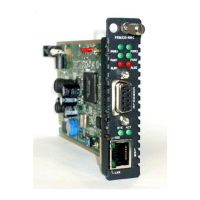
Introduces various FRM220 line card types, including fiber media converters and transponders.
Outlines the chapter's scope covering physical, electrical, and interface installation of the FRM220.
Lists necessary tools like screwdrivers, wrist straps, and antistatic mats for safe installation.
Specifies requirements for the installation location, including AC power and clearance.
Covers rack mounting, fan units, and line card installation within the chassis.
Details AC and DC power connections, grounding, and power module installation.
Describes how to connect alarm relay contacts for power and fan failure monitoring.
Explains how to connect multiple FRM220 chassis for management via a single IP address.
Provides instructions for hot-swapping AC and DC power supply modules in the FRM220.
Details the installation of line cards and the Network Management Controller (NMC) card.
Provides a brief introduction to FRM220 management interfaces and methodologies.
Outlines various management approaches including console, Telnet, Web GUI, and SNMP.
Guides through connecting and configuring a console terminal for initial FRM220 setup.
Explains how to access FRM220 management remotely via Telnet and Web GUI.
Describes the CTC Union's proprietary Element Management System for managing multiple devices.
 General
| Brand | CTC Union |
|---|---|
| Model | FRM220 |
| Category | Media Converter |
| Language | English |











 To Next Page
