Infotainment System
OR:
●
Compare the PIN code shown on the dis-
pla
y of the Inf
otainment system with the one
shown on the mobile phone. If they match,
confirm on both devices.
Now, the infotainment system and the mo-
bile phone will be connected to each other.
When the pairing has been finalized correct-
ly, the Telephone main menu will appear.
The phone book, call list and SMS messages
stored in the mobile phone will be loaded
once the requests have been accepted in
the mobile phone. After downloading, the
data will be available on the Infotainment
system.
Pairing and connection of mobile tele-
phones
You can pair up to 20 mobile telephones to
the Infotainment system, but the number of
simultaneous connections varies:
●
Media System Plus / Navi System: two mo-
bile phones simultaneously connected to
the hands-free profile, and one of them as
Bluetooth
®
audio.
●
Navi System Plus: two mobile phones si-
multaneously connected to the hands-free
profile and one of them or a third one con-
nected to the Bluetooth
®
audio.
When the Infotainment system is switched
on, it connects to the last connected mobile
telephone. If it is not possible to connect to
this mobile telephone, the system will try to
connect to the next mobile telephone on
the list of paired devices.
The maximum range of the connection is
approx. 10 metres. The connection will be
interrupted if this distance is exceeded. The
connection is automatically re-established
as soon as the device is once again within
Bluetooth
®
range.
If the maximum number of paired devices is
reached and you want to pair another one,
the system will automatically replace the
least recent one with it. If it is to replace an-
other one, the user must delete that one
first. Do do this:
●
Press the SETTINGS function button in the
telephone context.
●
Press the function button Bluetooth
settings > Paired devices.
●
In the list of linked devices, press the func-
tion button after the mobile phone to be
deleted, and then press Delete to confirm
the process.
WARNING
Do not perform the pairing and connection
process while driving. This may cause an
accident!
Note
Check that there are no requests pending
acceptance in your mobile phone. If there
are, this could block some of the functions
in the Telephone menu.
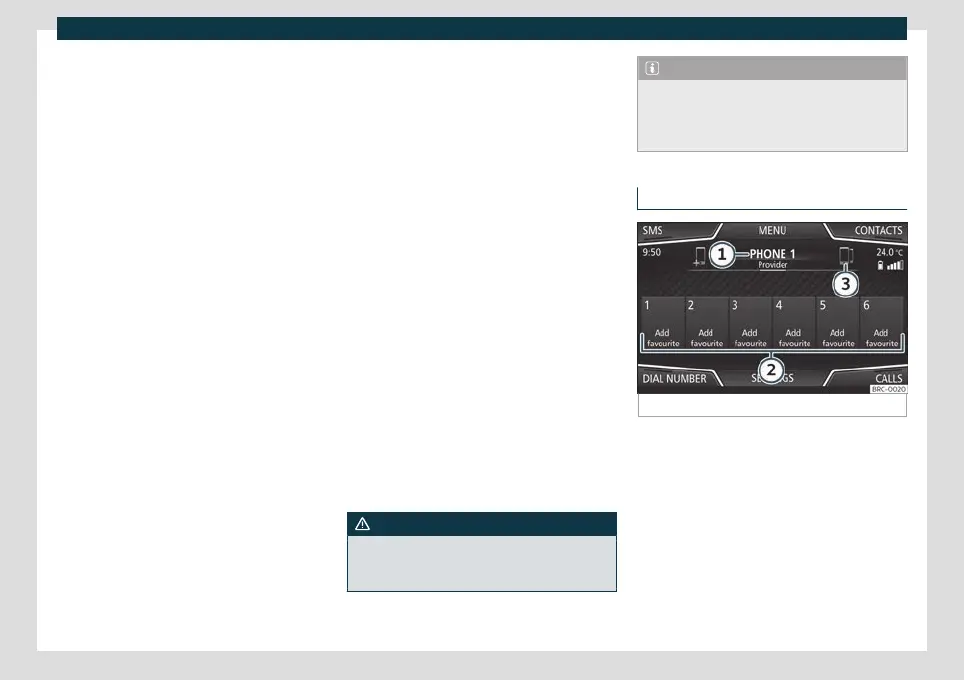
Telephone main menu
Fig. 185
Phone main menu.
Assign a user profile
The phonebook, the call lists and the speed
dial butt
ons ar
e assigned to a user profile and
remain stored on the telephone manage-
ment system. This information will be availa-
ble every time the mobile telephone is con-
nected.
After the first connection, it will take a few
minutes for the data from the linked mobile
phone to be available in the system. The next
216



 To Next Page