Operating modes
time that the mobile telephone is connected
the phonebook is updat
ed aut
omatically.
If the mobile phonebook has been modified
while connected, a manual update of the
phonebook data can be started from the
User profile settings menu.
Telephone management can store a maxi-
mum of 4 profiles for mobile phones. If you
wish to pair another mobile phone, the old-
est user profile will be replaced.
Telephone management system function
buttons
●
Press the infotainment button to open
the Phone main menu.
Function button: function
1
Name of connected mobile tele-
phone. Press the icon to the left to
connect another mobile phone.
2
Speed-dial buttons, connected tele-
phone contacts favourites.
3
To change to another telephone
connected to the hands-free profile.
Only visible when there are two tele-
phones connected as hands-free.
DIAL NO.
Open the numeric keypad
›››
page 218.
CONTACTS
To open the phonebook of the con-
nected telephone.
Function button: function
Text mes-
sage
To open the SMS menu.
CALLS
To open call lists of the connected
mobile telephone
›››
page 221.
SETTINGS To open the Phone settings menu.
Instructions and symbols of the phone
management system
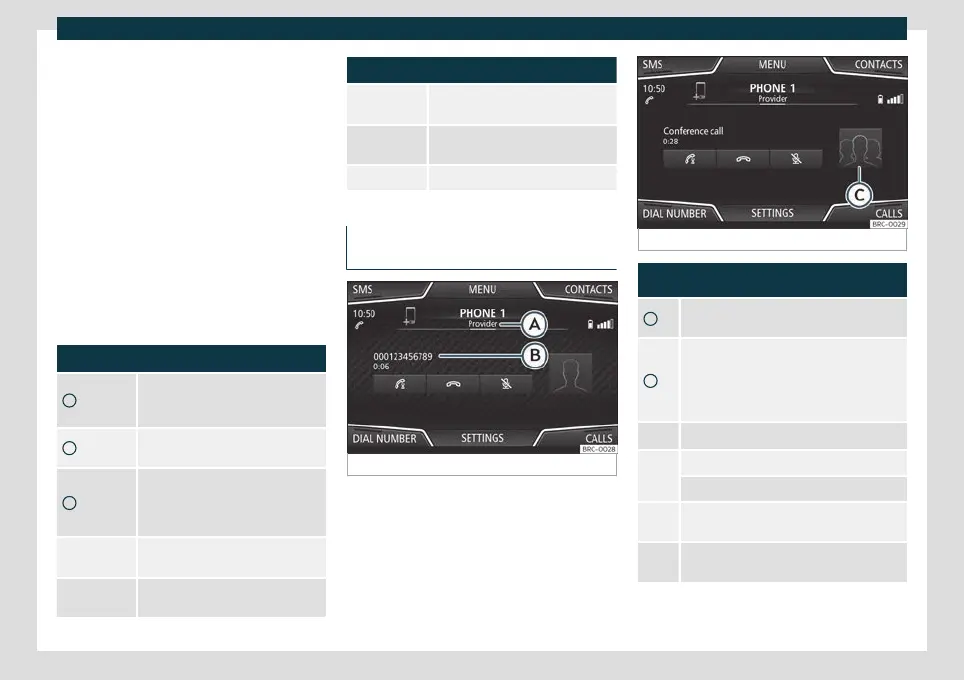
Fig. 186
Active call.
Fig. 187 Conference call.
Display: Meaning
›››
Fig. 186
A
Name of the mobile operator of the connec-
ted device.
B
Stored telephone number or name. If the
name stored in the phonebook has an as-
signed photo, it can be displayed: select Tel-
ephone > Settings > User profile >
Show pictures for contacts*.
To accept a call.
To end a call.
OR: To reject an incoming call.
To mute or to reactivate the ring tone during
an incoming call.
To mute the microphone during an active call
and to reactivate it.
»
217



 To Next Page