Help with parking and manoeuvring
If driving style is not adapted to the circum-
stances, an accident and serious injury or
damag
e may be caused.
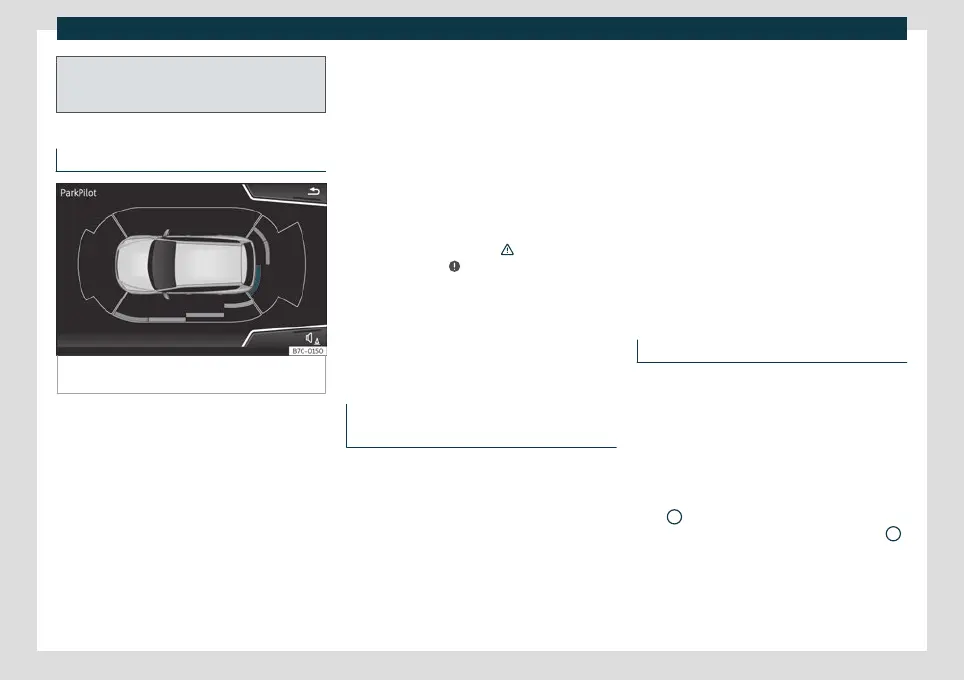
Visual indication segments
Fig. 241
Parking Aid display on the Easy Connect
system screen.
The optical indication of the segments works
as f
ollo
ws:
White segments: the obstacle is more
than approx. 30 cm away from the path
or in the direction opposite to travel.
They are also displayed when the elec-
tronic parking brake is activated.
Yellow segments: the obstacles lie on
the vehicle’s path and are at a distance
of less than approx. 30 cm away.
Red segments: obstacles are less than
approx. 30 cm away.
–
–
–
In addition, yellow lines indicate the vehicle's
expected path based on turns of the steer-
ing wheel.
If an obstacle is located in the vehicle’s way,
the corresponding audible warning will
sound.
When the penultimate segment is displayed,
the vehicle has reached the collision zone. In
the collision zone, the obstacles are repre-
sented in red, including those out of the
path. Stop the vehicle!
›››
in Introduction
on pag
e 290
,
›››
in Introduction on
pag
e 290
!
In the event the car is equipped with the Top
View Camera system, Park Assist visual guid-
ance will appear in accordance with the view
selected in the Top View Camera system.
Setting the indications and audio sig-
nals
The indications and audio signal settings are
in Eas
y C
onnect*
›››
page 80.
Automatic activation
on – off.
Front volume*
Volume in the front and rear area.
Front sound settings/sharpness*
Sound tone in the front area.
Rear volume*
Volume in the rear area.
Rear sound settings/sharpness*
Sound tone in the rear area.
Adjust volume
When the parking aid is switched on, the vol-
ume of the audio source will be reduced, de-
pending on the selected option.
Error messages
If a an error or fault message appears on the
instrument panel in P
arking assist, ther
e is a
fault.
If the fault doesn't disappear before discon-
necting the ignition, it will not be indicated
next time the parking aid is connected.
If a rear sensor is faulty, only the obstacles in
area
A
are displayed
›
›
›
Fig. 238. If a front
sensor is faulty, only the obstacles in area
B
are displayed. Symbol is displa
y
ed.
We recommend taking the vehicle to a spe-
cialised workshop to have the fault repaired.
293



 To Next Page