Driving
Parking and manoeuvring with re-
verse assist
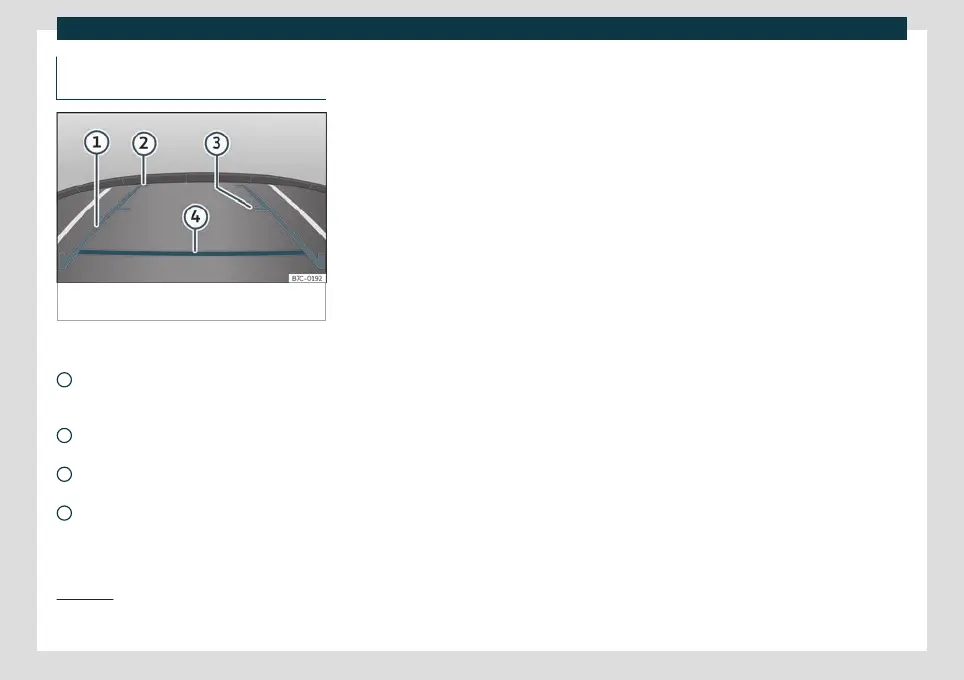
Fig. 248
Display on the Easy Connect system
screen: guide lines.
Meaning of the orientation lines
›
›
›
Fig. 248
Lateral lines: extension of the vehicle
(approximately in its total width) on the
road.
End of the side lines: approx. 2 m be-
hind the vehicle on the road.
Intermediate line: approx. 1 m behind
the vehicle on the road.
Horizontal red line: a safe distance of
approx. 40 cm at the rear of the vehicle
on the road.
1
2
3
4
Switching the system on and off
●
Reverse assist is connected by a contact
when eng
aging r
everse gear.
●
The system switches off 8 seconds after
disengaging reverse gear and immediately
after removing the contact.
●
The camera will stop transmitting images
above the speed of 15 km/h (9 mph) with re-
verse engaged.
In combination with the parking aid plus sys-
tem
›››
page 291, the camera image will no
longer be displayed when reverse gear is dis-
engaged, and the system will display the op-
tical information provided by the parking aid
system.
It is also possible to hide the reverse assist
image:
●
By pressing one of the Infotainment system
buttons on the display.
●
OR: by clicking on the miniature vehicle
shown on the screen.
If you wish to display the rear assist image
again:
●
Disengage and re-engage reverse gear.
●
OR: Press the RVC function button
1)
Parking manoeuvre
●
Stop the vehicle in front of a space and se-
lect reverse gear.
●
Reverse slowly, and turn the steering wheel
so that the side lines lead towards the park-
ing space.
●
Guide the vehicle into the parking space so
that the side lines run parallel to it.
1)
The RVC button will only be displayed when
re
verse gear is engaged.
302



 To Next Page