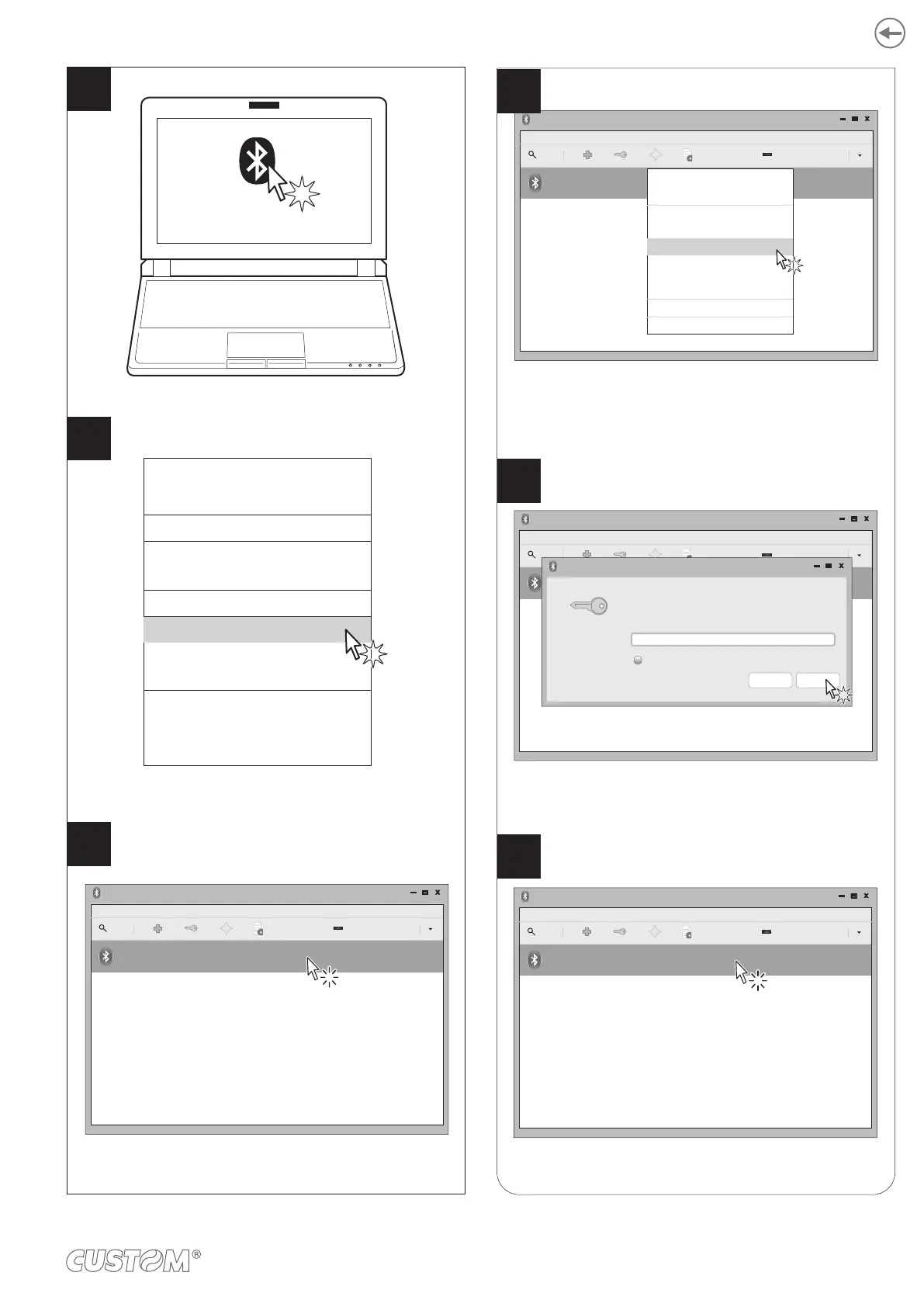
In the dropdown menu click
“Devices”.
Locate your printer (<device_BT ADDRESS>)
and select it with a click.
Make sure that the “Wireless” parameter on the printer
is set to “Bluetooth” and that the “AutoReconnect”
parameter is set to “Disabled” (see paragraph 6.4).
On the PC status bar click the
Bluetooth icon.
Turn Bluetooth off
Make Discoverable
Setup New Device...
Send Files to Device...
Browse Files on Device...
Recent Connections...
Devices...
Adapter...
Local Services...
Plugins
Help
Exit
Adapter
Bluetooth Devices
Device View help
Search
Setup...
<device_BT ADDRESS>
Unknown
<xx:xx:xx:xx:xx:xx>
4
6
5
Check that your device appears in the list
of paired devices.
If parameter “Pairing” on the printer is set to
“Enabled” (see paragraph 6.4), enter the code (1234)
and click “OK” to confirm.
In the dropdown menu, click the “Pair” key.
If parameter “Pairing” of the printer is set to
“Disabled” (see paragraph 6.4) skip to step 9.
“Pairing” = Enabled
“Pairing” = Disabled
Adapter
Bluetooth Devices
Device View help
Search
Setup...
<device_BT ADDRESS>
Unknown
<xx:xx:xx:xx:xx:xx>
Paring request
Pairing request for device:
<device_BT ADDRESS> (xx:xx:xx:xx:xx:xx)
Enter PIN code for authentication:
1234
Show input
OKStop
Adapter
Bluetooth Devices
Device View help
Search
Setup...
<device_BT ADDRESS>
Helmet
<xx:xx:xx:xx:xx:xx>
Adapter
Bluetooth Devices
Device View help
Search
Setup...
<device_BT ADDRESS>
Unknown
<xx:xx:xx:xx:xx:xx>
Connect To:
Serial Port
ISend a File...
Browse Device...
Pair
Trust
Setup...
Rename device...
Remove...
Disconnect
7
8
9
In the dropdown menu, click the “Pair” key.
If the parameter “Pairing” of the printer is set to
“Disabled” (see paragraph 6.6) skip to step 9.
If the parameter “Pairing” of the printer is set to
“Enabled” (see paragraph 6.6), enter the code (1234)
45












 To Next Page