DGS-3100 Series Gigabit Stackable Managed Switch User Manual
11
6
Mapping Priority to Classes (Queues)
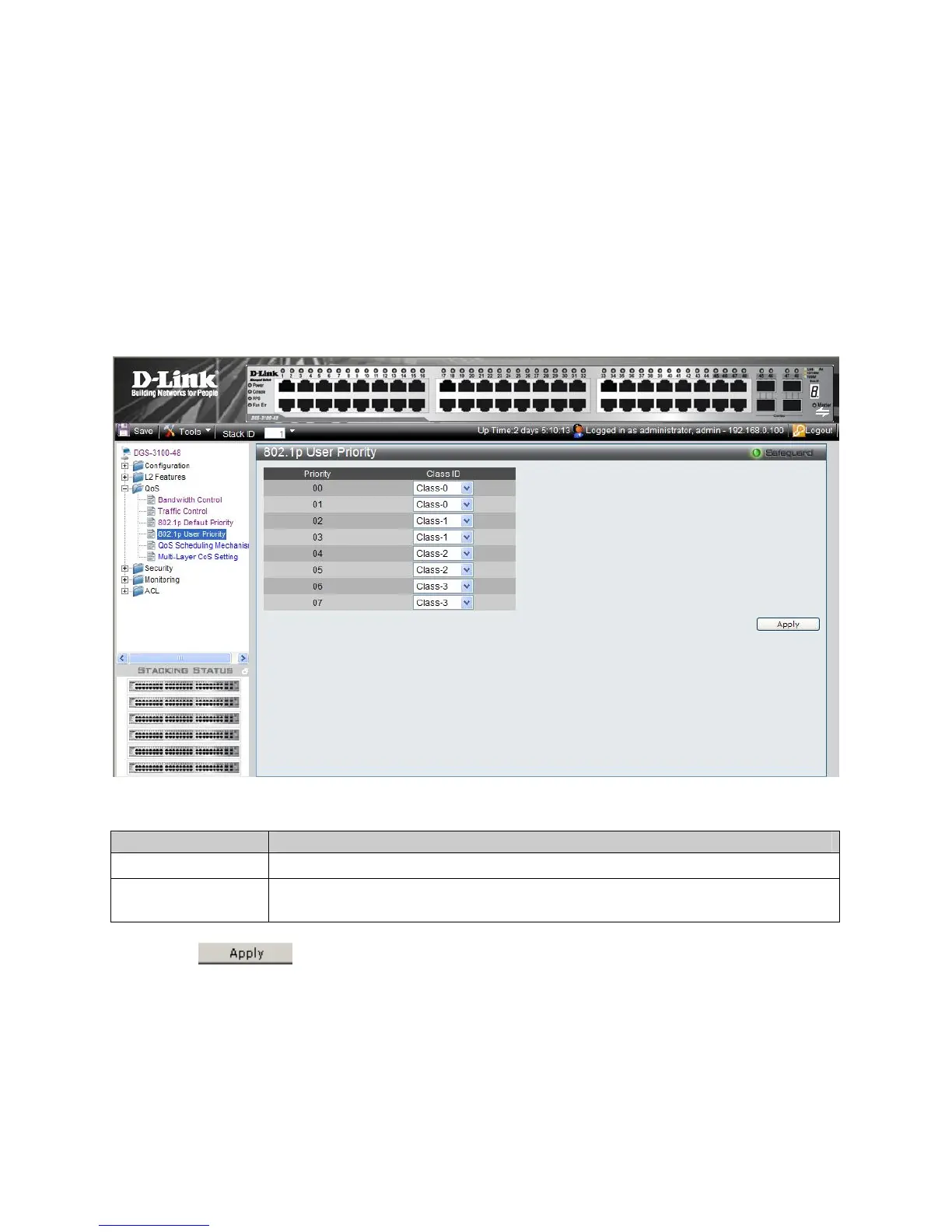
The 802.1P User Priority Page allows network managers to assign priority tags to classes (queues). If a network manager
defines a priority of 01 to Class 3, all packets arriving with an assigned value of 01 are sent to class (queue) 3.
The default mapping is:
Priority 0. 3 is assigned to Q0. This is the lowest priority queue.
Priority 1, 2 is assigned to Q1.
Priority 4, 5 is assigned to Q2.
Priority 6, 7 is assigned to Q3. This is the highest priority queue.
To map priority to queues:
1. Click QoS > 802.1p User Priority. The 802.1P User Priority Page opens:
Figure 4-5. 802.1P User Priority Page
The 802.1P User Priority Page contains the following fields:
Field Description
Priority
Indicates the packet priority that is assigned to the queue.
Class ID
Defines the class (queue) that is assigned to the priority. Class 0 is the lowest priority queue,
whereas Class 3 is the highest.
2. Define the queuing priority for 00 – 07 in the Class ID fields.
3. Click
. The User priority tags are assigned to classes, and the device is updated.











 To Next Page