DGS-3100 Series Gigabit Stackable Managed Switch User Manual
Viewing Port Utilization
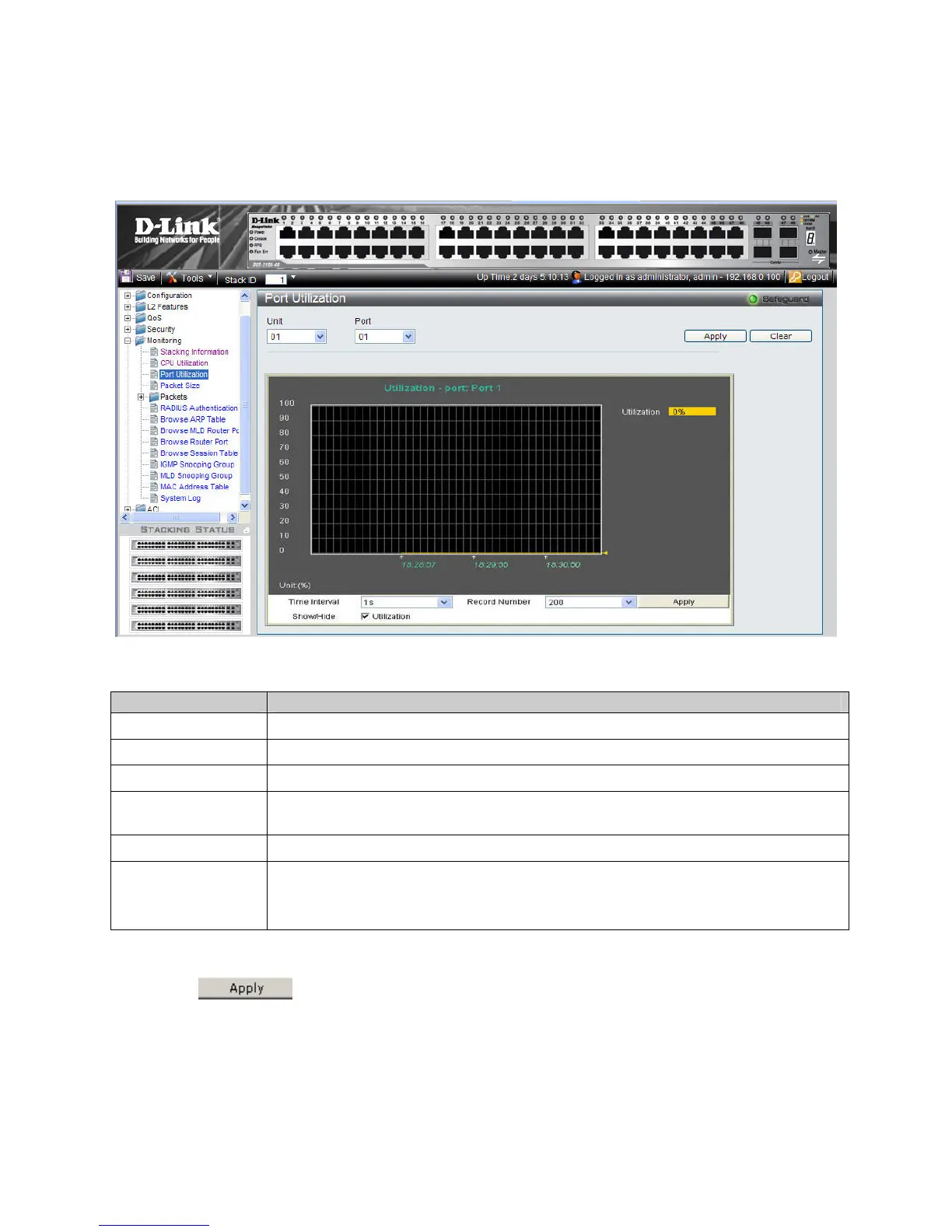
The Port Utilization Page contains port utilization information for specific ports. To view port statistics:
1. Click Monitoring > Port Utilization. The Port Utilization Page op
ens:
Figure 6-3. Port Utilization Page
The Port Utilization Page contains the following fields:
Field Description
Unit
Defines the unit number.
Port
Defines the port number.
Utilization
Displays current CPU utilization by percentage.
Time Interval
Defines the 1-60 second time intervals in which the usage samples are taken as follows:
1,2,3,4,5,10,20,30,40,50,60.
Record Number
Defines the record number.
Show/Hide
Displays the CPU utilization information. The possible fields are:
Utilization checked — Utilization information is enabled .This is the default value.
Utilization unchecked — Utilization information is disabled.
2. Define the Unit, Port, Time Interval, and Record Number fields.
3. Define the Show/Hide field.
4. Click
. A sample record of CPU port utilization is stored, and the device is updated.
15
1











 To Next Page