DGS-3100 Series Gigabit Stackable Managed Switch User Manual
Defining SNMP Communities
Access rights are managed by defining communities, using the SNMP Community Table Page. When the community names
are changed, access rights are also changed. SNMP communities are defined only for SNMP v1 and SNMP v2c. To define
SNMP communities:
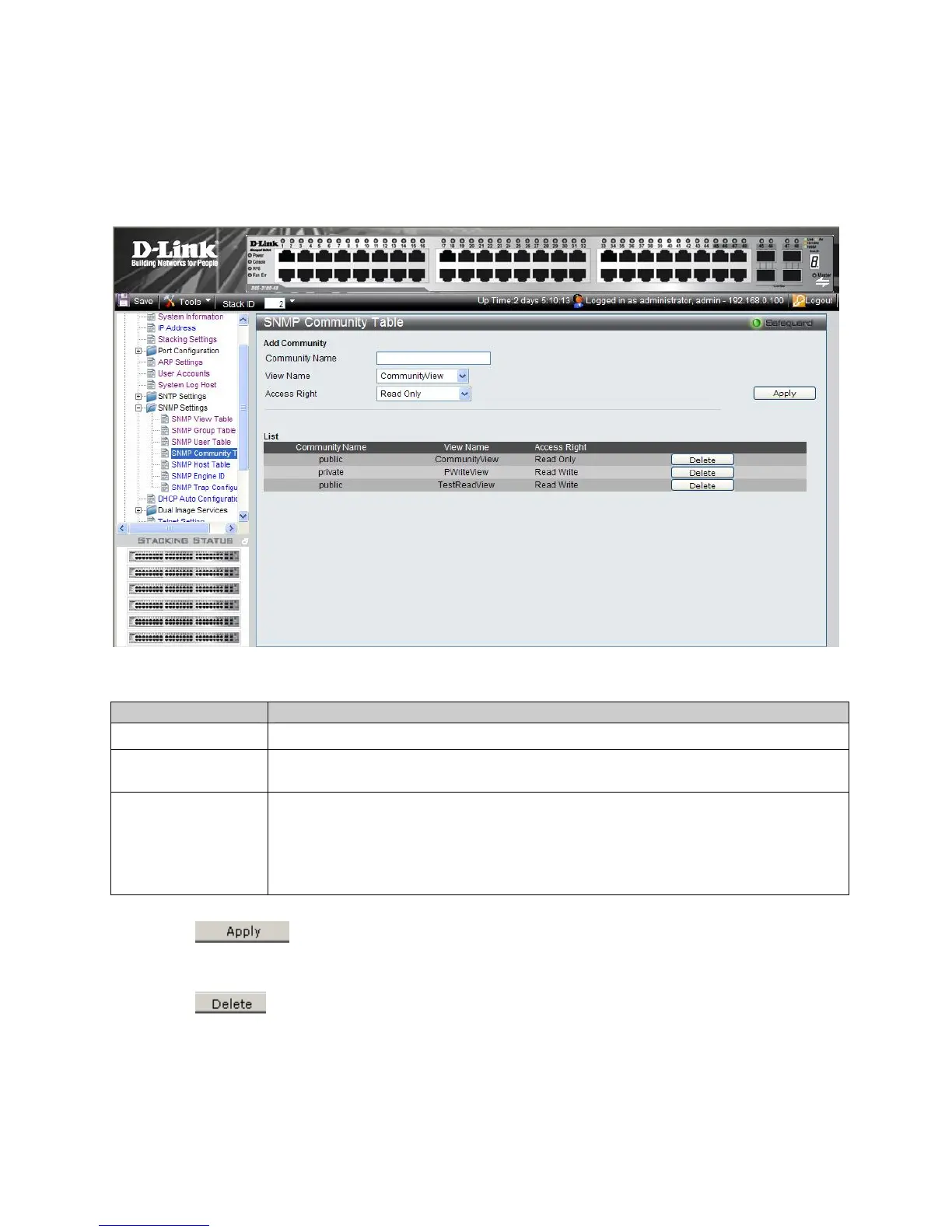
1. Click Configuration > SNMP Settings > SNMP Community Table. The SNMP Community Table Page op
ens:
Figure 2-15 SNMP Community Table Page
The SNMP Community Table Page contains the following fields:
Field Description
Community Name
Defines advanced SNMP community name (limited to 20 alphanumeric characters).
View Name
Defines the group of MIB objects that a remote SNMP manager is allowed to access on the
switch.
Access Rights
Defines the access rights of the community. The possible field values are:
Read Only — Management access is restricted to read only, and changes cannot be made to
the community.
Read Write — Management access is read/write and changes can be made to the device
configuration, but not to the community.
2. Define the Community Name, and View Name, Access Right fields.
3. Click
. The SNMP Community Table is defined, and the device is updated.
To delete a SNMP Community Table Page List entry:
1. Select a Community Nam
e.
2. Click
. The entry is deleted, and the device is updated.
51











 To Next Page