DGS-3100 Series Gigabit Stackable Managed Switch User Manual
149
Viewing Stacking Information
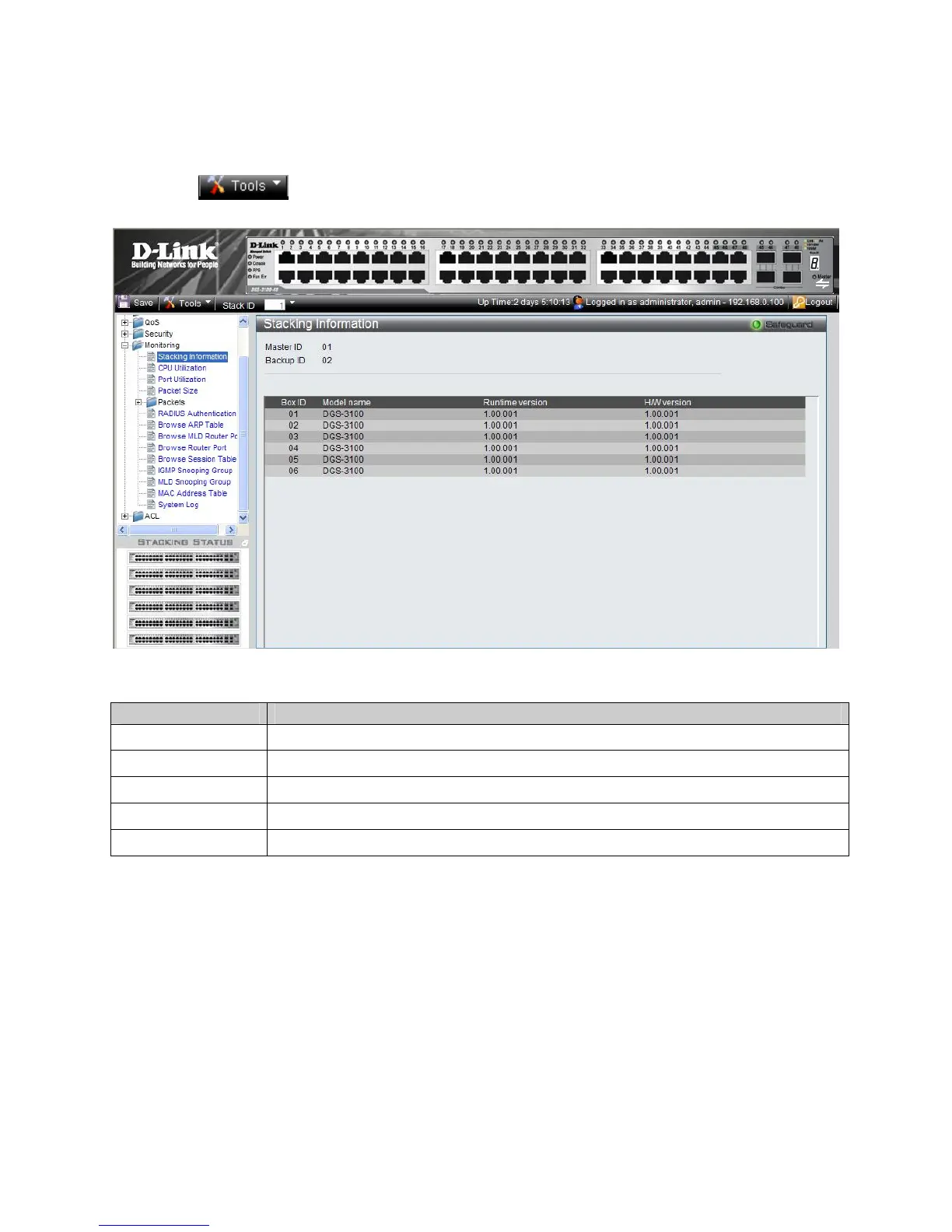
The Stacking Information Page provides specific information for stacked devices. To show the Stacking Information Page:
1. Click
, and from the menu select Show Stack Status.
2. Alternatively, click Monitoring > Stacking Information in the Tree View. The Stacking Information Page opens:
Figure 6-1 Stacking Information Page
The Stacking Information Page contains the following fields:
Field Description
Master ID
Displays the Stacking Master Unit ID number. (unit ID 1 or 2).
Backup ID
Displays the Backup Master Unit ID number. (unit ID 1 or 2).
Box ID
Displays the Unit ID numbers assigned to the stacking members.
Runtime version
Indicates the software version running on the device.
H/W version
Displays the stacking member’s hardware version.











 To Next Page