DGS-3100 Series Gigabit Stackable Managed Switch User Manual
15
2
Viewing Packet Size Information
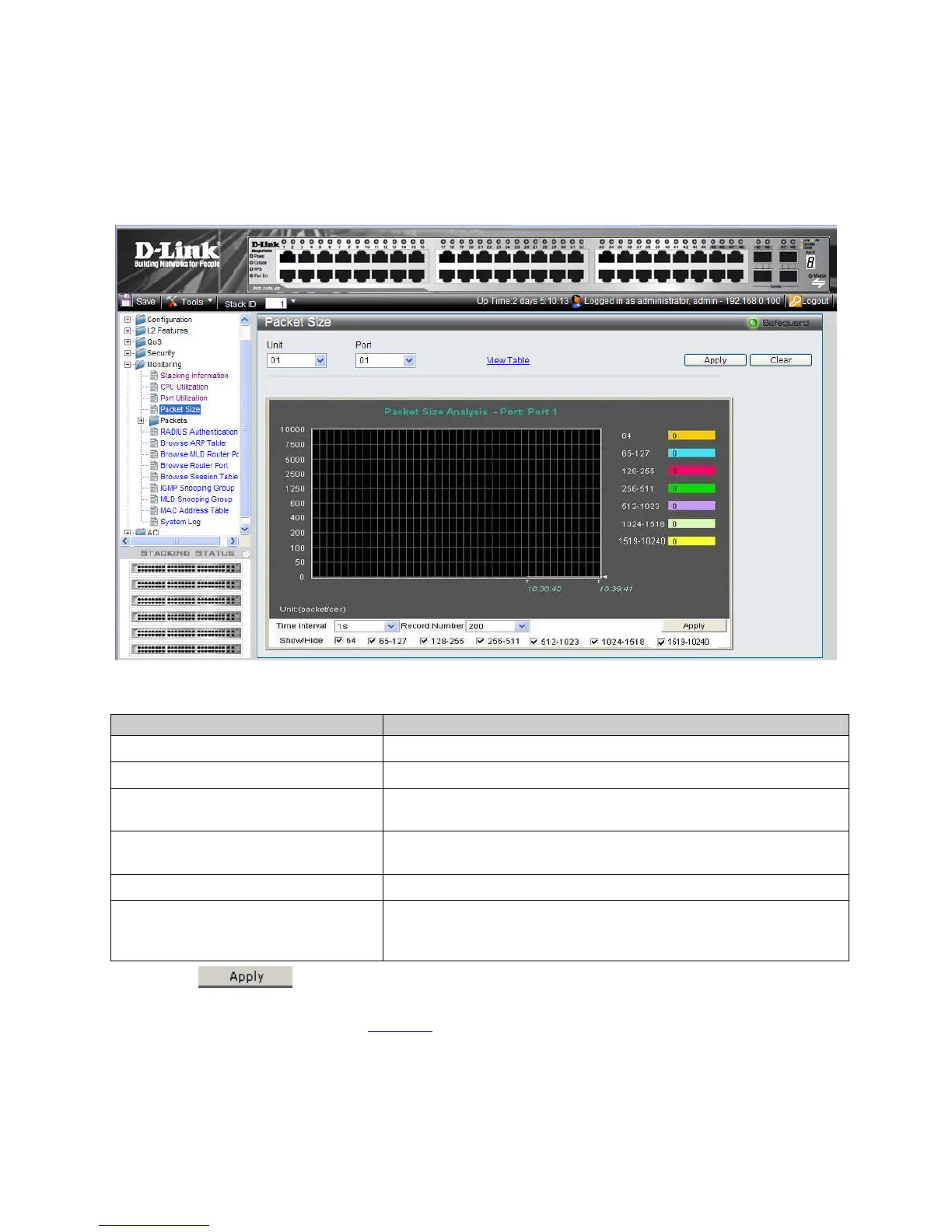
The Packet Size Page displays packets received by the switch, arranged in seven groups and classed by size, to be viewed as
either a line graph or a table.
1. Click Monitoring > Packet Size. The Packet Size Page opens:
Figure 6-4. Packet Size Page
The Packet Size Page contains the following fields:
Field Description
Unit
Defines the unit number.
Port
Defines the port number.
Packet Size Analysis – Selected Port
Number
Displays current packet size for ports.
Time Interval
Displays the time intervals at which the packet samples are taken. The
possible field values are: 1s - 5s, 10s, 15s, 20s, 30s, 40s, 50s, and 60s.
Record Number
Displays the packet size record number.
Show/Hide
Displays or hides packets size. The following packet length ranges can be
displayed: 64, 65-127, 128-255, 256-511, 512-1023 and, 1024-1518 and
1519-10240.
2. Click . A sample record of packet size analysis is stored, and the device is updated.
3. Define the Show/Hide field.
4. To view the graph as a table, click
View Table.











 To Next Page