DGS-3100 Series Gigabit Stackable Managed Switch User Manual
12
6
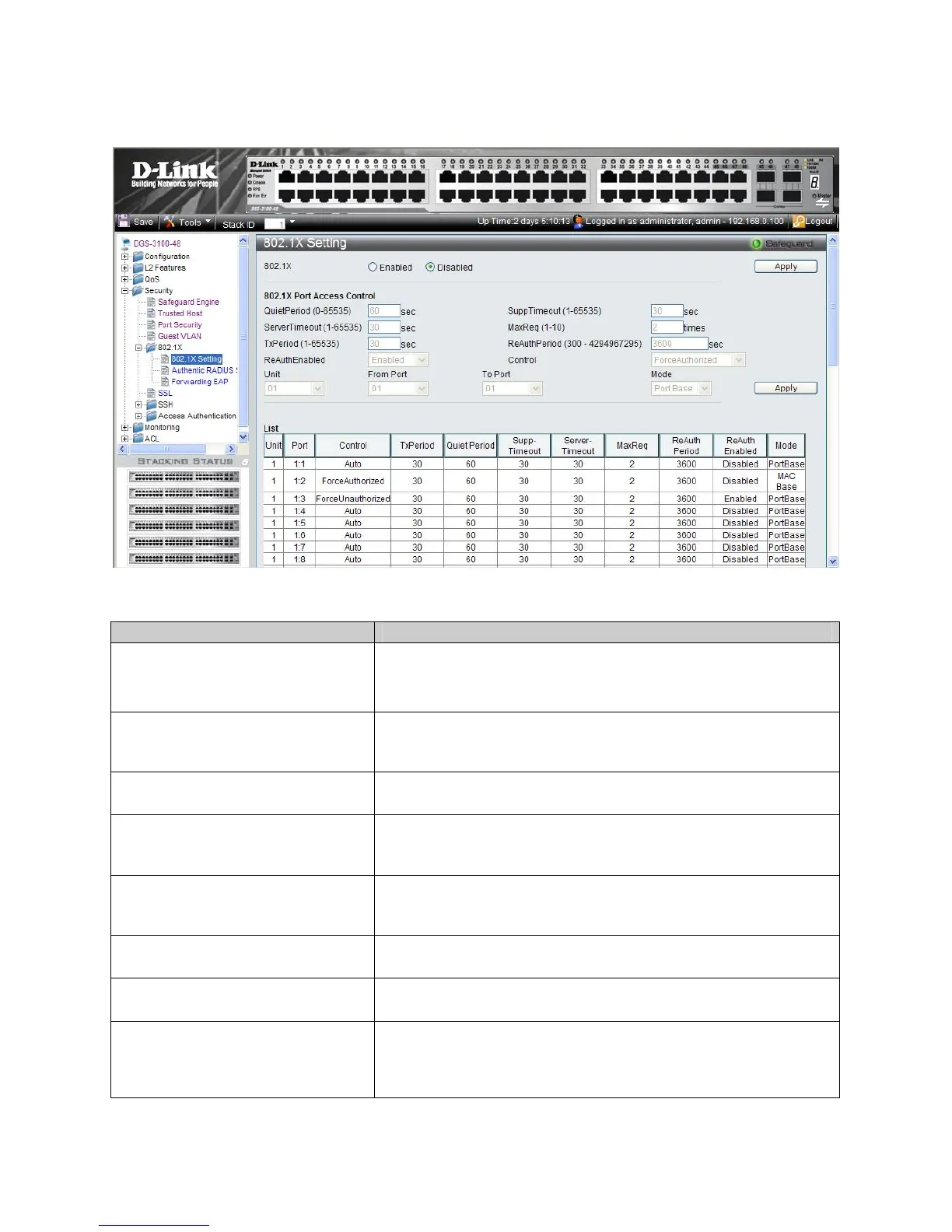
To enable the 802.1X:
1. Click Security > 802.1X Setting. The 802.1X Setting Page opens:
Figure 5-5. 802.1X Setting Page
The 802.1X Setting Page contains the following fields:
Field Description
802.1X
Indicates if 802.1X is enabled on the device. The possible field values are:
Enabled — Enables 802.1X on the device.
Disabled —Disables 802.1X on the device. This is the default value.
QuietPeriod (0-65535) sec
Indicates the number of seconds that the device remains in the quiet state
following a failed authentication exchange. The possible field range is 0-
65535. The field default is 60 seconds.
SuppTimeout (1-65535) sec
Indicates the amount of time that lapses before EAP requests are resent to
the supplicant. The field value is in seconds. The field default is 30 seconds.
ServerTimeout (1-65535) sec
Defines the amount of time that lapses before the device re-sends a request
to the authentication server. The field value is specified in seconds. The
field default is 30 seconds.
MaxReq (1-10) times
Displays the total amount of EAP requests sent. If a response is not received
after the defined period, the authentication process is restarted. The field
default is 2 retries.
TxPeriod (1-65535) sec
Defines the amount of time (in seconds) that lapses before EAP requests are
resent. The field default is 30 seconds.
ReAuthPeriod (300 - 4294967295) sec
Displays the time span (in seconds) in which the selected port is re-
authenticated. The field default is 3600 seconds.
ReAuthEnabled
Indicates if ports/MAC address can be re-authenticated after the port/MAC
address authentication has timed out. The possible field values are:
Enabled — Enables re-authenticating the port or MAC addresses after
the port or MAC address authentication has timed out. This is the default











 To Next Page